
Open the PT Activity. Perform the tasks in the activity instructions and then answer the question.
Which set of configuration commands issued on SW1 will successfully complete the EtherChannel link between SW1 and SW2?
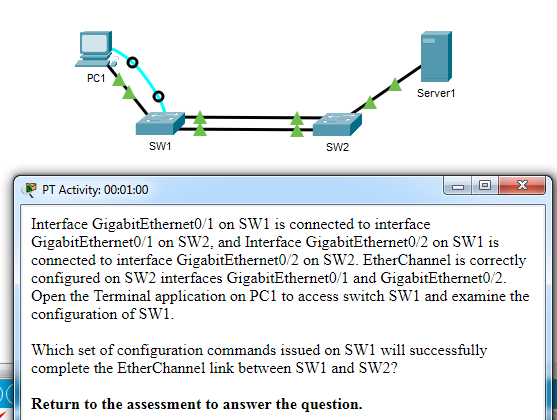
- interface GigabitEthernet0/2,channel-group 2 mode desirable
- interface GigabitEthernet0/1,channel-group 1 mode desirable
- interface Port-channel 1,no shutdown
- interface GigabitEthernet0/1,no shutdown
Explanation: The show running-config output on SW1 shows that interface GigabitEthernet0/2 is already a member of EtherChannel group 1 (channel-group 1 mode desirable, PAgP), but interface GigabitEthernet0/1 is only configured as a trunk and is missing the channel-group command. The show etherchannel summary output confirms that Port-channel 1 contains only Gig0/2. To complete the EtherChannel, Gi0/1 must join the same group (1) with a compatible PAgP mode, so the correct commands are interface GigabitEthernet0/1 and channel-group 1 mode desirable. Group 2 would create a different EtherChannel, and no shutdown does not add a port to the bundle. After the change, Po1 contains both Gig0/1 and Gig0/2 on SW1 and SW2.
Step 1: Examine the configuration of SW1.
On PC1, open Desktop > Terminal and click OK to connect to SW1 through the console cable. Gi0/2 belongs to channel group 1, but Gi0/1 has no channel-group command.
SW1# show running-config
Building configuration...

Current configuration : 1204 bytes
!
version 12.2
no service timestamps log datetime msec
no service timestamps debug datetime msec
no service password-encryption
!
hostname SW1
!
!
!
!
!
!
spanning-tree mode pvst
spanning-tree extend system-id
!
interface Port-channel1
 switchport mode trunk
!
interface FastEthernet0/1
!
interface FastEthernet0/2
!
interface FastEthernet0/3
!
interface FastEthernet0/4
!
interface FastEthernet0/5
!
interface FastEthernet0/6
!
interface FastEthernet0/7
!
interface FastEthernet0/8
!
interface FastEthernet0/9
!
interface FastEthernet0/10
!
interface FastEthernet0/11
!
interface FastEthernet0/12
!
interface FastEthernet0/13
!
interface FastEthernet0/14
!
interface FastEthernet0/15
!
interface FastEthernet0/16
!
interface FastEthernet0/17
!
interface FastEthernet0/18
!
interface FastEthernet0/19
!
interface FastEthernet0/20
!
interface FastEthernet0/21
!
interface FastEthernet0/22
!
interface FastEthernet0/23
!
interface FastEthernet0/24
!
interface GigabitEthernet0/1
 switchport mode trunk
!
interface GigabitEthernet0/2
 switchport mode trunk
 channel-group 1 mode desirable
!
interface Vlan1
 no ip address
 shutdown
!
!
!
!
line con 0
!
line vty 0 4
 login
line vty 5 15
 login
!
!
!
!
end
Step 2: Check the EtherChannel status.
On SW1, Port-channel 1 contains only Gig0/2:
SW1# show etherchannel summary
Flags:  D - down        P - in port-channel
        I - stand-alone s - suspended
        H - Hot-standby (LACP only)
        R - Layer3      S - Layer2
        U - in use      f - failed to allocate aggregator
        u - unsuitable for bundling
        w - waiting to be aggregated
        d - default port


Number of channel-groups in use: 1
Number of aggregators:           1

Group  Port-channel  Protocol    Ports
------+-------------+-----------+----------------------------------------------

1      Po1(SU)           PAgP   Gig0/2(P)
On SW2, Gig0/1 is stand-alone (I) because the matching port on SW1 is not in the bundle:
SW2# show etherchannel summary
Flags:  D - down        P - in port-channel
        I - stand-alone s - suspended
        H - Hot-standby (LACP only)
        R - Layer3      S - Layer2
        U - in use      f - failed to allocate aggregator
        u - unsuitable for bundling
        w - waiting to be aggregated
        d - default port


Number of channel-groups in use: 1
Number of aggregators:           1

Group  Port-channel  Protocol    Ports
------+-------------+-----------+----------------------------------------------

1      Po1(SU)           PAgP   Gig0/1(I) Gig0/2(P)
Step 3: Add Gi0/1 on SW1 to channel group 1.
SW1(config)# interface gigabitethernet 0/1
SW1(config-if)# channel-group 1 mode desirable
%EC-5-L3DONTBNDL2: Gig0/1 suspended: PAGP currently not enabled on the remote port.

%LINEPROTO-5-UPDOWN: Line protocol on Interface GigabitEthernet0/1, changed state to down

%LINEPROTO-5-UPDOWN: Line protocol on Interface GigabitEthernet0/1, changed state to up
Step 4: Verify the EtherChannel.
Port-channel 1 is now in use (SU) and both ports are bundled (P):
SW1# show etherchannel summary
Flags:  D - down        P - in port-channel
        I - stand-alone s - suspended
        H - Hot-standby (LACP only)
        R - Layer3      S - Layer2
        U - in use      f - failed to allocate aggregator
        u - unsuitable for bundling
        w - waiting to be aggregated
        d - default port


Number of channel-groups in use: 1
Number of aggregators:           1

Group  Port-channel  Protocol    Ports
------+-------------+-----------+----------------------------------------------

1      Po1(SU)           PAgP   Gig0/2(P) Gig0/1(P)
Related exam: CCNA 2 v7 Checkpoint Exam: Redundant Networks Exam Answers
