Refer to the exhibit. A computer technician creates a bootable USB hard drive and loads a Linux operating system on it. When the technician reboots the computer, it does not boot to the Linux OS. Instead, the light on the optical drive flashes and then the computer loads Windows. What needs to be done to ensure that the computer automatically boots from the USB hard drive if it is connected?
ITExam Editorial Team
Last Updated: Oct 2, 2020
IT Exam Items Repository › Refer to the exhibit. A computer technician creates a bootable USB hard drive and loads a Linux operating system on it. When the technician reboots the computer, it does not boot to the Linux OS. Instead, the light on the optical drive flashes and then the computer loads Windows. What needs to be done to ensure that the computer automatically boots from the USB hard drive if it is connected?
Refer to the exhibit. A computer technician creates a bootable USB hard drive and loads a Linux operating system on it. When the technician reboots the computer, it does not boot to the Linux OS. Instead, the light on the optical drive flashes and then the computer loads Windows. What needs to be done to ensure that the computer automatically boots from the USB hard drive if it is connected?
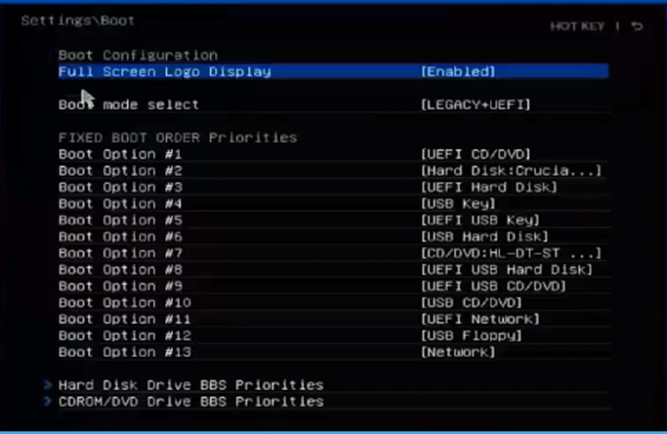
- Move the USB Key option to the top of boot order.
- Move the CD/DVD drive to the bottom of the boot order.
- Move both the CD/DVD and the hard disk options to the bottom of the boot order.
- Move the USB Hard Disk drive option to the top of the boot order.
Related exam: IT Essentials Final Exam Answers
About The Author

The ITExamAnswers Editorial Team is a dedicated group of certified IT professionals and network engineers. We rigorously review, verify, and update all exam materials to ensure you receive the most accurate and reliable resources for your certification journey.
