Refer to the exhibit. A computer with the displayed IP settings is unable to access a server on the 192.168.2.0 network using the server IP address but can access hosts on the 192.168.1.0 network. What should the network administrator do to troubleshoot this problem?
IT Exam Items Repository › Category: CCNA Discovery v4 › Refer to the exhibit. A computer with the displayed IP settings is unable to access a server on the 192.168.2.0 network using the server IP address but can access hosts on the 192.168.1.0 network. What should the network administrator do to troubleshoot this problem?
Refer to the exhibit. A computer with the displayed IP settings is unable to access a server on the 192.168.2.0 network using the server IP address but can access hosts on the 192.168.1.0 network. What should the network administrator do to troubleshoot this problem?
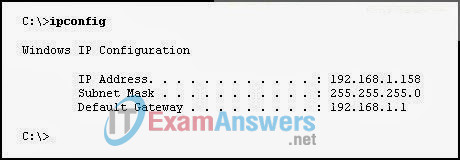
- Issue the ping 192.168.1.1 command on the host to determine if the host can communicate with the default gateway.
- Issue the ipconfig /all command to determine if a DNS server IP address was configured.
- Verify that the host has a link light.
- Check the cabling of the host.
Related exam: CCNA Discovery 2: DsmbISP Final Exam
About The Author

The ITExamAnswers Editorial Team is a dedicated group of certified IT professionals and network engineers. We rigorously review, verify, and update all exam materials to ensure you receive the most accurate and reliable resources for your certification journey.
