
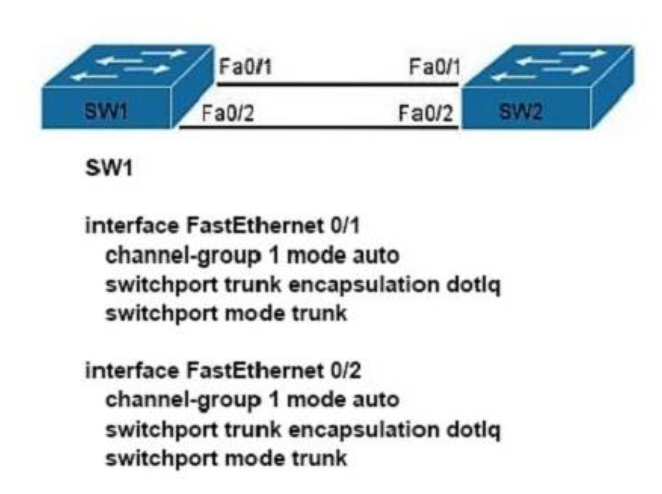
Refer to the exhibit. A network administrator is configuring an EtherChannel between SW1 and SW2. The SW1 configuration is shown. What is the correct configuration for SW2?
- A. interface FastEthernet 0/1
channel-group 1 mode active
switchport trunk encapsulation dot1q
switchport mode trunk
interface FastEthernet 0/2
channel-group 1 mode active
switchport trunk encapsulation dot1q
switchport mode trunk - B. interface FastEthernet 0/1
channel-group 2 mode auto
switchport trunk encapsulation dot1q
switchport mode trunk
interface FastEthernet 0/2
channel-group 2 mode auto
switchport trunk encapsulation dot1q
switchport mode trunk - C. interface FastEthernet 0/1
channel-group 1 mode desirable
switchport trunk encapsulation dot1q
switchport mode trunk
interface FastEthernet 0/2
channel-group 1 mode desirable
switchport trunk encapsulation dot1q
switchport mode trunk - D. interface FastEthernet 0/1
channel-group 1 mode passive
switchport trunk encapsulation
dot1q switchport mode trunk
interface FastEthernet 0/2
channel-group 1 mode passive
switchport trunk encapsulation dot1q
switchport mode trunk
Explanation:
If the etherchannel was configured with mode "auto", it was using PagP, so, we need to configure the other switch with "desirable" mode.
PagP modes: auto | Desirable
LACP modes: active | pasive
Related exam: CA201
Related exam: CCNA v3.0 (200-125) Study Guide – Exam Dumps
