Refer to the exhibit. A network engineer is securing a network against DHCP spoofing attacks. On all switches, the engineer applied the ip dhcp snooping command and enabled DHCP snooping on all VLANs with the ip dhcp snooping vlan command. What additional step should be taken to configure the security required on the network?
IT Exam Items Repository › Category: CCNP › Refer to the exhibit. A network engineer is securing a network against DHCP spoofing attacks. On all switches, the engineer applied the ip dhcp snooping command and enabled DHCP snooping on all VLANs with the ip dhcp snooping vlan command. What additional step should be taken to configure the security required on the network?
Refer to the exhibit. A network engineer is securing a network against DHCP spoofing attacks. On all switches, the engineer applied the ip dhcp snooping command and enabled DHCP snooping on all VLANs with the ip dhcp snooping vlan command. What additional step should be taken to configure the security required on the network?
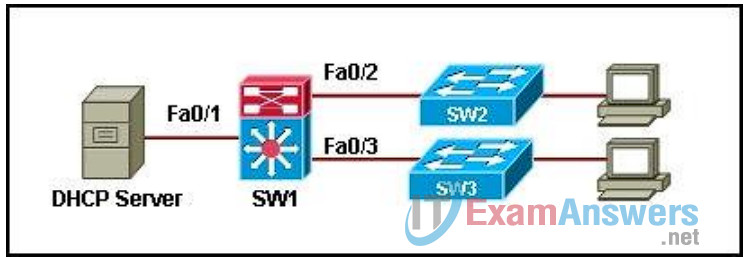
- Issue the ip dhcp snooping trust command on all uplink interfaces on SW1, SW2 and SW3.
- Issue the ip dhcp snooping trust command on all interfaces on SW2 and SW3.
- Issue the ip dhcp snooping trust command on all interfaces on SW1, SW2, and SW3.
- Issue the ip dhcp snooping trust command on all interfaces on SW1, SW2, and SW3 except interface Fa0/1 on SW1.
Related exam: CCNP SWITCH Chapter 10 Exam Answers
Related exam: CCNP SWITCH (Version 6.0) Chapter 6 Exam
About The Author

The ITExamAnswers Editorial Team is a dedicated group of certified IT professionals and network engineers. We rigorously review, verify, and update all exam materials to ensure you receive the most accurate and reliable resources for your certification journey.
