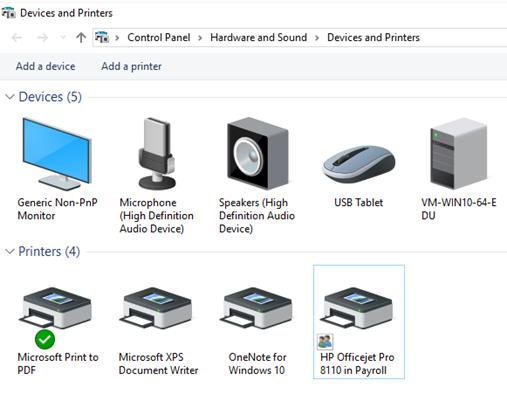
Refer to the exhibit. A payroll department employee has shared a locally attached HP Officejet Pro 8110 printer over the network in Windows 10. What do the other Windows 10 users in the payroll department have to do in order to print to the shared printer?
ITExam Editorial Team
Last Updated: Oct 2, 2020
IT Exam Items Repository › Refer to the exhibit. A payroll department employee has shared a locally attached HP Officejet Pro 8110 printer over the network in Windows 10. What do the other Windows 10 users in the payroll department have to do in order to print to the shared printer?
Refer to the exhibit. A payroll department employee has shared a locally attached HP Officejet Pro 8110 printer over the network in Windows 10. What do the other Windows 10 users in the payroll department have to do in order to print to the shared printer?
- Enable File and printer sharing in the Network and Sharing Center > Advanced sharing settings screen.
- Nothing. The shared printer will automatically appear in the Devices and Printers listing when someone logs in.
- Download and install the latest HP Officejet Pro 8110 driver for Windows 10 from the HP web site.
- Use the Add a printer option and select the HP Officejet Pro 8110 in Payroll printer in the Select a printer screen.
Related exam: IT Essentials Final Exam Answers
About The Author

The ITExamAnswers Editorial Team is a dedicated group of certified IT professionals and network engineers. We rigorously review, verify, and update all exam materials to ensure you receive the most accurate and reliable resources for your certification journey.
