Refer to the exhibit. After the configuration has been applied to ACSw22, frames that are bound for the node on port FastEthernet 0/1 are periodically being dropped. What should be done to correct the issue?
IT Exam Items Repository › Category: CCNP › Refer to the exhibit. After the configuration has been applied to ACSw22, frames that are bound for the node on port FastEthernet 0/1 are periodically being dropped. What should be done to correct the issue?
Refer to the exhibit. After the configuration has been applied to ACSw22, frames that are bound for the node on port FastEthernet 0/1 are periodically being dropped. What should be done to correct the issue?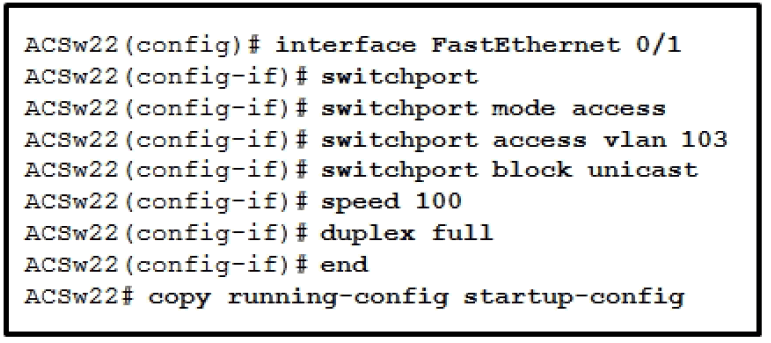
- Add the switchport port-security mac-address sticky command to the interface configuration.
- Change the port speed to speed auto with the interface configuration mode.
- Use the switchport mode trunk command in the interface configuration.
- Remove the switchport command from the interface configuration.
Related exam: CCNP SWITCH Chapter 10 Exam Answers
Related exam: CCNP SWITCH (Version 6.0) Chapter 6 Exam
About The Author

The ITExamAnswers Editorial Team is a dedicated group of certified IT professionals and network engineers. We rigorously review, verify, and update all exam materials to ensure you receive the most accurate and reliable resources for your certification journey.
