Refer to the exhibit. Brand new switches with empty CAM tables are interconnected via a trunk link. All hosts on both switches are configured with the VLAN memberships shown. How is a frame sent from Host A forwarded to Host B?
IT Exam Items Repository › Category: CCNA 3 v4.0 ESwitching › Refer to the exhibit. Brand new switches with empty CAM tables are interconnected via a trunk link. All hosts on both switches are configured with the VLAN memberships shown. How is a frame sent from Host A forwarded to Host B?
Refer to the exhibit. Brand new switches with empty CAM tables are interconnected via a trunk link. All hosts on both switches are configured with the VLAN memberships shown. How is a frame sent from Host A forwarded to Host B?
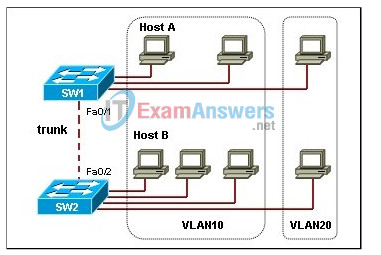
- Switch SW1 floods the message from Host A to all hosts attached to SW1.
- Switch SW1 floods the message from Host A to all hosts attached to both switches.
- Switch SW1 tags the frame with VLAN ID 10 and floods the frame to all hosts on switch SW2.
- Switch SW1 tags the frame with VLAN ID 10 and floods the frame to all hosts on switch SW2 that are members of VLAN10.
Related exam: CCNA 3 Exploration v4.0 Chapter 3 Quiz
About The Author

The ITExamAnswers Editorial Team is a dedicated group of certified IT professionals and network engineers. We rigorously review, verify, and update all exam materials to ensure you receive the most accurate and reliable resources for your certification journey.
