Refer to the exhibit. The commands for a router to connect to a trunked uplink are shown in the exhibit. A packet is received from IP address 192.168.1.54. The packet destination address is 192.168.1.120. What will the router do with this packet?
IT Exam Items Repository › Category: CCNA 3 v4 › Refer to the exhibit. The commands for a router to connect to a trunked uplink are shown in the exhibit. A packet is received from IP address 192.168.1.54. The packet destination address is 192.168.1.120. What will the router do with this packet?
Refer to the exhibit. The commands for a router to connect to a trunked uplink are shown in the exhibit. A packet is received from IP address 192.168.1.54. The packet destination address is 192.168.1.120. What will the router do with this packet?
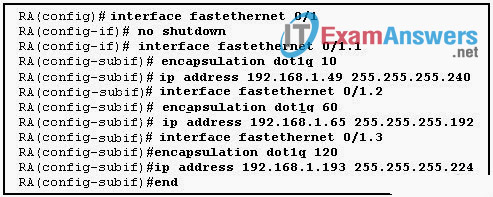
- The router will forward the packet out interface FastEthernet 0/1.1 tagged for VLAN 10.
- The router will forward the packet out interface FastEthernet 0/1.2 tagged for VLAN 60.
- The router will forward the packet out interface FastEthernet 0/1.3 tagged for VLAN 120.
- The router will not process the packet since the source and destination are on the same subnet.
- The router will drop the packet since no network that includes the source address is attached to the router.
Related exam: CCNA Exploration 3: ESwitching Chapter 6 Exam
About The Author

The ITExamAnswers Editorial Team is a dedicated group of certified IT professionals and network engineers. We rigorously review, verify, and update all exam materials to ensure you receive the most accurate and reliable resources for your certification journey.
