Refer to the exhibit. VLAN 20 was recently added on the network. Users on VLAN 20 on SW1 start complaining that they do not have connectivity to the users on the same VLAN on switch SW2. What should be done to remedy the problem?
IT Exam Items Repository › Category: CCNA 3 v4 › Refer to the exhibit. VLAN 20 was recently added on the network. Users on VLAN 20 on SW1 start complaining that they do not have connectivity to the users on the same VLAN on switch SW2. What should be done to remedy the problem?
Refer to the exhibit. VLAN 20 was recently added on the network. Users on VLAN 20 on SW1 start complaining that they do not have connectivity to the users on the same VLAN on switch SW2. What should be done to remedy the problem?
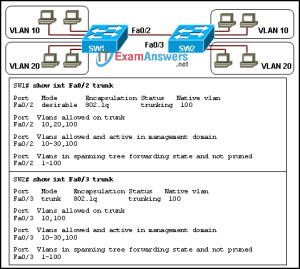
- Configure the trunk port in a desirable mode on SW2.
- Include VLAN 20 in the list of allowed VLANs on the trunk link on SW2.
- Configure VLAN 1 to be the native VLAN for both networks on SW1 and SW2.
- Remove VLAN 20 from the allowed VLANs on the trunk link on SW2, an action that will enable all VLANs on the trunk link.
Related exam: CCNA Exploration 3: ESwitching Final Exam
About The Author

The ITExamAnswers Editorial Team is a dedicated group of certified IT professionals and network engineers. We rigorously review, verify, and update all exam materials to ensure you receive the most accurate and reliable resources for your certification journey.
