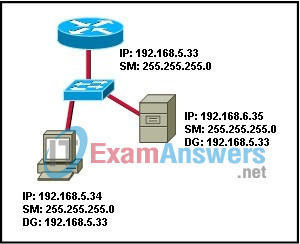
Refer to the graphic. A user at the workstation cannot connect to the server. All cables have been tested and are working and all devices have IP addressing. However, the user cannot ping the server. What is causing the problem?
IT Exam Items Repository › Category: CCNA Discovery v4 › Refer to the graphic. A user at the workstation cannot connect to the server. All cables have been tested and are working and all devices have IP addressing. However, the user cannot ping the server. What is causing the problem?
Refer to the graphic. A user at the workstation cannot connect to the server. All cables have been tested and are working and all devices have IP addressing. However, the user cannot ping the server. What is causing the problem?
- The router interface does not have a default gateway.
- The switch does not have an IP address and default gateway
- The workstation and server are on different logical networks.
- The workstation does not know the MAC address of the switch.
Related exam: CCNA Discovery 1: DHomeSB Chapter 5 Exam
About The Author

The ITExamAnswers Editorial Team is a dedicated group of certified IT professionals and network engineers. We rigorously review, verify, and update all exam materials to ensure you receive the most accurate and reliable resources for your certification journey.
