Which command can you enter on a switch to display the IP addresses associated with connected devices?
IT Exam Items Repository › Which command can you enter on a switch to display the IP addresses associated with connected devices?
Which command can you enter on a switch to display the IP addresses associated with connected devices?
- Show cdp neighbors detail
- Show cdp neighbor
- Show cdp interface
- Show cdp traffic
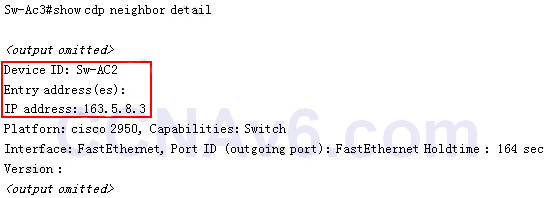
Explanation: Only the “show cdp neighbor detail” gives us information about the IP address of the connected device. Below is an example of this command.
Related exam: CCNA v3.0 (200-125) Study Guide – Exam Dumps
About The Author

The ITExamAnswers Editorial Team is a dedicated group of certified IT professionals and network engineers. We rigorously review, verify, and update all exam materials to ensure you receive the most accurate and reliable resources for your certification journey.
