
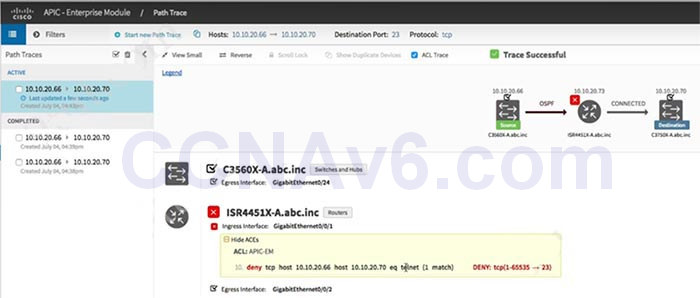
Which utility can you use to identify the cause of a traffic-flow blockage between the two devices in a network?
- ACL path analysis tool in APIC-EM
- I WAN application
- ACL analysis tool in APIC-EM
- APIC-EM automation scheduler
Explanation: The ACL Path Analysis tool in APIC-EM can help to identify where the traffic was blocked in the transmission.
Icon  means “there are ACLs that permit the traffic applied on the interface”.
Icon  means “traffic may or may not be blocked. For example, if your traffic matches a deny access control entry (ACE), traffic is denied. However, if your traffic matches any other ACEs, it is permitted. You can get this type of results if you leave out the protocol, source port, or destination port when defining a path trace”.
Icon  means “there is an ACL on the device or interface that is blocking the traffic on the path”.
Icon  means “there are no ACLs applied on the interface”.
Related exam: CCNA v3.0 (200-125) Study Guide – Exam Dumps
