
Open the PT Activity. Perform the tasks in the activity instructions and then answer the question.
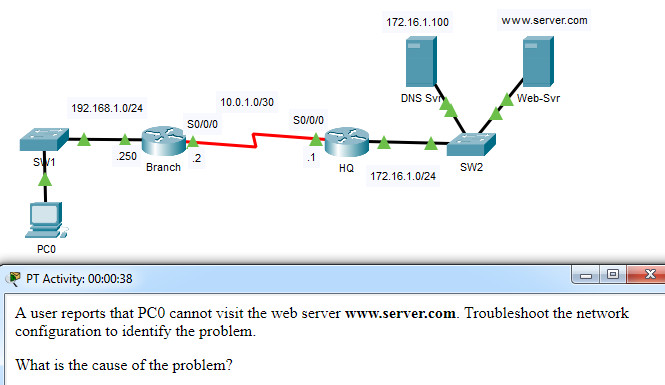
A user reports that PC0 cannot visit the web server http://www.server.com. Troubleshoot the network configuration to identify the problem.
What is the cause of the problem?
- The clock rate on one of the serial links is configured incorrectly.
- A serial interface on Branch is configured incorrectly.
- The DNS server address on PC0 is configured incorrectly.
- Routing between HQ and Branch is configured incorrectly.
Explanation: In order to allow communication to remote networks, proper routing, either static or dynamic, is necessary. Both routers must be configured with a routing method.
Related exam: CCNA 2 v7 Checkpoint Exam: Routing Concepts and Configuration Exam Answers
