Open the PT activity. Perform the tasks in the activity instructions and then answer the question. To verify that the SVI is configured correctly, answer this question: Which ping command completed successfully?
IT Exam Items Repository › Open the PT activity. Perform the tasks in the activity instructions and then answer the question. To verify that the SVI is configured correctly, answer this question: Which ping command completed successfully?
Open the PT activity. Perform the tasks in the activity instructions and then answer the question.
To verify that the SVI is configured correctly, answer this question: Which ping command completed successfully?
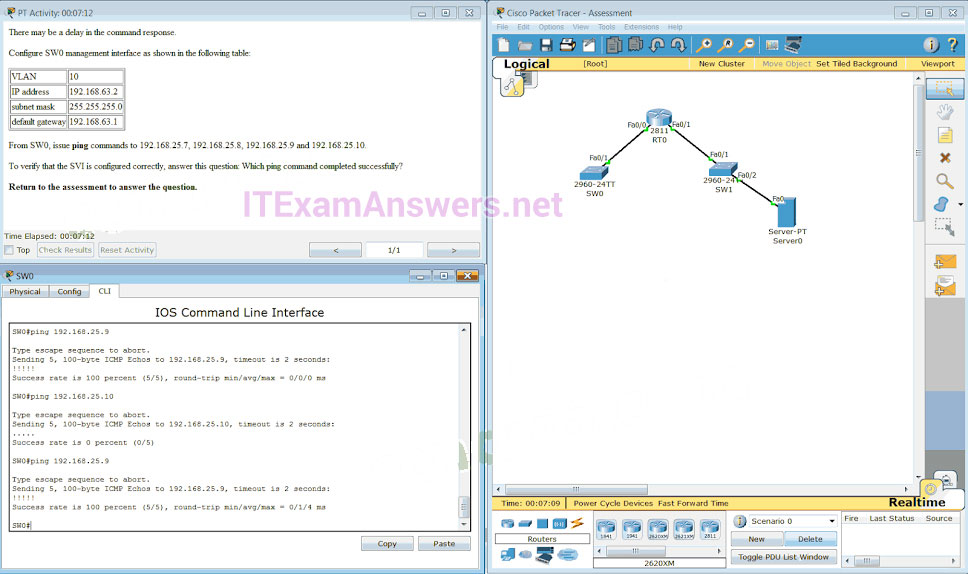
- ping 192.168.25.9
- ping 192.168.25.10
- ping 192.168.25.7
- ping 192.168.25.8
CONFIGURATION
SW0(config)#interface vlan 10
SW0(config-if)#ip address 192.168.63.2 255.255.255.0
SW0(config-if)#exit
SW0(config)#ip default-gateway 192.168.63.1
SW0(config)#end
Related exam: CCNA 2 (v5.0.3 + v6.0) Practice Final Exam Answers
About The Author

The ITExamAnswers Editorial Team is a dedicated group of certified IT professionals and network engineers. We rigorously review, verify, and update all exam materials to ensure you receive the most accurate and reliable resources for your certification journey.
