
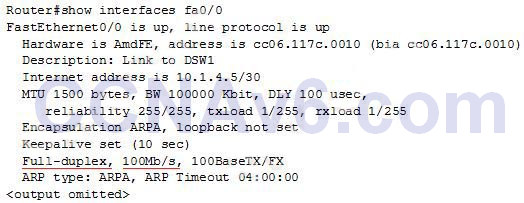
Refer to exhibit. Which command can you enter to verify link speed and duplex setting on the interface?
R1(config)#interface gigabitEthernet0/1
R1(config-if)#ip address 192.168.1.1. 255.255.255.0
R1(config-if)#speed 100
R1(config-if)#duplex full
- router#show ip protocols
- router#show startup-config
- router#show line
- router#show interface gig 0/1
Explanation: The “show interfaces …” command gives us information about speed and duplex mode of the interface. In the output below, the link speed is 100Mbps and it is working in Full-duplex mode.
Related exam: CCNA v3.0 (200-125) Study Guide – Exam Dumps
