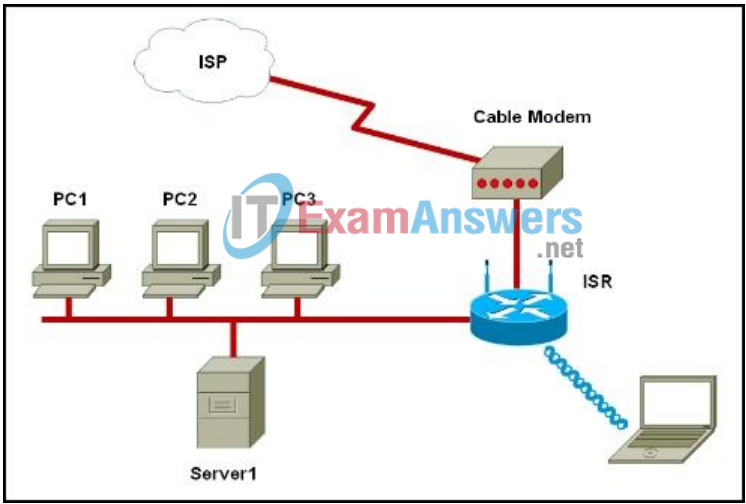
Refer to the exhibit. A small office uses an ISR to provide connectivity for both wired and wireless computers. One day, a sales person who is using a laptop cannot connect to Server1 through the wireless network. A network technician attempts to determine if the problem is on the wireless or the wired network. The technician pings successfully from the wireless laptop to the default gateway IP address on the ISR. What should be the next troubleshooting step?
IT Exam Items Repository › Category: CCNA Discovery v4 › Refer to the exhibit. A small office uses an ISR to provide connectivity for both wired and wireless computers. One day, a sales person who is using a laptop cannot connect to Server1 through the wireless network. A network technician attempts to determine if the problem is on the wireless or the wired network. The technician pings successfully from the wireless laptop to the default gateway IP address on the ISR. What should be the next troubleshooting step?
Refer to the exhibit. A small office uses an ISR to provide connectivity for both wired and wireless computers. One day, a sales person who is using a laptop cannot connect to Server1 through the wireless network. A network technician attempts to determine if the problem is on the wireless or the wired network. The technician pings successfully from the wireless laptop to the default gateway IP address on the ISR. What should be the next troubleshooting step?
- Ping from the laptop to PC1.
- Ping from Server1 to PC1.
- Ping from Server1 to its gateway IP address.
- Ping from the laptop to the Ethernet port on the cable modem.
Related exam: CCNA Discovery 1: DHomeSB Final Exam
About The Author

The ITExamAnswers Editorial Team is a dedicated group of certified IT professionals and network engineers. We rigorously review, verify, and update all exam materials to ensure you receive the most accurate and reliable resources for your certification journey.
