
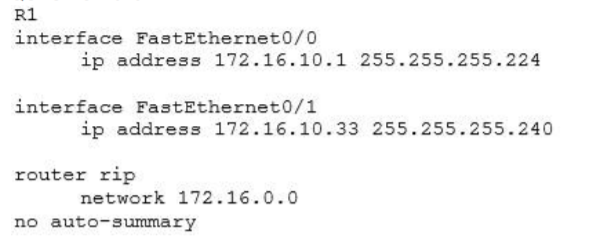
Refer to the exhibit.After you apply the given configuration to R1, you determine that it is failing to advertise the 172.16.10.32/27 network .Which action most likely to correct the problem.
- Enable passive interface
- Enable RIPv2
- Enable manual summarization
- Enable autosummarization.
Explanation: The difference between RIPv1 and RIPv2 is RIPv1 is a classful protocol (no support for VLSM or CIDR) while RIPv2 is a classless protocol (which supports VLSM and CIDR). Therefore in this question if we forget to enable RIPv2 then the router will use RIPv1 and it only advertise major network 172.16.0.0/16 to other routers. By enabling RIPv2 (via the “version 2” command) the router will advertise two subnets 172.16.10.0/27 & 172.16.10.32/28.
Related exam: CCNA v3.0 (200-125) Study Guide – Exam Dumps
