
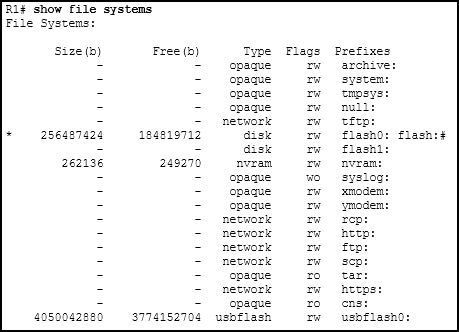
Refer to the exhibit. An administrator is trying to back up the current running configuration of the router to a USB drive, and enters the command copy usbflash0:/R1-config running-config on the router command line. After removing the USB drive and connecting it to a PC, the administrator discovers that the running configuration was not properly backed up to the R1-config file. What is the problem?
- The file already exists on the USB drive and cannot be overwritten.
- The drive was not properly formatted with the FAT16 file system.
- There is no space left on the USB drive.
- The USB drive is not recognized by the router.
- The command that the administrator used was incorrect.
Explanation: The Cisco IOS copy command follows the syntax copy [source] [destination]. In this scenario, the administrator entered copy usbflash0:/R1-config running-config, which attempts to copy a file from the USB drive to the router's RAM (a restore operation). To properly back up the current configuration to the USB drive, the command should have been copy running-config usbflash0:/R1-config. The show file systems output confirms the USB drive was recognized, had write permissions (rw), and plenty of free space, so the only issue was the command syntax.
Related exam: CCNA 3 Final Exam Answers
