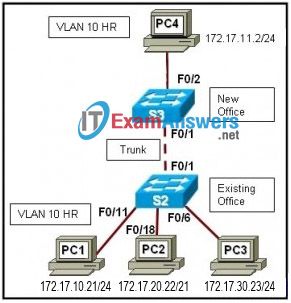
Refer to the exhibit. Company HR is adding PC4, a specialized application workstation, to a new company office. The company will add a switch, S3, connected via a trunk link to S2, another switch. For security reasons the new PC will reside in the HR VLAN, VLAN 10. The new office will use the 172.17.11.0/24 subnet. After installation, users on PC1 are unable to access shares on PC4. What is the likely cause?
IT Exam Items Repository › Category: CCNA 3 v4 › Refer to the exhibit. Company HR is adding PC4, a specialized application workstation, to a new company office. The company will add a switch, S3, connected via a trunk link to S2, another switch. For security reasons the new PC will reside in the HR VLAN, VLAN 10. The new office will use the 172.17.11.0/24 subnet. After installation, users on PC1 are unable to access shares on PC4. What is the likely cause?
Refer to the exhibit. Company HR is adding PC4, a specialized application workstation, to a new company office. The company will add a switch, S3, connected via a trunk link to S2, another switch. For security reasons the new PC will reside in the HR VLAN, VLAN 10. The new office will use the 172.17.11.0/24 subnet. After installation, users on PC1 are unable to access shares on PC4. What is the likely cause?
- The switch to switch connection must be configured as an access port to permit access to VLAN 10 on S3.
- The new PC is on a different subnet so Fa0/2 on S3 must be configured as a trunk port.
- PC4 must use the same subnet as PC1.
- A single VLAN cannot span multiple switches.
Related exam: CCNA Exploration 3: ESwitching Chapter 3 Exam
About The Author

The ITExamAnswers Editorial Team is a dedicated group of certified IT professionals and network engineers. We rigorously review, verify, and update all exam materials to ensure you receive the most accurate and reliable resources for your certification journey.
