
Refer to the exhibit.
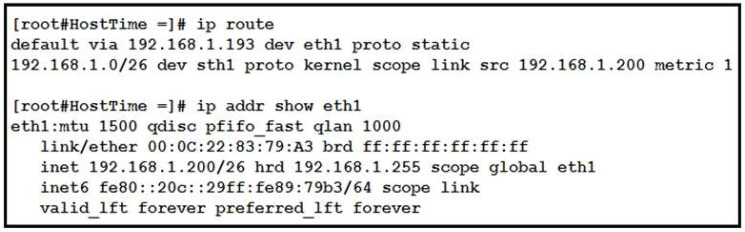
Drag and drop the networking parameters from the left onto the correct values on the right.
Select and Place:
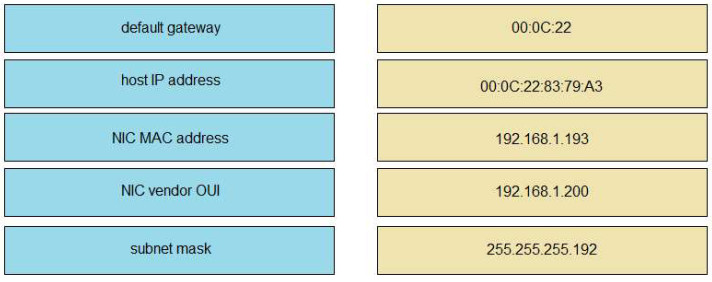
Correct Answer:
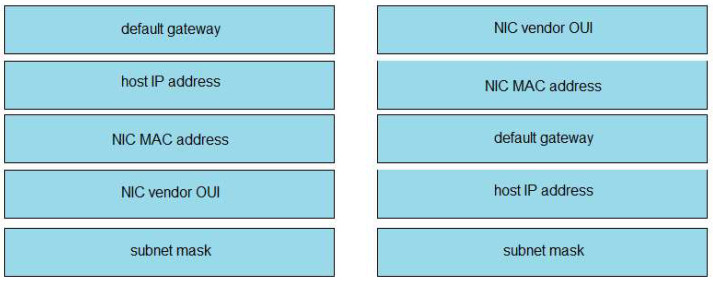
NIC vendor OUI –> 00:0C:22
NIC MAC address –> 00:0C:22:83:79:A3
default gateway –> 192.168.1.193
host IP address –> 192.168.1.200
subnet mask –> 255.255.255.192
Explanation: The “ip route” and “ip addr show eth1” are Linux commands.
+ “ip route”: display the routing table
+ “ip addr show eth1”: get depth information (only on eth1 interface) about your network interfaces like IP Address, MAC Address information
Related exam: CA201
