
Refer to the exhibit. How was the host route 2001:DB8:CAFE:4::1/128 installed in the routing table?
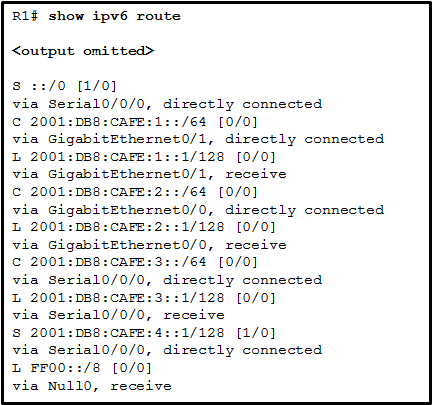
- The route was dynamically created by router R1.
- The route was dynamically learned from another router.
- The route was manually entered by an administrator.
- The route was automatically installed when an IP address was configured on an active interface.
Explanation: A host route is an IPv6 route with a 128-bit mask. A host route can be installed in a routing table automatically when an IP address is configured on a router interface or manually if a static route is created.
Related exam: CCNA 2 v7 Checkpoint Exam: Routing Concepts and Configuration Exam Answers
Related exam: CCNA 2 SRWEv7 Practice Final Exam Answers
Related exam: CCNA 2 v6.0 - CCENT (ICND1) Practice Certification Exam
