
Refer to the exhibit. Router R1 is configured with static NAT. Addressing on the router and the web server are correctly configured, but there is no connectivity between the web server and users on the Internet. What is a possible reason for this lack of connectivity?
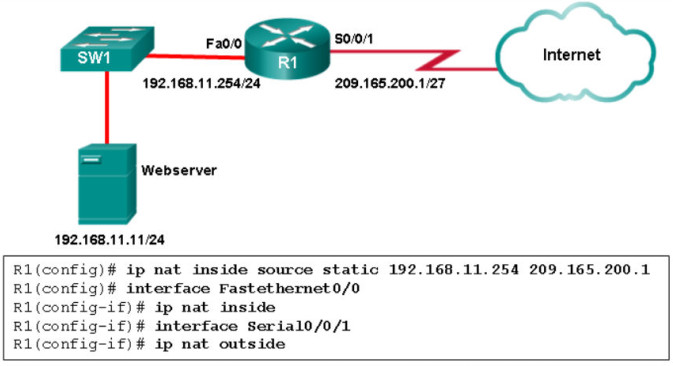
- A. The router NAT configuration has an incorrect inside local address.
- B. The inside global address is incorrect.
- C. The NAT configuration on interface S0/0/1 is incorrect.
- D. Interface Fa0/0 should be configured with the command ip nat outside
Correct Answer: A
Explanation: To configure static NAT, the command syntax is ip nat inside source static [inside local address] [inside global address]. The inside local address should be the actual private IP address assigned to the internal device (the web server). In the exhibit description, the web server's IP is 192.168.11.11, but the command entered (192.168.11.254) mistakenly uses the IP address of the router's FastEthernet 0/0 interface. Because the mapping does not point to the server's real address, the NAT process will not function for the web server's traffic.
- 135. Parameter Mismatch: The incoming packet fails to match the single Access Control Entry (ACE) on multiple fields. Specifically, its source address (198.133.219.100) and destination address (198.133.219.170) do not match the ACE's required source (192.168.100.32 0.0.0.7) and host destination (198.133.219.76).
- Implicit Deny: According to the sources, when a packet does not match any defined ACE in a list, it is automatically discarded due to the implicit deny any statement that is present at the end of every ACL. Because this packet matches no permit criteria, it is denied.
Related exam: CCNA 3 Final Exam Answers
