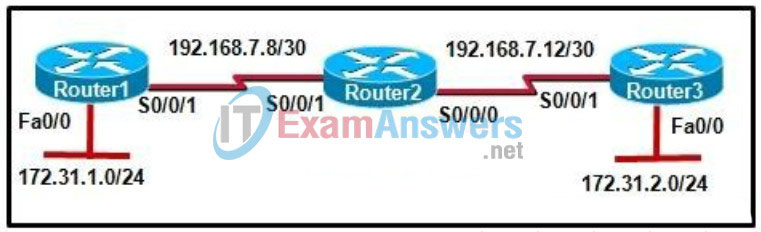
Refer to the exhibit. The routers are configured with RIPv2 and utilize the default configuration. When attempting to communicate with other networks, hosts from 172.31.1.0/24 are experiencing connectivity issues. What could be done to resolve this issue?
IT Exam Items Repository › Category: CCNA Discovery v4 › Refer to the exhibit. The routers are configured with RIPv2 and utilize the default configuration. When attempting to communicate with other networks, hosts from 172.31.1.0/24 are experiencing connectivity issues. What could be done to resolve this issue?
Refer to the exhibit. The routers are configured with RIPv2 and utilize the default configuration. When attempting to communicate with other networks, hosts from 172.31.1.0/24 are experiencing connectivity issues. What could be done to resolve this issue?
- Change to a public IP address scheme.
- Ensure that automatic route summarization has been disabled on all routers in the network.
- Change the IP address for the Router3 LAN to be 192.168.7.0/24.
- Change the subnet mask on the link between Router2 and Router3 to 255.255.255.0.
Related exam: CCNA Discovery 4: DCompNtwk Final Exam
About The Author

The ITExamAnswers Editorial Team is a dedicated group of certified IT professionals and network engineers. We rigorously review, verify, and update all exam materials to ensure you receive the most accurate and reliable resources for your certification journey.
