
Open the PT Activity. Perform the tasks in the activity instructions and then answer the question.
What is the code displayed on the web page?
- Welldone!
- BGP is configured!
- BGP is running!
- Configuration is correct!
Explanation: The basic EBGP configuration includes the following tasks:
Step 1: Enable BGP routing.
Step 2: Configure the BGP neighbors or neighbor.
Step 3: Advertise the network or networks originating from the AS.
Related exam: CCNA 4 Chapter 3 Exam Answers
Case 2:
Download PT activity: https://itexamanswers.net/download/what-is-the-code-displayed-on-the-web-page
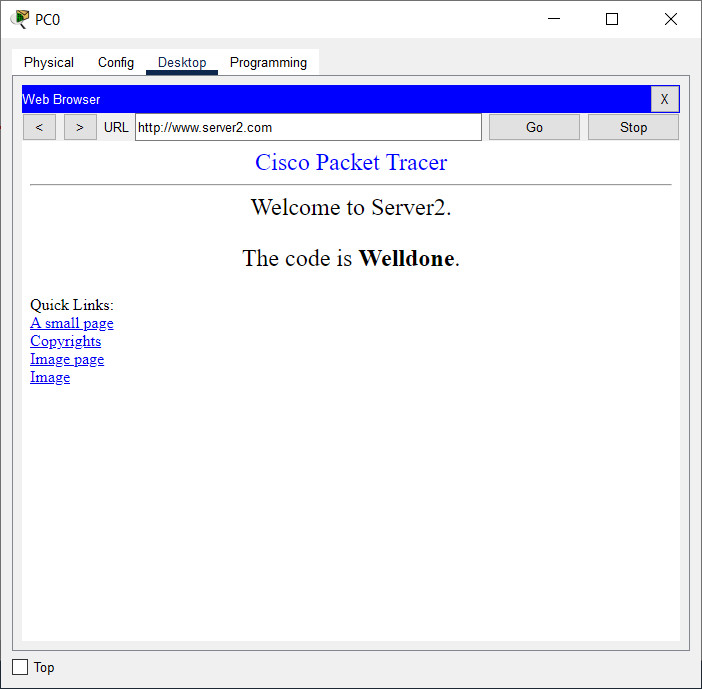
Open the PT activity. Perform the tasks in the activity instructions and then answer the question. What is the code displayed on the web page?
- Success
- Correct
- Welldone
- Configured Right
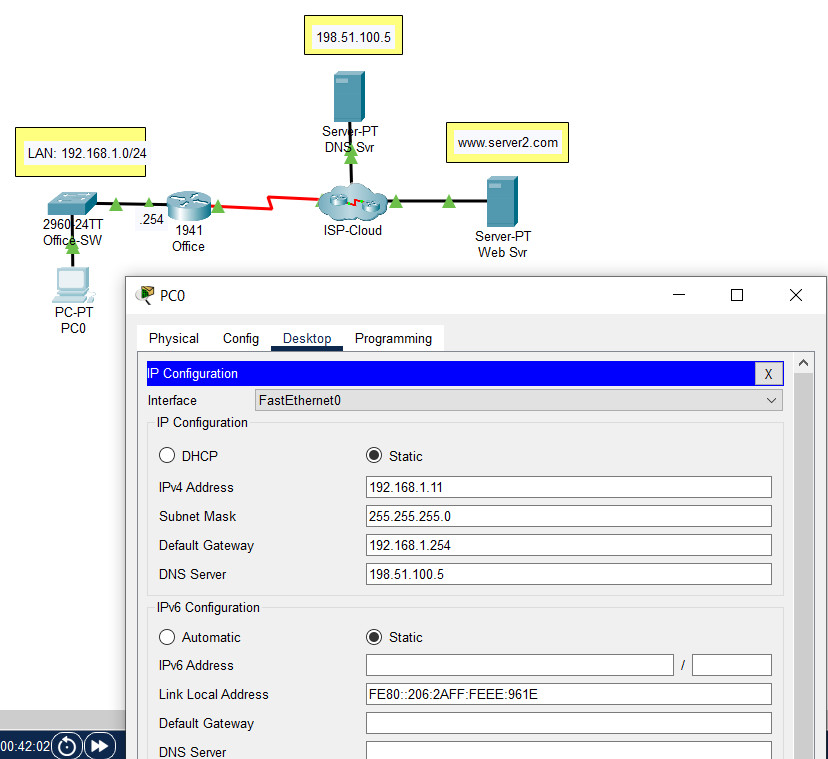
Explanation: The IP address configuration on PC0 requires the following:
- IP address - any valid host address on the LAN, except for .254
- Subnet mask - default value for the network
- Gateway - the nearest router interface
- DNS - the DNS server on the ISP network
Related exam: Networking Basics Course Final Exam
Related exam: Networking Essentials 3.0: Course Final Exam
