Refer to the exhibit. A network technician has just configured router East to establish a tunnel to router West. After the configuration is applied, tunnel 1 is flapping. What needs to be done to stop this flapping?
IT Exam Items Repository › Category: CCNP › Refer to the exhibit. A network technician has just configured router East to establish a tunnel to router West. After the configuration is applied, tunnel 1 is flapping. What needs to be done to stop this flapping?
Refer to the exhibit. A network technician has just configured router East to establish a tunnel to router West. After the configuration is applied, tunnel 1 is flapping. What needs to be done to stop this flapping?
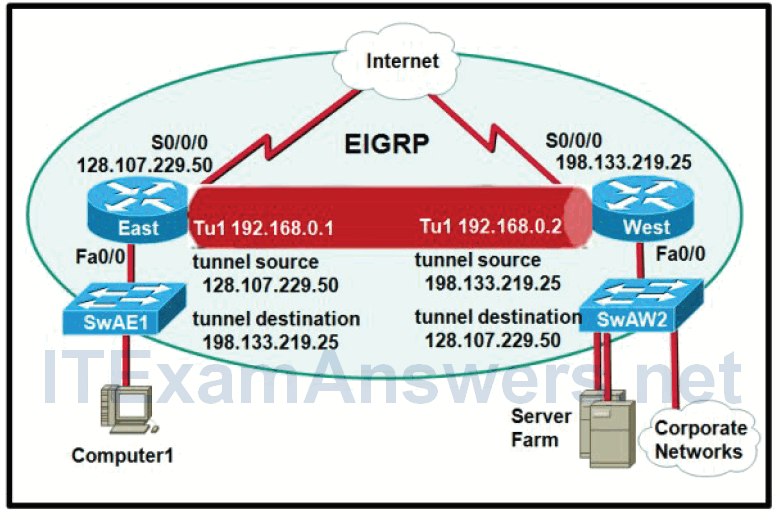
- Add a static route on router East out S0/0/0 to 198.133.219.25.
- Set the default gateway of Computer1 to 128.107.229.50.
- Change the configuration on router East such that the destination of tunnel 1 is 192.168.0.2.
- Make tunnel 1 on router East an EIGRP passive interface.
Related exam: CCNP TSHOOT Chapter 9 Exam Answers (Version 7)
About The Author

The ITExamAnswers Editorial Team is a dedicated group of certified IT professionals and network engineers. We rigorously review, verify, and update all exam materials to ensure you receive the most accurate and reliable resources for your certification journey.
