Refer to the exhibit. An administrator is troubleshooting connectivity on the office network. PC1 is able to send print jobs to Printer1, but is unable to access File Server1. Which action would correct the problem?
ITExam Editorial Team
Last Updated: Aug 11, 2023
IT Exam Items Repository › Category: IT Essentials 8 › Refer to the exhibit. An administrator is troubleshooting connectivity on the office network. PC1 is able to send print jobs to Printer1, but is unable to access File Server1. Which action would correct the problem?
Refer to the exhibit. An administrator is troubleshooting connectivity on the office network. PC1 is able to send print jobs to Printer1, but is unable to access File Server1. Which action would correct the problem?
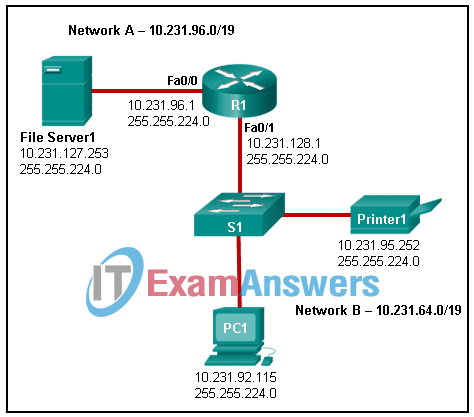
- Change the R1 Fa0/1 interface IP address to 10.231.64.1.
- Change the R1 Fa0/0 interface subnet mask to 255.255.0.0.
- Change the File Server1 IP address to 10.231.96.253.
- Change the PC1 IP address to 10.231.64.115.
Explanation: To correct the problem the Fa0/1 interface must be put into the 10.231.64.0 /19 network, so that it is in the same logical network as PC1. Currently the interface is in the 10.231.128.0 network.
Related exam: Networking Devices and Initial Configuration Course Final Exam Answers
Related exam: Network Technician Career Path Exam Answers
About The Author

The ITExamAnswers Editorial Team is a dedicated group of certified IT professionals and network engineers. We rigorously review, verify, and update all exam materials to ensure you receive the most accurate and reliable resources for your certification journey.
