
Refer to the exhibit. An administrator configures the following ACL in order to prevent devices on the 192.168.1.0 subnet from accessing the server at 10.1.1.5:
access-list 100 deny ip 192.168.1.0 0.0.0.255 host 10.1.1.5
access-list 100 permit ip any any
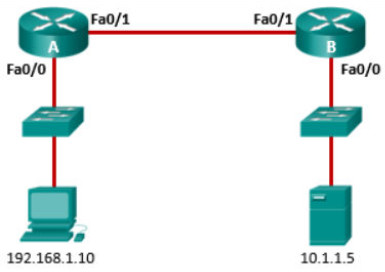
Where should the administrator place this ACL for the most efficient use of network resources?
- inbound on router A Fa0/0
- outbound on router B Fa0/0
- outbound on router A Fa0/1
- inbound on router B Fa0/1
Explanation: The configured ACL (100) is an Extended ACL because it filters traffic based on both source and destination IP addresses. According to standard design guidelines, Extended ACLs should be placed as close to the source of the traffic as possible. By applying this ACL inbound on Router A’s Fa0/0 interface, the unwanted traffic from the 192.168.1.0 subnet is discarded immediately upon entering the router, which prevents it from consuming bandwidth or processing resources across the point-to-point link and the rest of the network.
Related exam: CCNA 3 v7 Course Final Exam Answers
