
8.7.4 Packet Tracer - Configure IPv6 ACLs Answers Version
Topology
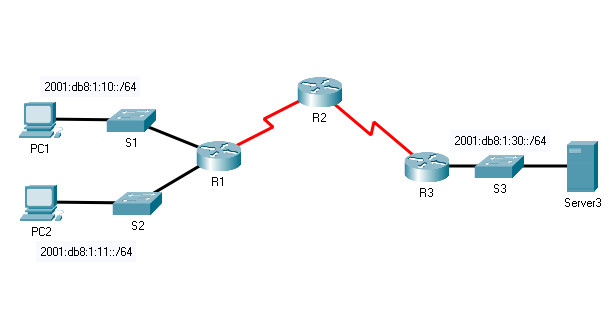
8.7.4 Packet Tracer – Configure IPv6 ACLs
Addressing Table
| Device | Interface | IPv6 Address/Prefix | Default Gateway |
|---|---|---|---|
| PC1 | NIC | 2001:db8:1:10::10/64 | fe80::1 |
| PC2 | NIC | 2001:db8:1:11::11/64 | fe80::1 |
| Server3 | NIC | 2001:db8:1:30::30/64 | fe80::30 |
Objectives
- Part 1: Configure, Apply, and Verify an IPv6 ACL
- Part 2: Configure, Apply, and Verify a Second IPv6 ACL
Instructions
Part 1: Configure, Apply, and Verify an IPv6 ACL
Logs indicate that a computer on the 2001:db8:1:11::0/64 network is repeatedly refreshing a web page. This is causing a Denial-of-Service (DoS) attack against Server3. Until the client can be identified and cleaned, you must block HTTP and HTTPS access to that network with an access list.
Step 1: Configure an ACL that will block HTTP and HTTPS access.
Configure an ACL named BLOCK_HTTP on R1 with the following statements.
a. Block HTTP and HTTPS traffic from reaching Server3.
R1(config)# ipv6 access-list BLOCK_HTTP
	R1(config)# deny tcp any host 2001:db8:1:30::30 eq www
R1(config)# deny tcp any host 2001:db8:1:30::30 eq 443
b. Allow all other IPv6 traffic to pass.
R1(config)# permit ipv6 any any
Step 2: Apply the ACL to the correct interface.
Apply the ACL on the interface closest to the source of the traffic to be blocked.
R1(config)# interface GigabitEthernet0/1

R1(config-if)# ipv6 traffic-filter BLOCK_HTTP in
Step 3: Verify the ACL implementation.
Verify that the ACL is operating as intended by conducting the following tests:
- Open the web browser of PC1 to http://2001:db8:1:30::30 or https://2001:db8:1:30::30. The website should appear.
- Open the web browser of PC2 to http://2001:db8:1:30::30 or https://2001:db8:1:30::30. The website should be blocked.
- Ping from PC2 to 2001:db8:1:30::30. The ping should be successful.
Part 2: Configure, Apply, and Verify a Second IPv6 ACL
The logs now indicate that your server is receiving pings from many different IPv6 addresses in a Distributed Denial of Service (DDoS) attack. You must filter ICMP ping requests to your server.
Step 1: Create an access list to block ICMP.
Configure an ACL named BLOCK_ICMP on R3 with the following statements:
a. Block all ICMP traffic from any hosts to any destination.
R1(config)# ipv6 access-list BLOCK_ICMP

R3(config)# deny icmp any any
b. Allow all other IPv6 traffic to pass.
R3(config)# permit ipv6 any any
Step 2: Apply the ACL to the correct interface.
In this case, ICMP traffic can come from any source. To ensure that ICMP traffic is blocked, regardless of its source or any changes that occur to the network topology, apply the ACL closest to the destination.
R3(config)# interface GigabitEthernet0/0

R3(config-if)# ipv6 traffic-filter BLOCK_ICMP out
Step 3: Verify that the proper access list functions.
a. Ping from PC2 to 2001:db8:1:30::30. The ping should fail.
b. Ping from PC1 to 2001:db8:1:30::30. The ping should fail.
c. Open the web browser of PC1 to http://2001:db8:1:30::30 or https://2001:db8:1:30::30. The website should display.
Device Configs - Final
Router R1
! ==============================================================
!--- 8.7.4 Packet Tracer - Configure IPv6 ACLs
!--- ANSWER SCRIPT FOR ROUTER R1
!--- Usage: copy this whole file and paste it into the R1 terminal (start at the R1> prompt). Every line beginning with "!" is a comment; IOS ignores it, so pasting a comment by accident is harmless.
! ==============================================================

enable
configure terminal

! --------------------------------------------------------------
!--- Part 1: Configure, Apply, and Verify the BLOCK_HTTP IPv6 ACL.
! --------------------------------------------------------------

!--- Begin the named IPv6 ACL.
ipv6 access-list BLOCK_HTTP

!--- Block HTTP (port 80/www) from any source to Server3 — mitigates the DoS traffic reported from 2001:db8:1:11::/64.
 deny tcp any host 2001:db8:1:30::30 eq www

!--- Block HTTPS (port 443) from any source to Server3.
 deny tcp any host 2001:db8:1:30::30 eq 443

!--- Permit everything else — IPv6 ACLs also end with an implicit "deny all" (plus an implicit permit for
!--- ICMPv6 neighbor discovery), so this explicit permit keeps all other traffic, including PC1's own
!--- access to Server3, unaffected.
 permit ipv6 any any
 exit

! --------------------------------------------------------------
!--- Part 2: Apply the ACL to the Correct Interface.
! --------------------------------------------------------------

!--- Apply inbound on G0/1 — the interface facing 2001:db8:1:11::/64 (PC2's LAN), closest to the source of the DoS traffic.
interface gigabitethernet 0/1
 ipv6 traffic-filter BLOCK_HTTP in
 exit

end

! --------------------------------------------------------------
!--- Save the configuration to NVRAM. (Press Enter when prompted for the destination filename.)
! --------------------------------------------------------------
copy running-config startup-config


! ==============================================================
!--- Verification:
!---   show ipv6 access-list BLOCK_HTTP -> confirms both deny lines and the trailing permit ipv6 any any
!---   show run | section interface GigabitEthernet0/1 -> confirms "ipv6 traffic-filter BLOCK_HTTP in"
!---   PC1 browser -> http(s)://2001:db8:1:30::30 -> succeeds (PC1 is on 2001:db8:1:10::/64, not filtered)
!---   PC2 browser -> http(s)://2001:db8:1:30::30 -> blocked (PC2 is on 2001:db8:1:11::/64, the filtered network)
!---   PC2 -> ping 2001:db8:1:30::30              -> still succeeds (ICMP isn't matched by this ACL)
!--- Note: the source note in the lab's own Instructions labels Part 2 Step 1 as running on "R1" —
!--- that's a copy-paste artifact in the documentation only; the actual commands and the lab's own Answer
!--- script correctly target R3 for BLOCK_ICMP (see the separate R3 script).
! ==============================================================
Router R3
! ==============================================================
!--- 8.7.4 Packet Tracer - Configure IPv6 ACLs
!--- ANSWER SCRIPT FOR ROUTER R3
!--- Usage: copy this whole file and paste it into the R3 terminal (start at the R3> prompt). Every line beginning with "!" is a comment; IOS ignores it, so pasting a comment by accident is harmless.
! ==============================================================

enable
configure terminal

! --------------------------------------------------------------
!--- Part 1: Configure, Apply, and Verify the BLOCK_ICMP IPv6 ACL.
! --------------------------------------------------------------

!--- Begin the named IPv6 ACL.
ipv6 access-list BLOCK_ICMP

!--- Block all ICMPv6 traffic, from any source to any destination — mitigates the DDoS ping flood against Server3.
 deny icmp any any

!--- Permit everything else, so non-ICMP traffic (like PC1's HTTP/HTTPS access to Server3) is unaffected.
 permit ipv6 any any
 exit

! --------------------------------------------------------------
!--- Part 2: Apply the ACL to the Correct Interface.
! --------------------------------------------------------------

!--- Apply outbound on G0/0 — the interface facing Server3, closest to the destination. Filtering here
!--- catches ICMP from any source and stays effective even if the topology upstream changes later.
interface gigabitethernet 0/0
 ipv6 traffic-filter BLOCK_ICMP out
 exit

end

! --------------------------------------------------------------
!--- Save the configuration to NVRAM. (Press Enter when prompted for the destination filename.)
! --------------------------------------------------------------
copy running-config startup-config


! ==============================================================
!--- Verification:
!---   show ipv6 access-list BLOCK_ICMP -> confirms "deny icmp any any" and the trailing permit ipv6 any any
!---   show run | section interface GigabitEthernet0/0 -> confirms "ipv6 traffic-filter BLOCK_ICMP out"
!---   PC2 -> ping 2001:db8:1:30::30              -> now fails (ICMP blocked outbound toward Server3)
!---   PC1 -> ping 2001:db8:1:30::30              -> now fails (ICMP blocked regardless of source)
!---   PC1 browser -> http(s)://2001:db8:1:30::30 -> still succeeds (this ACL only matches ICMP, not TCP)
!--- Note: applying the filter "out" on the interface closest to Server3 (rather than "in" on every
!--- possible source interface) is what makes it catch ICMP from any source — including PC2, which was
!--- already blocked for HTTP/HTTPS by BLOCK_HTTP on R1, but was still able to ping before this ACL.
! ==============================================================


