
19.5.5 Packet Tracer - Configure and Verify a Site-to-Site IPsec VPN Answers Version
Topology
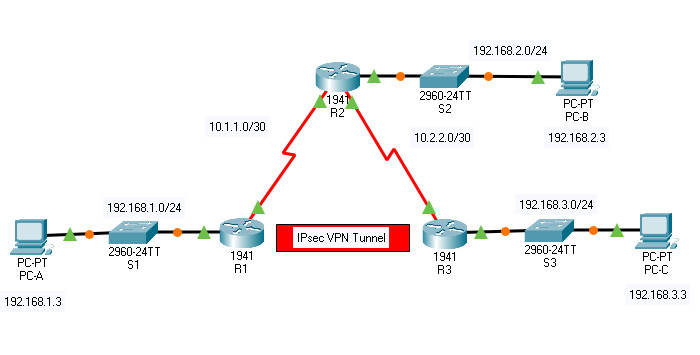
19.5.5 Packet Tracer – Configure and Verify a Site-to-Site IPsec VPN
Addressing Table
| Device | Interface | IP Address | Subnet Mask | Default Gateway | Switch Port |
|---|---|---|---|---|---|
| R1 | G0/0 | 192.168.1.1 | 255.255.255.0 | N/A | S1 F0/1 |
| S0/0/0 (DCE) | 10.1.1.2 | 255.255.255.252 | N/A | N/A | |
| R2 | G0/0 | 192.168.2.1 | 255.255.255.0 | N/A | S2 F0/2 |
| S0/0/0 | 10.1.1.1 | 255.255.255.252 | N/A | N/A | |
| S0/0/1 (DCE) | 10.2.2.1 | 255.255.255.252 | N/A | N/A | |
| R3 | G0/0 | 192.168.3.1 | 255.255.255.0 | N/A | S3 F0/5 |
| S0/0/1 | 10.2.2.2 | 255.255.255.252 | N/A | N/A | |
| PC-A | NIC | 192.168.1.3 | 255.255.255.0 | 192.168.1.1 | S1 F0/2 |
| PC-B | NIC | 192.168.2.3 | 255.255.255.0 | 192.168.2.1 | S2 F0/1 |
| PC-C | NIC | 192.168.3.3 | 255.255.255.0 | 192.168.3.1 | S3 F0/18 |
Objectives
- Verify connectivity throughout the network.
- Configure R1 to support a site-to-site IPsec VPN with R3.
Background / Scenario
The network topology shows three routers. Your task is to configure R1 and R3 to support a site-to-site IPsec VPN when traffic flows between their respective LANs. The IPsec VPN tunnel is from R1 to R3 via R2. R2 acts as a pass-through and has no knowledge of the VPN. IPsec provides secure transmission of sensitive information over unprotected networks, such as the Internet. IPsec operates at the network layer and protects and authenticates IP packets between participating IPsec devices (peers), such as Cisco routers.
ISAKMP Phase 1 Policy Parameters
| Parameters | R1 | R3 | |
|---|---|---|---|
| Key Distribution Method
Encryption Algorithm |
Manual or ISAKMP
DES, 3DES, or AES |
ISAKMP | ISAKMP |
| AES 256 | AES 256 | ||
| Hash Algorithm
Authentication Method Key Exchange |
MD5 or SHA-1
Pre-shared keys or RSA DH Group 1, 2, or 5 |
SHA-1 | SHA-1 |
| pre-share | pre-share | ||
| DH 5 | DH 5 | ||
| IKE SA Lifetime
ISAKMP Key |
86400 seconds or less | 86400 | 86400 |
| vpnpa55 | vpnpa55 | ||
Note: Bolded parameters are defaults. Only unbolded parameters have to be explicitly configured.
IPsec Phase 2 Policy Parameters
| Parameters | R1 | R3 |
|---|---|---|
| Transform Set Name | VPN-SET | VPN-SET |
| ESP Transform Encryption | esp-aes | esp-aes |
| ESP Transform Authentication | esp-sha-hmac | esp-sha-hmac |
| Peer IP Address | 10.2.2.2 | 10.1.1.2 |
| Traffic to be Encrypted | access-list 110 (source 192.168.1.0 dest 192.168.3.0) |
access-list 110 (source 192.168.3.0 dest 192.168.1.0) |
| Crypto Map Name | VPN-MAP | VPN-MAP |
| SA Establishment | ipsec-isakmp | ipsec-isakmp |
The routers have been pre-configured with the following:
• Password for console line: ciscoconpa55
• Password for vty lines: ciscovtypa55
• Enable password: ciscoenpa55
• SSH username and password: SSHadmin / ciscosshpa55
• OSPF 101
Instructions
Part 1: Configure IPsec Parameters on R1
Step 1: Test connectivity.
Ping from PC-A to PC-C. The devices are all configured with routing. Therefore, the ping should succeed.
Step 2: Enable the Security Technology package.
a. On R1, issue the show version command to view the Security Technology package license information.
b. If the Security Technology package has not been enabled, use the following command to enable the package.
R1(config)# license boot module c1900 technology-package securityk9
c. Accept the end-user license agreement.
d. Save the running-config and reload the router to enable the security license.
e. Use the show version command again to verify that the securityk9 is listed under current Technology packages.
Step 3: Identify interesting traffic on R1.
Configure ACL 110 to identify the traffic from the LAN on R1 to the LAN on R3 as interesting. This interesting traffic will trigger the IPsec VPN to be implemented when there is traffic between the R1 to R3 LANs. All other traffic sourced from the LANs will not be encrypted. Because of the implicit deny all, there is no need to configure a deny ip any any statement.
R1(config)# access-list 110 permit ip 192.168.1.0 0.0.0.255 192.168.3.0 0.0.0.255
Step 4: Configure the IKE Phase 1 ISAKMP policy on R1.
Configure the crypto ISAKMP policy 10 properties on R1 along with the shared crypto key vpnpa55. Default values do not have to be configured. Therefore, only the encryption method, key exchange method, and DH method must be configured.
Note: The highest DH group currently supported by Packet Tracer is group 5. In a production network, you would configure at least DH 24.
R1(config)# crypto isakmp policy 10
R1(config-isakmp)# encryption aes 256
R1(config-isakmp)# authentication pre-share
R1(config-isakmp)# group 5
R1(config-isakmp)# exit
R1(config)# crypto isakmp key vpnpa55 address 10.2.2.2
Step 5: Configure the IKE Phase 2 IPsec policy on R1.
a. Create the transform-set VPN-SET to use esp-aes and esp-sha-hmac.
R1(config)# crypto ipsec transform-set VPN-SET esp-aes esp-sha-hmac
b. Create the crypto map VPN-MAP that binds all of the Phase 2 parameters together. Use sequence number 10 and identify it as an ipsec-isakmp map.
R1(config)# crypto map VPN-MAP 10 ipsec-isakmp
R1(config-crypto-map)# description VPN connection to R3
R1(config-crypto-map)# set peer 10.2.2.2
R1(config-crypto-map)# set transform-set VPN-SET
R1(config-crypto-map)# match address 110
R1(config-crypto-map)# exit
Step 6: Configure the crypto map on the outgoing interface.
Bind the VPN-MAP crypto map to the outgoing Serial 0/0/0 interface.
R1(config)# interface s0/0/0
R1(config-if)# crypto map VPN-MAP
Part 2: Configure IPsec Parameters on R3
Step 1: Enable the Security Technology package.
a. On R3, issue the show version command to verify that the Security Technology package license information has been enabled.
b. If the Security Technology package has not been enabled, enable the package and reload R3.
Step 2: Configure router R3 to support a site-to-site VPN with R1.
Configure reciprocating parameters on R3. Configure ACL 110 identifying the traffic from the LAN on R3 to the LAN on R1 as interesting.
R3(config)# access-list 110 permit ip 192.168.3.0 0.0.0.255 192.168.1.0 0.0.0.255
Step 3: Configure the IKE Phase 1 ISAKMP properties on R3.
Configure the crypto ISAKMP policy 10 properties on R3 along with the shared crypto key vpnpa55.
R3(config)# crypto isakmp policy 10
R3(config-isakmp)# encryption aes 256
R3(config-isakmp)# authentication pre-share
R3(config-isakmp)# group 5
R3(config-isakmp)# exit
R3(config)# crypto isakmp key vpnpa55 address 10.1.1.2
Step 4: Configure the IKE Phase 2 IPsec policy on R3.
a. Create the transform-set VPN-SET to use esp-aes and esp-sha-hmac.
R3(config)# crypto ipsec transform-set VPN-SET esp-aes esp-sha-hmac
b. Create the crypto map VPN-MAP that binds all of the Phase 2 parameters together. Use sequence number 10 and identify it as an ipsec-isakmp map.
R3(config)# crypto map VPN-MAP 10 ipsec-isakmp
R3(config-crypto-map)# description VPN connection to R1
R3(config-crypto-map)# set peer 10.1.1.2
R3(config-crypto-map)# set transform-set VPN-SET
R3(config-crypto-map)# match address 110
R3(config-crypto-map)# exit
Step 5: Configure the crypto map on the outgoing interface.
Bind the VPN-MAP crypto map to the outgoing Serial 0/0/1 interface. Note: This is not graded.
R3(config)# interface s0/0/1
R3(config-if)# crypto map VPN-MAP
Part 3: Verify the IPsec VPN
Step 1: Verify the tunnel prior to interesting traffic.
Issue the show crypto ipsec sa command on R1. Notice that the number of packets encapsulated, encrypted, decapsulated, and decrypted are all set to 0.
Step 2: Create interesting traffic.
Ping PC-C from PC-A.
Step 3: Verify the tunnel after interesting traffic.
On R1, re-issue the show crypto ipsec sa command. Notice that the number of packets is more than 0, which indicates that the IPsec VPN tunnel is working.
Step 4: Create uninteresting traffic.
Ping PC-B from PC-A. Note: Issuing a ping from router R1 to PC-C or R3 to PC-A is not interesting traffic.
Step 5: Verify the tunnel.
On R1, re-issue the show crypto ipsec sa command. Notice that the number of packets has not changed, which verifies that uninteresting traffic is not encrypted.
Step 6: Check results.
Your completion percentage should be 100%. Click Check Results to see feedback and verification of which required components have been completed.
Device Configs - Final
ROUTER R1
! ==============================================================
!--- 19.5.5 Packet Tracer - Configure and Verify a Site-to-Site IPsec VPN
!--- ANSWER SCRIPT FOR ROUTER R1
!--- Usage: this script has TWO paste blocks separated by a router reload — you cannot paste it all in one
!--- shot. Paste Block 1, wait for R1 to finish reloading and reach the R1> prompt again, log back in
!--- (enable), then paste Block 2. Every line beginning with "!" is a comment; IOS ignores it, so pasting a
!--- comment by accident is harmless.
! ==============================================================

! ============================== BLOCK 1 ==============================
enable
configure terminal

! --------------------------------------------------------------
!--- Part 1: Enable the Security Technology Package (required for AES/IPsec commands).
! --------------------------------------------------------------

!--- Only needed if "show version" doesn't already list securityk9 under active Technology packages.
license boot module c1900 technology-package securityk9

!--- Accepts the end-user license agreement prompt this command triggers.
yes

end
copy running-config startup-config

!--- The license only takes effect after a reload — wait for R1 to come back up before continuing.
reload
! ============================ END BLOCK 1 =============================


! ============================== BLOCK 2 ==============================
!--- After R1 reloads: enable, then paste everything below.
enable
configure terminal

! --------------------------------------------------------------
!--- Part 2: Identify Interesting Traffic (ACL 110).
! --------------------------------------------------------------

!--- Traffic from R1's LAN to R3's LAN triggers the VPN tunnel; everything else stays unencrypted
!--- (the implicit deny-all at the end of the ACL is only used for the "interesting traffic" match, not to
!--- block traffic outright).
access-list 110 permit ip 192.168.1.0 0.0.0.255 192.168.3.0 0.0.0.255

! --------------------------------------------------------------
!--- Part 3: Configure the IKE Phase 1 (ISAKMP) Policy.
! --------------------------------------------------------------

!--- Only non-default parameters need to be set: AES 256 encryption, pre-shared key auth, DH group 5.
crypto isakmp policy 10
 encryption aes 256
 authentication pre-share
 group 5
 exit

!--- Pre-shared key, tied to R3's WAN peer address (its S0/0/1 IP, the far end of the tunnel).
crypto isakmp key vpnpa55 address 10.2.2.2

! --------------------------------------------------------------
!--- Part 4: Configure the IKE Phase 2 (IPsec) Policy.
! --------------------------------------------------------------

!--- Transform set: AES encryption + SHA HMAC authentication for the actual encrypted payload.
crypto ipsec transform-set VPN-SET esp-aes esp-sha-hmac

!--- Crypto map binding: peer, transform set, and which traffic (ACL 110) triggers this tunnel.
crypto map VPN-MAP 10 ipsec-isakmp
 description VPN connection to R3
 set peer 10.2.2.2
 set transform-set VPN-SET
 match address 110
 exit

! --------------------------------------------------------------
!--- Part 5: Apply the Crypto Map to the Outgoing Interface.
! --------------------------------------------------------------

!--- Apply on S0/0/0 — R1's link toward R2 (and, through it, toward R3).
interface serial 0/0/0
 crypto map VPN-MAP
 exit

end

! --------------------------------------------------------------
!--- Save the configuration to NVRAM. (Press Enter when prompted for the destination filename.)
! --------------------------------------------------------------
copy running-config startup-config
! ============================ END BLOCK 2 =============================


! ==============================================================
!--- Verification:
!---   show version                    -> confirms "securityk9" now appears under active Technology packages
!---   show crypto isakmp policy       -> confirms policy 10: AES 256, pre-share, DH group 5
!---   show crypto map                 -> confirms VPN-MAP: peer 10.2.2.2, transform-set VPN-SET, ACL 110
!---   show crypto ipsec sa            -> before any interesting traffic, all packet counters read 0
!---   ping PC-C (192.168.3.3) from PC-A -> "interesting" traffic; re-run show crypto ipsec sa -> counters > 0
!---   ping PC-B (192.168.2.3) from PC-A -> "uninteresting" traffic (not matched by ACL 110); counters stay unchanged
!--- Note: R2 is a pure transit router in this VPN — it carries the encrypted ESP packets between R1 and
!--- R3 but has no crypto configuration of its own and no visibility into the tunnel's contents.
! ==============================================================
ROUTER R3
! ==============================================================
!--- 19.5.5 Packet Tracer - Configure and Verify a Site-to-Site IPsec VPN
!--- ANSWER SCRIPT FOR ROUTER R3
!--- Usage: Block 1 is OPTIONAL — only run it if "show version" does not already list securityk9 under
!--- active Technology packages (the lab's own Answer Script omits it for R3, implying it may already be
!--- enabled in this PKA). If you do run Block 1, wait for R3 to finish reloading and log back in (enable)
!--- before pasting Block 2. Every line beginning with "!" is a comment; IOS ignores it.
! ==============================================================

! ======================= BLOCK 1 (OPTIONAL) ============================
enable
configure terminal

! --------------------------------------------------------------
!--- Part 1: Enable the Security Technology Package, if not already active.
! --------------------------------------------------------------
license boot module c1900 technology-package securityk9

!--- Accepts the end-user license agreement prompt this command triggers.
yes

end
copy running-config startup-config

!--- The license only takes effect after a reload.
reload
! ===================== END BLOCK 1 (OPTIONAL) ==========================


! ============================== BLOCK 2 ==============================
!--- If Block 1 was needed, wait for R3 to reload, then enable and paste everything below.
enable
configure terminal

! --------------------------------------------------------------
!--- Part 2: Identify Interesting Traffic (ACL 110).
! --------------------------------------------------------------

!--- Reciprocal of R1's ACL 110: traffic from R3's LAN to R1's LAN triggers the VPN tunnel.
access-list 110 permit ip 192.168.3.0 0.0.0.255 192.168.1.0 0.0.0.255

! --------------------------------------------------------------
!--- Part 3: Configure the IKE Phase 1 (ISAKMP) Policy.
! --------------------------------------------------------------

!--- Must match R1's policy exactly for the two peers to negotiate Phase 1 successfully.
crypto isakmp policy 10
 encryption aes 256
 authentication pre-share
 group 5
 exit

!--- Pre-shared key, tied to R1's WAN peer address (its S0/0/0 IP, the far end of the tunnel).
crypto isakmp key vpnpa55 address 10.1.1.2

! --------------------------------------------------------------
!--- Part 4: Configure the IKE Phase 2 (IPsec) Policy.
! --------------------------------------------------------------

!--- Transform set must match R1's exactly.
crypto ipsec transform-set VPN-SET esp-aes esp-sha-hmac

!--- Crypto map binding: peer, transform set, and which traffic (ACL 110) triggers this tunnel.
crypto map VPN-MAP 10 ipsec-isakmp
 description VPN connection to R1
 set peer 10.1.1.2
 set transform-set VPN-SET
 match address 110
 exit

! --------------------------------------------------------------
!--- Part 5: Apply the Crypto Map to the Outgoing Interface.
! --------------------------------------------------------------

!--- Apply on S0/0/1 — R3's link toward R2 (and, through it, toward R1).
interface serial 0/0/1
 crypto map VPN-MAP
 exit

end

! --------------------------------------------------------------
!--- Save the configuration to NVRAM. (Press Enter when prompted for the destination filename.)
! --------------------------------------------------------------
copy running-config startup-config
! ============================ END BLOCK 2 =============================


! ==============================================================
!--- Verification:
!---   show crypto isakmp policy       -> confirms policy 10: AES 256, pre-share, DH group 5 (matches R1)
!---   show crypto map                 -> confirms VPN-MAP: peer 10.1.1.2, transform-set VPN-SET, ACL 110
!---   show crypto ipsec sa            -> packet counters increase only after PC-A pings PC-C
!--- Note: the lab explicitly marks binding the crypto map to R3's interface (Part 2 Step 5) as "not
!--- graded" — but the tunnel will not actually pass traffic without it, so it's included here regardless.
! ==============================================================
Download Packet Tracer (.pka) file:


