1. Refer to the exhibit. ServerB is attempting to contact HostA. Which two statements correctly identify the addressing that ServerB will generate in the process? (Choose two.)
ServerB will generate a frame with the destination MAC address of RouterB.
ServerB will generate a packet with the destination IP address of HostA.
ServerB will generate a frame with the destination MAC address of RouterA.
ServerB will generate a frame with the destination MAC address of SwitchB.
ServerB will generate a packet with the destination IP address of RouterB.
ServerB will generate a packet with the destination IP address of RouterA.
Explanation: Topic 4.4.5 (Topic 21.4.5)
In order to send data to HostA, ServerB will generate a packet that contains the IP address of the destination device on the remote network and a frame that contains the MAC address of the default gateway device on the local network.
2. When would a switch record multiple entries for a single switch port in its MAC address table?
when multiple ARP broadcasts have been forwarded
when another switch is connected to the switch port
when a router is connected to the switch port
when the switch is configured for Layer 3 switching
Explanation: Topic 4.4.4 (Topic 21.4.4)
When another switch or a hub is connected to a switch port then frames could be received from the multiple nodes connected to the other switch or the hub. This will result in the MAC address for each of those multiple nodes to be recorded in the MAC address table against that one port. When a router is connected to a switch port, only the MAC address of the router interface would be recorded against the switch port. ARP broadcasts are used to associate MAC addresses with IP addresses and such broadcasts would not directly result in multiple MAC addresses being recorded against a single switch port. Configuring the switch to perform Layer 3 switching will not result in multiple MAC addresses being recorded against a single switch port. The ARP table associated with the Layer 3 switch port may contain multiple IP address to MAC address mappings but this is to enable the correct framing of Layer 3 packets, not the Layer 2 frame switching function.
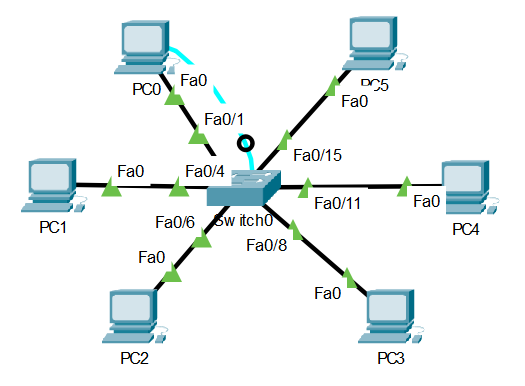
3. Open the PT Activity. Perform the tasks in the activity instructions and then answer the question.
Open the PT Activity. Perform the tasks in the activity instructions and then answer the question.Which port does Switch0 use to send frames to the host with the IPv4 address 10.1.1.5?
Fa0/1
Fa0/5
Fa0/9
Fa0/11
Explanation: Topic 4.4.2 (Topic 21.4.2)
A switch learns which port leads to each host by recording the source MAC address of every frame it receives, together with the port the frame arrived on. To find the port used for 10.1.1.5, ping that host from PC0 so that both hosts send frames through Switch0, then view the MAC address table on Switch0 from the PC0 Terminal (console connection). The table shows two dynamic entries: one is PC0's own MAC address, so the other entry is the MAC address and port of the host 10.1.1.5. In this activity that entry is 000c.85e9.a99d on port Fa0/11.
Step 1: Find the MAC address of PC0.
On PC0, open Desktop > Command Prompt and enter ipconfig /all. Note the Physical Address of the FastEthernet0 connection.
Step 2: Check the MAC address table on Switch0.
On PC0, open Desktop > Terminal and click OK to connect to Switch0 through the console cable. The table is empty because no frames have passed through the switch yet. (If it already has entries, clear them with clear mac-address-table dynamic from privileged EXEC mode.)
Switch0> show mac-address-table
          Mac Address Table
-------------------------------------------

Vlan    Mac Address       Type        Ports
----    -----------       --------    -----
Step 3: Ping the host 10.1.1.5 from PC0.
C:\> ping 10.1.1.5

Pinging 10.1.1.5 with 32 bytes of data:

Reply from 10.1.1.5: bytes=32 time=2ms TTL=128
Reply from 10.1.1.5: bytes=32 time<1ms TTL=128
Reply from 10.1.1.5: bytes=32 time<1ms TTL=128
Reply from 10.1.1.5: bytes=32 time<1ms TTL=128

Ping statistics for 10.1.1.5:
    Packets: Sent = 4, Received = 4, Lost = 0 (0% loss),
Approximate round trip times in milli-seconds:
    Minimum = 0ms, Maximum = 2ms, Average = 0ms
Step 4: View the MAC address table on Switch0 again.
Return to the Terminal window. Switch0 has now learned two MAC addresses. 0060.473e.9176 on Fa0/1 is PC0 (Step 1), so the other entry belongs to the host 10.1.1.5: Switch0 sends frames for that host out of port Fa0/11.
Switch0# show mac-address-table
          Mac Address Table
-------------------------------------------

Vlan    Mac Address       Type        Ports
----    -----------       --------    -----

   1    000c.85e9.a99d    DYNAMIC     Fa0/11
   1    0060.473e.9176    DYNAMIC     Fa0/1
4. Which information does a switch use to populate the MAC address table?
the source MAC address and the incoming port
the source MAC address and the outgoing port
the source and destination MAC addresses and the outgoing port
the destination MAC address and the incoming port
the destination MAC address and the outgoing port
the source and destination MAC addresses and the incoming port
Explanation: Topic 4.4.2 (Topic 21.4.2)
To maintain the MAC address table, the switch uses the source MAC address of the incoming packets and the port that the packets enter. The destination address is used to select the outgoing port.
5. Refer to the exhibit. The exhibit shows a small switched network and the contents of the MAC address table of the switch. PC1 has sent a frame addressed to PC3. What will the switch do with the frame?
The switch will forward the frame to all ports.
The switch will discard the frame.
The switch will forward the frame only to port 2.
The switch will forward the frame only to ports 1 and 3.
The switch will forward the frame to all ports except port 4.
Explanation: Topic 4.4.2 (Topic 21.4.2)
The MAC address of PC3 is not present in the MAC table of the switch. Because the switch does not know where to send the frame that is addressed to PC3, it will forward the frame to all the switch ports, except for port 4, which is the incoming port.
6. When a computer assembles a frame to be sent over the network, what is the maximum size of an Ethernet frame?
64 bytes
128 bytes
1024 bytes
1518 bytes
Explanation: Topic 4.2.4 (Topic 21.2.4)
Ethernet standards define a frame size with a minimum of 64 bytes and a maximum of 1518 bytes including fields of destination MAC address, source MAC, Length/Type, data payload, and FCS.
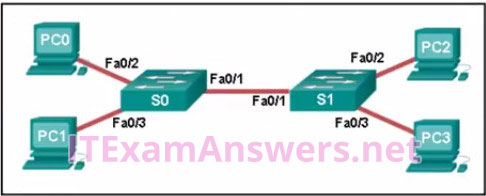
7. Refer to the exhibit. A ping to PC3 is issued from PC0, PC1, and PC2 in this exact order. Which MAC addresses will be contained in the S1 MAC address table that is associated with the Fa0/1 port?
just the PC2 MAC address
just the PC0 MAC address
just the PC1 MAC address
just PC0 and PC1 MAC addresses
PC0, PC1, and PC2 MAC addresses
Explanation: Topic 4.4.4 (Topic 21.4.4)
Switch S1 builds a MAC address table based on the source MAC address in the frame and the port upon which the frame enters the switch. The PC2 MAC address will be associated with port FA0/2. Because port FA0/1 of switch S1 connects with another switch, port FA0/1 will receive frames from multiple different devices. The MAC address table on switch S1 will therefore contain MAC addresses associated with each of the sending PCs.
8. What are two functions that are provided by the network layer? (Choose two.)
carrying data between processes that are running on source and destination hosts
placing data on the network medium
directing data packets to destination hosts on other networks
providing dedicated end-to-end connections
providing end devices with a unique network identifier
Explanation: Topic 5.1.2 (Topic 22.1.2)
The network layer is primarily concerned with passing data from a source to a destination on another network. IP addresses supply unique identifiers for the source and destination. The network layer provides connectionless, best-effort delivery. Devices rely on higher layers to supply services to processes.
9. Which IPv4 header field is responsible for defining the priority of the packet?
differentiated services
flow label
flags
traffic class
Explanation: Topic 5.2.2 (Topic 22.2.2)
Differentiated services (DiffServ) is an IPv4 header field that is used to define the priority of each packet. The first 6 bits identify the value that is used by the QoS mechanism, and the last 2 bits identify the value that can be used to avoid packet dropping during network congestion. Traffic class is an IPv6 header field that is equivalent to the IPv4 differentiated services (DiffServ) field. Flow label is also an IPv6 header field that can be used to tell routers and switches to keep the same path for the packet flow to avoid packet reordering. Flags is an IPv4 header field that identifies how the packet is fragmented.
10. Which field in an IPv6 packet is used by the router to determine if a packet has expired and should be dropped?
TTL
Address Unreachable
No Route to Destination
Hop Limit
Explanation: Topic 5.3.4 (Topic 22.3.4)
ICMPv6, like IPv4, sends a Time Exceeded message if the router cannot forward an IPv6 packet because the packet has expired. However, the IPv6 packet does not have a TTL field. Instead, it uses the Hop Limit field to determine if the packet has expired.
11. What is correct in relation to NAT for IPv6?
It is a temporary mechanism to assist in the migration from IPv4 to IPv6.
Dual stack is an example of implementation of NAT for IPv6.
NAT64 has been deprecated by IETF in favor of NAT-PT.
It is used to convert private IPv6 addresses to public IPv6 addresses.
Explanation: Topic 5.3.1 (Topic 22.3.1)
NAT for IPv6 is a temporary measure to aid in the move from IPv4 to IPv6. NAT64 is replacing NAT-PT. Dual stack is a method for running IPv4 and IPv6 on the same network.
12. Which field in the IPv6 header points to optional network layer information that is carried in the IPv6 packet?
flow label
traffic class
next header
version
Explanation: Topic 5.3.4 (Topic 22.3.4)
Optional Layer 3 information about fragmentation, security, and mobility is carried inside of extension headers in an IPv6 packet. The next header field of the IPv6 header acts as a pointer to these optional extension headers if they are present.
13. Match the characteristics with the correct IP protocol version.
12 basic header fields --> IPv4
128-bit address space --> IPv6
40 octets header --> IPv6
20 octets header --> IPv4
8 header fields --> IPv6
32-bit address space --> IPv4
Explanation: Topic 5.3.2 (Topic 22.3.2)
Options matched to the correct selection.
IPv4
IPv6
12 basic header fields
128-bit address space
20 octets header
40 octets header
32-bit address space
8 header fields
14. What is one advantage that the IPv6 simplified header offers over IPv4?
smaller-sized source and destination IP addresses
efficient packet handling
smaller-sized header
little requirement for processing checksums
Explanation: Topic 5.3.2 (Topic 22.3.2)
The IPv6 simplified header offers several advantages over IPv4:
· Better routing efficiency and efficient packet handling for performance and forwarding-rate scalability
· No requirement for processing checksums
· Simplified and more efficient extension header mechanisms (as opposed to the IPv4 Options field)
· A Flow Label field for per-flow processing with no need to open the transport inner packet to identify the various traffic flows
15. Refer to the exhibit. If all devices are using a subnet mask of 255.255.255.0, which laptop would have an IP address with the same network number as the server?
C
A
B
Explanation: Topic 6.1.2 (Topic 23.1.2)
The subnet mask shows which part of the IP address is the network number. Because all the devices have a subnet mask of 255.255.255.0, the first three sets of numbers in each IP address indicate the network number. The server and laptop C both have network numbers of 192.168.3.0.
16. Why does a Layer 3 device perform the ANDing process on a destination IP address and subnet mask?
to identify the network address of the destination network
to identify the host address of the destination host
to identify the broadcast address of the destination network
to identify faulty frames
Explanation: Topic 6.1.4 (Topic 23.1.4)
ANDing allows us to identify the network address from the IP address and the network mask.
17. Refer to the exhibit. A computer that is configured with the IPv4 address as shown in the exhibit is unable to access the internet. What is the problem?
The IP address is a broadcast address.
The settings were not validated.
The gateway address is in the wrong subnet.
The IP address is a network address.
Explanation: Topic 6.1.4 (Topic 23.1.4)
The subnet mask of 255.255.255.224 identifies the network of 192.168.44.128. The usable range for the network is 192.168.44.129 through 192.168.44.158. The default gateway address of 192.168.44.161 exists on a separate network from the PC it is configured on.
18. A network engineer subnets the network 192.168.100.0 /24 into 16 subnets. How many usable host addresses will be available on each of the subnets?
6
62
14
30
Explanation: Topic 6.1.3 (Topic 23.1.3)
When network 192.168.100.0 /24 is subnetted into 16 subnets, each subnet will have a new network mask of 255.255.255.240. This new mask will leave four bits of the address available for hosts. Four host bits yield 16 host addresses. However, two of those addresses are reserved, the lowest for the subnet and the highest for the subnet broadcast. This leaves 14 addresses for host configuration.
19. What subnet mask would be associated with the IPv4 prefix of /28?
255.255.255.252
255.255.255.0
255.255.255.224
255.255.255.248
255.255.255.240
Explanation: Topic 6.1.3 (Topic 23.1.3)
/28 represents the number of consecutive 1s in the subnet mask. 24 1s makes the 255.255.255 part of the subnet mask. The last 4 1s in the mask is where it gets a little tricky. Add the values that these 4 1s represent to get the last octet of the mask: 128 + 64 + 32 + 16 = 240. /28 = 255.255.255.240
20. Consider the group of five IPv4 addresses each with the subnet mask of 255.255.255.0. Which two IPv4 addresses belong to the same local network? (Choose two.)
192.168.10.2
192.168.10.56
193.168.10.16
192.168.100.62
192.167.10.74
Explanation: Topic 6.1.1 (Topic 23.1.1)
The subnet mask determines which part of the IP address is the network number. Because the subnet mask is 255.255.255.0, the first three sets of numbers in each IPv4 address indicate the network number. IPv4 addresses with the same network number are considered in the same local network.
21. Which two hosts exist on the same subnet? (Choose two.)
host 172.16.101.199/23
host 172.16.98.250/23
host 172.16.100.4/23
host 172.16.97.78/23
host 172.16.102.237/23
Explanation: Topic 6.1.4 (Topic 23.1.4)
Hosts 172.16.100.4/23 and 172.16.101.199/23 both exist in network 172.16.100.0/23. This network includes all addresses from 172.16.100.1 through 172.16.101.255.
The ITExamAnswers Editorial Team is a dedicated group of certified IT professionals and network engineers. We rigorously review, verify, and update all exam materials to ensure you receive the most accurate and reliable resources for your certification journey.