
Subnet & Wildcard Mask Calculator
Analyze any IPv4 address to instantly compute its subnet mask, wildcard mask, and network details.
⚙️ Network Input
⚡ Quick examples:
💡 The calculator accepts any valid IPv4 host or network address. Results include both the network perspective and binary representations.
The Wildcard Mask
The wildcard mask is typically the inverse of the subnet mask configured on that interface. In a subnet mask, binary 1 is equal to a match and binary 0 is not a match. In a wildcard mask, the reverse is true, as shown in here:
- Wildcard mask bit 0 - Matches the corresponding bit value in the address.
- Wildcard mask bit 1 - Ignores the corresponding bit value in the address.
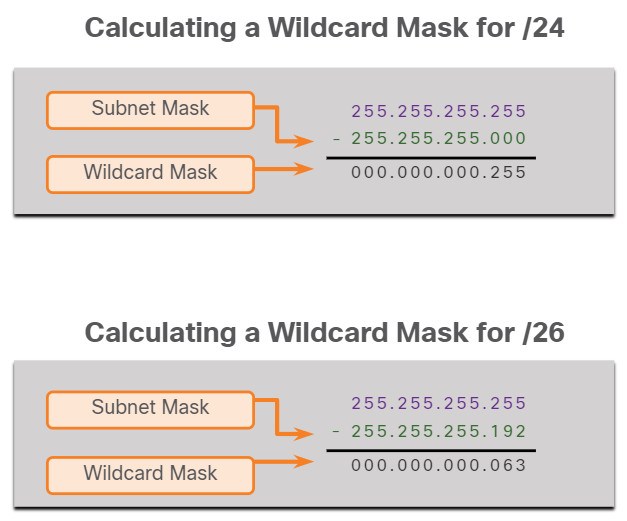
The easiest method for calculating a wildcard mask is to subtract the network subnet mask from 255.255.255.255, as shown for /24 and /26 subnet masks in the figure.
IPv4 Addresses and IPv4 Subnetting
| CIDR | SUBNET MASK | ADDRESSES | WILDCARD MASK |
|---|---|---|---|
| /32 | 255.255.255. 255 | 1 | 0.0.0.0 |
| /31 | 255.255.255. 254 | 2 | 0.0.0.1 |
| /30 | 255.255.255. 252 | 4 | 0.0.0.3 |
| /29 | 255.255.255. 248 | 8 | 0.0.0.7 |
| /28 | 255.255.255. 240 | 16 | 0.0.0.15 |
| /27 | 255.255.255. 224 | 32 | 0.0.0.31 |
| /26 | 255.255.255. 192 | 64 | 0.0.0.63 |
| /25 | 255.255.255. 128 | 128 | 0.0.0.127 |
| /24 | 255.255.255.0 | 256 | 0.0.0.255 |
| /23 | 255.255.254.0 | 512 | 0.0.1.255 |
| /22 | 255.255.252.0 | 1024 | 0.0.3.255 |
| /21 | 255.255.248.0 | 2048 | 0.0.7.255 |
| /20 | 255.255.240.0 | 4096 | 0.0.15.255 |
| /19 | 255.255.224.0 | 8192 | 0.0.31.255 |
| /18 | 255.255.192.0 | 16384 | 0.0.63.255 |
| /17 | 255.255.128.0 | 32768 | 0.0.127.255 |
| /16 | 255.255.0.0 | 65536 | 0.0.255.255 |
| /15 | 255.254.0.0 | 131072 | 0.1.255.255 |
| /14 | 255.252.0.0 | 262144 | 0.3.255.255 |
| /13 | 255.248.0.0 | 524288 | 0.7.255.255 |
| /12 | 255.240.0.0 | 1048576 | 0.15.255.255 |
| /11 | 255.224.0.0 | 2097152 | 0.31.255.255 |
| /10 | 255.192.0.0 | 4194304 | 0.63.255.255 |
| /9 | 255.128.0.0 | 8388608 | 0.127.255.255 |
| /8 | 255.0.0.0 | 16777216 | 0.255.255.255 |
| /7 | 254.0.0.0 | 33554432 | 1 .255.255.255 |
| /6 | 252.0.0.0 | 67108864 | 3 .255.255.255 |
| /5 | 248.0.0.0 | 134217728 | 7 .255.255.255 |
| /4 | 240.0.0.0 | 268435456 | 15. 255.255.255 |
| /3 | 224.0.0.0 | 536870912 | 31. 255.255.255 |
| /2 | 192.0.0.0 | 1073741824 | 63. 255.255.255 |
| /1 | 128.0.0.0 | 2147483648 | 127. 255.255.255 |
| /0 | 0.0.0.0 | 4294967296 | 255. 255.255.255 |
| Classful IPv4 Addresses | |
|---|---|
| Class A | 0.0.0.0 - 127.255.255.255 |
| Class B | 128.0.0.0 - 191.255.255.255 |
| Class C | 192.0.0.0 - 223.255.255.255 |
| Class D | 224.0.0.0 - 239.255.255.255 |
| Class E | 240.0.0.0 - 255.255.255.255 |
| Private IPv4 Addresses | |
| 10.0.0.0 - 10.255.255.255 | |
| 172.16.0.0 - 172.31.255.255 | |
| 192.168.0.0 - 192.168.255.255 |
| Special IPv4 Addresses | |
| Local Host | 127.0.0.0 - 127.255.255.255 |
| APIPA | 169.254.0.0 - 169.254.255.255 |
| Bogon IPv4 Addresses | |
| 0.0.0.0/8 | This network |
| 10.0.0.0/8 | Private IPv4 Address Block |
| 100.64.0.0/10 | Carrier-grade NAT |
| 127.0.0.0/8 | Loopback |
| 127.0.53.53 | Name collision occurrence |
| 169.254.0.0/16 | Link local |
| 172.16.0.0/12 | Private IPv4 Address Block |
| 192.0.0.0/24 | IETF protocol assignments |
| 192.0.2.0/24 | TEST-NET-1 |
| 192.168.0.0/16 | Private IPv4 Address Block |
| 198.18.0.0/15 | Network benchmark testing |
| 198.51.100.0/24 | TEST-NET-2 |
| 203.0.113.0/24 | TEST-NET-3 |
| 224.0.0.0/4 | Multicast |
| 240.0.0.0/4 | Reserved |
| 255.255.255.255/32 | Limited broadcast |
