
5.1.8 Packet Tracer - Configure Numbered Standard IPv4 ACLs Answers
Topology
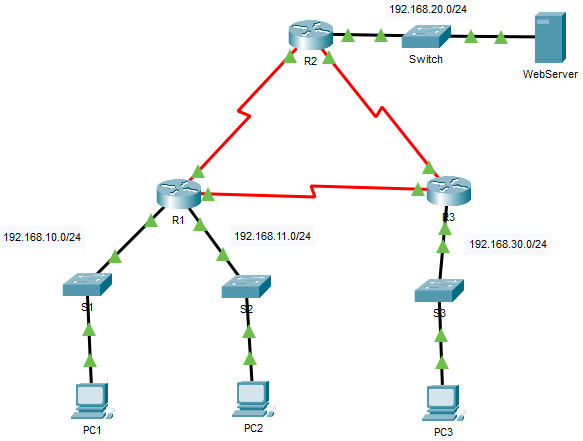
5.1.8 Packet Tracer - Configure Numbered Standard IPv4 ACLs
Addressing Table
| Device | Interface | IP Address | Subnet Mask | Default Gateway |
|---|---|---|---|---|
| R1 | G0/0 | 192.168.10.1 | 255.255.255.0 | N/A |
| G0/1 | 192.168.11.1 | 255.255.255.0 | ||
| S0/0/0 | 10.1.1.1 | 255.255.255.252 | ||
| S0/0/1 | 10.3.3.1 | 255.255.255.252 | ||
| R2 | G0/0 | 192.168.20.1 | 255.255.255.0 | N/A |
| S0/0/0 | 10.1.1.2 | 255.255.255.252 | ||
| S0/0/1 | 10.2.2.1 | 255.255.255.252 | ||
| R3 | G0/0 | 192.168.30.1 | 255.255.255.0 | N/A |
| S0/0/0 | 10.3.3.2 | 255.255.255.252 | ||
| S0/0/1 | 10.2.2.2 | 255.255.255.252 | ||
| PC1 | NIC | 192.168.10.10 | 255.255.255.0 | 192.168.10.1 |
| PC2 | NIC | 192.168.11.10 | 255.255.255.0 | 192.168.11.1 |
| PC3 | NIC | 192.168.30.10 | 255.255.255.0 | 192.168.30.1 |
| WebServer | NIC | 192.168.20.254 | 255.255.255.0 | 192.168.20.1 |
Objectives
- Part 1: Plan an ACL Implementation
- Part 2: Configure, Apply, and Verify a Standard ACL
Background / Scenario
Standard access control lists (ACLs) are router configuration scripts that control whether a router permits or denies packets based on the source address. This activity focuses on defining filtering criteria, configuring standard ACLs, applying ACLs to router interfaces, and verifying and testing the ACL implementation. The routers are already configured, including IP addresses and Enhanced Interior Gateway Routing Protocol (EIGRP) routing.
Instructions
Part 1: Plan an ACL Implementation
Step 1: Investigate the current network configuration.
Before applying any ACLs to a network, it is important to confirm that you have full connectivity. Verify that the network has full connectivity by choosing a PC and pinging other devices on the network. You should be able to successfully ping every device.
Step 2: Evaluate two network policies and plan ACL implementations.
a. The following network policies are implemented on R2:
- The 192.168.11.0/24 network is not allowed access to the WebServer on the 192.168.20.0/24 network.
- All other access is permitted.
To restrict access from the 192.168.11.0/24 network to the WebServer at 192.168.20.254 without interfering with other traffic, an ACL must be created on R2. The access list must be placed on the outbound interface to the WebServer. A second rule must be created on R2 to permit all other traffic.
b. The following network policies are implemented on R3:
- The 192.168.10.0/24 network is not allowed to communicate with the 192.168.30.0/24 network.
- All other access is permitted.
To restrict access from the 192.168.10.0/24 network to the 192.168.30.0/24 network without interfering with other traffic, an access list will need to be created on R3. The ACL must be placed on the outbound interface to PC3. A second rule must be created on R3 to permit all other traffic.
Part 2: Configure, Apply, and Verify a Standard ACL
Step 1: Configure and apply a numbered standard ACL on R2.
a. Create an ACL using the number 1 on R2 with a statement that denies access to the 192.168.20.0/24 network from the 192.168.11.0/24 network.
R2(config)# access-list 1 deny 192.168.11.0 0.0.0.255
b. By default, an access list denies all traffic that does not match any rules. To permit all other traffic, configure the following statement:
R2(config)# access-list 1 permit any
c. Before applying an access list to an interface to filter traffic, it is a best practice to review the contents of the access list, in order to verify that it will filter traffic as expected.
R2# show access-lists
Standard IP access list 1
      10 deny 192.168.11.0 0.0.0.255
      20 permit any
d. For the ACL to actually filter traffic, it must be applied to some router operation. Apply the ACL by placing it for outbound traffic on the GigabitEthernet 0/0 interface. Note: In an actual operational network, it is not a good practice to apply an untested access list to an active interface.
R2(config)# interface gigabitethernet 0/0
R2(config-if)# ip access-group 1 out
Step 2: Configure and apply a numbered standard ACL on R3.
a. Create an ACL using the number 1 on R3 with a statement that denies access to the 192.168.30.0/24 network from the PC1 (192.168.10.0/24) network.
R3(config)# access-list 1 deny 192.168.10.0 0.0.0.255
b. By default, an ACL denies all traffic that does not match any rules. To permit all other traffic, create a second rule for ACL 1.
R3(config)# access-list 1 permit any
c. Verify that the access list is configured correctly.
R3# show access-lists
Standard IP access list 1
      10 deny 192.168.10.0 0.0.0.255
      20 permit any
d. Apply the ACL by placing it for outbound traffic on the GigabitEthernet 0/0 interface.
R3(config)# interface gigabitethernet 0/0
R3(config-if)# ip access-group 1 out
Step 3: Verify ACL configuration and functionality.
a. Enter the show run or show ip interface gigabitethernet 0/0 command to verify the ACL placements.
R2:
R2# show ip interface gigabitethernet 0/0
GigabitEthernet0/0 is up, line protocol is up (connected)
  Internet address is 192.168.20.1/24
  Broadcast address is 255.255.255.255
  Address determined by setup command
  MTU is 1500 bytes
  Helper address is not set
  Directed broadcast forwarding is disabled
  Outgoing access list is 1
  Inbound  access list is not set
  Proxy ARP is enabled
  Security level is default
  Split horizon is enabled
  ICMP redirects are always sent
  ICMP unreachables are always sent
  ICMP mask replies are never sent
  IP fast switching is disabled
  IP fast switching on the same interface is disabled
  IP Flow switching is disabled
  IP Fast switching turbo vector
  IP multicast fast switching is disabled
  IP multicast distributed fast switching is disabled
  Router Discovery is disabled
  IP output packet accounting is disabled
  IP access violation accounting is disabled
  TCP/IP header compression is disabled
  RTP/IP header compression is disabled
  Probe proxy name replies are disabled
  Policy routing is disabled
  Network address translation is disabled
  BGP Policy Mapping is disabled
  Input features: MCI Check
  WCCP Redirect outbound is disabled
  WCCP Redirect inbound is disabled
  WCCP Redirect exclude is disabled
R3:
R3# show ip interface gigabitethernet 0/0
GigabitEthernet0/0 is up, line protocol is up (connected)
  Internet address is 192.168.30.1/24
  Broadcast address is 255.255.255.255
  Address determined by setup command
  MTU is 1500 bytes
  Helper address is not set
  Directed broadcast forwarding is disabled
  Outgoing access list is 1
  Inbound  access list is not set
  Proxy ARP is enabled
  Security level is default
  Split horizon is enabled
  ICMP redirects are always sent
  ICMP unreachables are always sent
  ICMP mask replies are never sent
  IP fast switching is disabled
  IP fast switching on the same interface is disabled
  IP Flow switching is disabled
  IP Fast switching turbo vector
  IP multicast fast switching is disabled
  IP multicast distributed fast switching is disabled
  Router Discovery is disabled
  IP output packet accounting is disabled
  IP access violation accounting is disabled
  TCP/IP header compression is disabled
  RTP/IP header compression is disabled
  Probe proxy name replies are disabled
  Policy routing is disabled
  Network address translation is disabled
  BGP Policy Mapping is disabled
  Input features: MCI Check
  WCCP Redirect outbound is disabled
  WCCP Redirect inbound is disabled
  WCCP Redirect exclude is disabled
b. With the two ACLs in place, network traffic is restricted according to the policies detailed in Part 1. Use the following tests to verify the ACL implementations:
- A ping from 192.168.10.10 (PC1) to 192.168.11.10 (PC2) succeeds.
C:\> ping 192.168.11.10
- A ping from 192.168.10.10 (PC1) to 192.168.20.254 (WebServer) succeeds.
C:\> ping 192.168.20.254
- A ping from 192.168.11.10 (PC2) to 192.168.20.254 (WebServer) fails.
C:\> ping 192.168.20.254
- A ping from 192.168.10.10 (PC1) to 192.168.30.10 (PC3) fails.
C:\> ping 192.168.30.10
- A ping from 192.168.11.10 (PC2) to 192.168.30.10 (PC3) succeeds.
C:\> ping 192.168.30.10
- A ping from 192.168.30.10 (PC3) to 192.168.20.254 (WebServer) succeeds.
C:\> ping 192.168.20.254
c. Issue the show access-lists command again on routers R2 and R3. You should see output that indicates the number of packets that have matched each line of the access list. Note: The number of matches shown for your routers may be different, due to the number of pings that are sent and received.
R2:
R2# show access-lists
Standard IP access list 1
    10 deny 192.168.11.0 0.0.0.255 (4 match(es))
    20 permit any (8 match(es))
R3:
R3# show access-lists
Standard IP access list 1
    10 deny 192.168.10.0 0.0.0.255 (4 match(es))
    20 permit any (8 match(es))
Device Configs - Final
ROUTER R2
! ==============================================================
!--- 5.1.8 Packet Tracer - Configure Numbered Standard IPv4 ACLs
!--- ANSWER SCRIPT FOR ROUTER R2
!--- Usage: open the R2 CLI tab and paste this whole file at the R2> prompt. Every line beginning with "!" is a comment; IOS ignores it, so pasting a comment by accident is harmless.
! ==============================================================

enable
configure terminal

! --------------------------------------------------------------
!--- Part 2, Step 1: Configure and apply a numbered standard ACL on R2.
! --------------------------------------------------------------

!--- a. ACL 1: deny the 192.168.11.0/24 network (PC2 LAN).
access-list 1 deny 192.168.11.0 0.0.0.255

!--- b. Permit all other traffic (an ACL denies everything that does not match a rule).
access-list 1 permit any

!--- d. Apply ACL 1 to outbound traffic on GigabitEthernet0/0 (toward the WebServer).
interface gigabitethernet 0/0
 ip access-group 1 out
 exit

end

! --------------------------------------------------------------
!--- Save the configuration to NVRAM. (Press Enter when prompted for the destination filename.)
! --------------------------------------------------------------
copy running-config startup-config


! ==============================================================
!--- Verification:
!---   show access-lists                        -> 10 deny 192.168.11.0 0.0.0.255, 20 permit any
!---   show ip interface gigabitethernet 0/0    -> Outgoing access list is 1
!---   ping 192.168.20.254 from PC2             -> fails; from PC1 and PC3 -> succeeds
! ==============================================================
ROUTER R3
! ==============================================================
!--- 5.1.8 Packet Tracer - Configure Numbered Standard IPv4 ACLs
!--- ANSWER SCRIPT FOR ROUTER R3
!--- Usage: open the R3 CLI tab and paste this whole file at the R3> prompt. Every line beginning with "!" is a comment; IOS ignores it, so pasting a comment by accident is harmless.
! ==============================================================

enable
configure terminal

! --------------------------------------------------------------
!--- Part 2, Step 2: Configure and apply a numbered standard ACL on R3.
! --------------------------------------------------------------

!--- a. ACL 1: deny the 192.168.10.0/24 network (PC1 LAN).
access-list 1 deny 192.168.10.0 0.0.0.255

!--- b. Permit all other traffic (an ACL denies everything that does not match a rule).
access-list 1 permit any

!--- d. Apply ACL 1 to outbound traffic on GigabitEthernet0/0 (toward PC3).
interface gigabitethernet 0/0
 ip access-group 1 out
 exit

end

! --------------------------------------------------------------
!--- Save the configuration to NVRAM. (Press Enter when prompted for the destination filename.)
! --------------------------------------------------------------
copy running-config startup-config


! ==============================================================
!--- Verification:
!---   show access-lists                        -> 10 deny 192.168.10.0 0.0.0.255, 20 permit any
!---   show ip interface gigabitethernet 0/0    -> Outgoing access list is 1
!---   ping 192.168.30.10 from PC1              -> fails; from PC2 -> succeeds
! ==============================================================
Download Packet Tracer (.pka) file:


