
6.8.1 Packet Tracer - Configure NAT for IPv4 (Instructor Version)
Instructor Note: Red font color or gray highlights indicate text that appears in the instructor copy only.
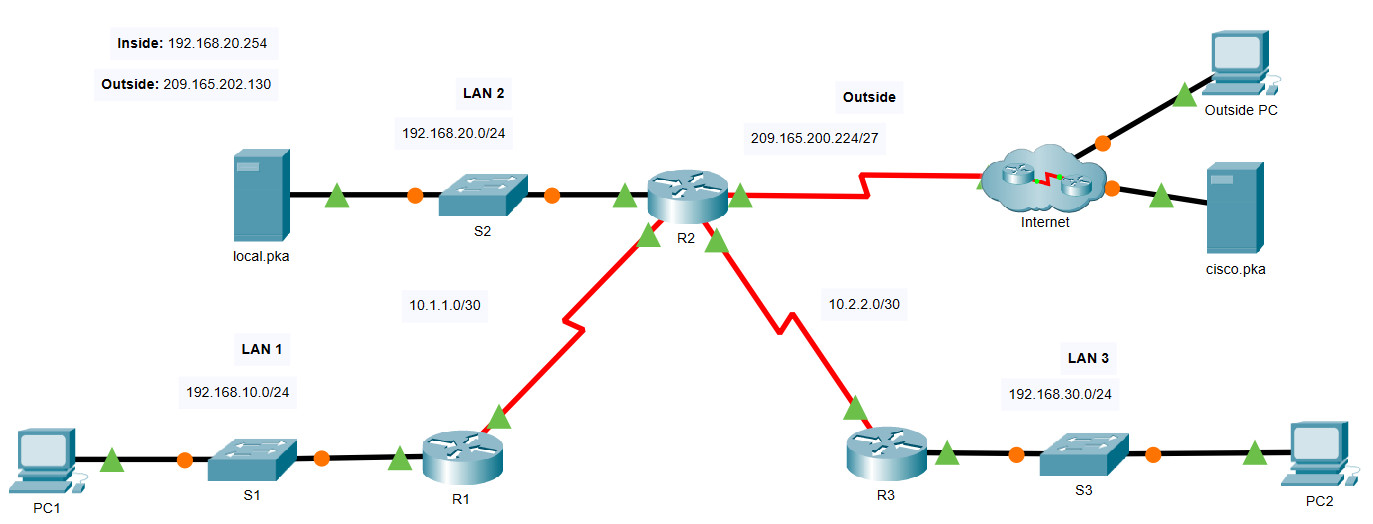
Addressing Table
| Device | Interface | IP Address |
|---|---|---|
| R1 | S0/0/0 | 10.1.1.1/30 |
| F0/0 | 192.168.10.1/24 | |
| R2 | S0/0/0 | 10.1.1.2/30 |
| S0/0/1 | 10.2.2.1/30 | |
| S0/1/0 | 209.165.200.225/27 | |
| F0/0 | 192.168.20.1/24 | |
| R3 | S0/0/1 | 10.2.2.2/30 |
| F0/0 | 192.168.30.1/24 | |
| PC1 | NIC | 192.168.10.10/24 |
| PC2 | NIC | 192.168.30.10/24 |
| local.pka | NIC | 192.168.20.254/24 |
| Outside PC | NIC | 209.165.201.14/28 |
| cisco.pka | NIC | 209.165.201.30/28 |
Objectives
- Configure Dynamic NAT with PAT
- Configure Static NAT
Background / Scenario
In this lab, you will configure a router with dynamic NAT with PAT. This will translate addresses from the three internal LANs to a single outside address. In addition, you will configure static NAT to translate an internal server address to an outside address.
Instructions
In this activity you will only configure router R2.
-
- Use a named ACL to permit the addresses from LAN1, LAN2, and LAN3 to be translated. Specify the LANs in this order. Use the name R2NAT. The name you use must match this name exactly.
R2(config)#ip access-list standard R2NAT
R2(config-std-nacl)#permit 192.168.10.0 0.0.0.255
R2(config-std-nacl)#permit 192.168.20.0 0.0.0.255
R2(config-std-nacl)#permit 192.168.30.0 0.0.0.255
-
- Create a NAT pool named R2POOL. The pool should use the first address from the 209.165.202.128/30 address space. The pool name you use must match this name exactly. All translated addresses must use this address as their outside address.
R2(config)#ip nat pool R2POOL 209.165.202.129 209.165.202.129 netmask 255.255.255.252
-
- Configure NAT with the ACL and NAT pool that you have created.
R2(config)#ip nat inside source list R2NAT pool R2POOL overload
-
- Configure static NAT to map the local.pka server inside address to the second address from the 209.165.202.128/30 address space.
R2(config)#ip nat inside source static 192.168.20.254 209.165.202.130
-
- Configure the interfaces that will participate in NAT.
R2(config)#interface FastEthernet0/0
R2(config-if)#ip nat inside
R2(config-if)#interface Serial0/0/0
R2(config-if)#ip nat inside
R2(config-if)#interface Serial0/0/1
R2(config-if)#ip nat inside
R2(config-if)#interface Serial0/1/0
R2(config-if)#ip nat outside
Device Configs - Final
Router R2
! ==============================================================
!--- 6.8.1 Packet Tracer - Configure NAT for IPv4
!--- ANSWER SCRIPT FOR ROUTER R2
!--- Usage: from the console (or CLI tab) on R2, enter privileged EXEC mode with "enable",
!--- then paste this whole file. Every line beginning with "!" is a comment; IOS ignores it.
!--- Per the lab's own instructions, R2 is the ONLY device configured in this activity - R1
!--- and R3 are already fully set up. R2 combines PAT (for general LAN1/LAN2/LAN3 outbound
!--- traffic, all sharing one outside address) with static NAT (for local.pka, so outside
!--- hosts can reach it at a fixed public address).
!---
!--- NOTE: the Addressing Table lists R2's LAN2 interface as "F0/0/0", but both the topology
!--- diagram and this lab's own Answer Configurations use "F0/0" (two-segment name) instead -
!--- the table row has an extra "/0". This script uses F0/0, matching the topology and the
!--- interface actually referenced everywhere else in the document.
! ==============================================================

enable
configure terminal

! --------------------------------------------------------------
!--- Named ACL R2NAT (case-sensitive, exact name required) - permits LAN1, LAN2, LAN3 in
!--- that specific order, per the lab's requirement.
! --------------------------------------------------------------
ip access-list standard R2NAT
 permit 192.168.10.0 0.0.0.255
 permit 192.168.20.0 0.0.0.255
 permit 192.168.30.0 0.0.0.255

! --------------------------------------------------------------
!--- NAT pool R2POOL (exact name required) - a single-address pool using only the FIRST
!--- usable address in 209.165.202.128/30 (.129); listing the same address as both start and
!--- end of the range is what makes it a 1-address pool.
! --------------------------------------------------------------
ip nat pool R2POOL 209.165.202.129 209.165.202.129 netmask 255.255.255.252

! --------------------------------------------------------------
!--- Bind R2NAT to R2POOL with "overload" - this is what makes it PAT: all three LANs'
!--- traffic shares that single pool address, distinguished by port number.
! --------------------------------------------------------------
ip nat inside source list R2NAT pool R2POOL overload

! --------------------------------------------------------------
!--- Static NAT for local.pka - maps its private address to the SECOND usable address in
!--- the same /30 (.130), a fixed 1-to-1 mapping so outside hosts can always reach it there.
! --------------------------------------------------------------
ip nat inside source static 192.168.20.254 209.165.202.130

! --------------------------------------------------------------
!--- Mark every LAN-facing/internal-facing interface "inside" (F0/0 to LAN2, S0/0/0 to R1/
!--- LAN1, S0/0/1 to R3/LAN3) and the internet-facing interface "outside".
! --------------------------------------------------------------
interface FastEthernet0/0
 ip nat inside
exit

interface Serial0/0/0
 ip nat inside
exit

interface Serial0/0/1
 ip nat inside
exit

interface Serial0/1/0
 ip nat outside

end

! ==============================================================
!--- Verification (from R2 and the hosts):
!---   R2# show ip nat translations -> a static entry for local.pka (192.168.20.254 <->
!---   209.165.202.130), plus dynamic/extended entries appearing for PC1/PC2/local.pka's
!---   own outbound traffic as it's generated, all sharing 209.165.202.129
!---   PC1, PC2, local.pka > browse to cisco.pka (209.165.201.30) -> all succeed, each shows
!---   up translated to 209.165.202.129 with a distinct port
!---   Outside PC > browse to 209.165.202.130 (local.pka's public address) -> succeeds
! ==============================================================


