
17.7.7 Packet Tracer - Troubleshoot Connectivity Issues - Physical Mode Answers
Topology
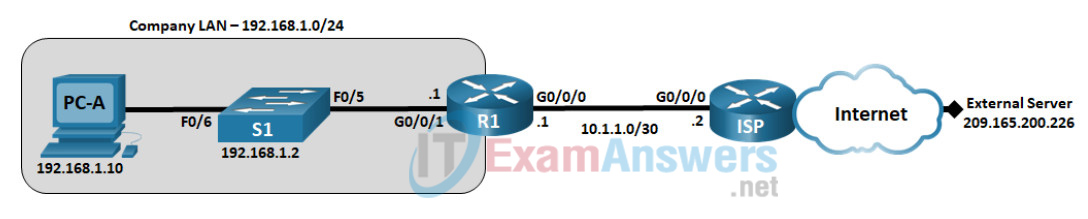
17.7.7 Packet Tracer - Troubleshoot Connectivity Issues - Physical Mode
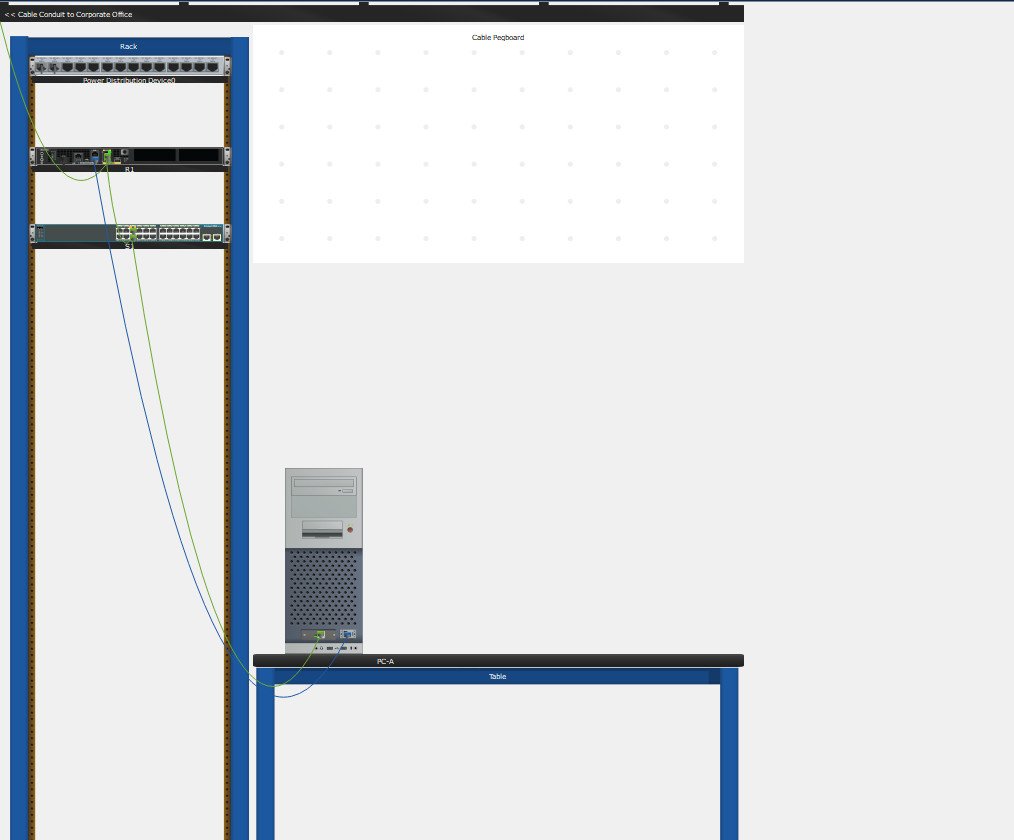
Addressing Table
| Device | Interface | IP Address | Subnet Mask | Default Gateway |
|---|---|---|---|---|
| R1 | G0/0/1 | 192.168.1.1 | 255.255.255.0 | N/A |
| G0/0/0 | 10.1.1.1 | 255.255.255.252 | N/A | |
| ISP | G0/0/0 | 10.1.1.2 | 255.255.255.252 | N/A |
| Lo0 | 209.165.200.226 | 255.255.255.255 | N/A | |
| S1 | VLAN 1 | 192.168.1.2 | 255.255.255.0 | 192.168.1.1 |
| PC-A | NIC | 192.168.1.10 | 255.255.255.0 | 192.168.1.1 |
Objectives
- Part 1: Identify the Problem
- Part 2: Implement Network Changes
- Part 3: Verify Full Functionality
- Part 4: Document Findings and Configuration Changes
Background / Scenario
In this Packet Tracer Physical Mode (PTPM) activity, the company that you work for is experiencing problems with their LAN. You have been asked to troubleshoot and resolve the network issues. In Part 1, you will connect to devices on the LAN and use troubleshooting tools to identify the network issues, establish a theory of probable cause, and test that theory. In Part 2, you will establish a plan of action to resolve and implement a solution. In Part 3, you will verify that full functionality has been restored. Part 4 provides space for you to document your troubleshooting findings along with the configuration changes that you made to the LAN devices.
Contents
- Part 1: Identify the Problem (Problems 1, 2, 3, 4, 5, 6)
- Part 2: Implement Network Changes (Fix 1, Fix 2, Fix 3, Fix 4, Fix 5, Fix 6)
- Part 3: Verify Full Functionality
- Part 4: Document Findings and Configuration Changes
- Device Configs - Final
Instructions
Part 1: Identify the Problem
The only available information about the network problem is that the users are experiencing slow response times and that they are not able to reach an external device on the internet at IP address 209.165.200.226. To determine probable cause(s) for these network issues, you will need to utilize network commands and tools on the LAN equipment.
Note: The username admin01 with a password of cisco12345 will be required to log on to the network equipment.
Step 1: Troubleshoot the network.
Use the tools available to you to troubleshoot the network, keeping in mind that the requirement is to restore connectivity to the external server and eliminate slow response times.
How to reach the devices
Open the console (CLI) of S1 and R1. In this Packet Tracer file the console opens at the user EXEC prompt (S1>, R1>) and enable needs no password; use username admin01 and password cisco12345 if a login is requested. Start on PC-A, then follow the path of the traffic: PC-A > S1 > R1 > ISP.
Problem 1: PC-A has no default gateway
C:\> ipconfig

FastEthernet0 Connection:(default port)

   Connection-specific DNS Suffix..:
   Link-local IPv6 Address.........: FE80::209:7CFF:FEC6:DE60
   IPv6 Address....................: ::
   IPv4 Address....................: 192.168.1.10
   Subnet Mask.....................: 255.255.255.0
   Default Gateway.................: ::
0.0.0.0C:\> ping 192.168.1.1
Pinging 192.168.1.1 with 32 bytes of data:
Reply from 192.168.1.1: bytes=32 time=1ms TTL=255
Reply from 192.168.1.1: bytes=32 time<1ms TTL=255
Reply from 192.168.1.1: bytes=32 time<1ms TTL=255
Reply from 192.168.1.1: bytes=32 time<1ms TTL=255
Ping statistics for 192.168.1.1:
Packets: Sent = 4, Received = 4, Lost = 0 (0% loss),
Approximate round trip times in milli-seconds:
Minimum = 0ms, Maximum = 1ms, Average = 0msC:\> ping 209.165.200.226
Pinging 209.165.200.226 with 32 bytes of data:
Request timed out.
Request timed out.
Request timed out.
Request timed out.
Ping statistics for 209.165.200.226:
Packets: Sent = 4, Received = 0, Lost = 4 (100% loss),Problem 2: S1 F0/5 is forced to 10 Mbps half duplex
S1# show interfaces fastethernet 0/5
FastEthernet0/5 is up, line protocol is up (connected)
  Hardware is Lance, address is 0001.97a7.3605 (bia 0001.97a7.3605)
 BW 10000 Kbit, DLY 100 usec,
     reliability 255/255, txload 1/255, rxload 1/255
  Encapsulation ARPA, loopback not set
  Keepalive set (10 sec)
  Half-duplex, 10Mb/s
  input flow-control is off, output flow-control is off
  ARP type: ARPA, ARP Timeout 00:04:00
  Last input 00:00:08, output 00:00:05, output hang never
  Last clearing of "show interface" counters never
  Input queue: 0/75/0/0 (size/max/drops/flushes); Total output drops: 0
  Queueing strategy: fifo
  Output queue :0/40 (size/max)
  5 minute input rate 0 bits/sec, 0 packets/sec
  5 minute output rate 0 bits/sec, 0 packets/sec
     956 packets input, 193351 bytes, 0 no buffer
     Received 956 broadcasts, 0 runts, 0 giants, 0 throttles
     0 input errors, 0 CRC, 0 frame, 0 overrun, 0 ignored, 0 abort
     0 watchdog, 0 multicast, 0 pause input
     0 input packets with dribble condition detected
     2357 packets output, 263570 bytes, 0 underruns
     0 output errors, 0 collisions, 10 interface resets
     0 babbles, 0 late collision, 0 deferred
     0 lost carrier, 0 no carrier
0 output buffer failures, 0 output buffers swapped outProblem 3: S1 has the wrong default gateway
S1# show running-config | include default-gateway
ip default-gateway 192.168.1.0Problem 4: R1 G0/0/1 has wrong bandwidth, speed and duplex
R1# show interfaces gigabitethernet 0/0/1
GigabitEthernet0/0/1 is up, line protocol is up (connected)
  Hardware is Lance, address is 000a.4120.b202 (bia 000a.4120.b202)
  Internet address is 192.168.1.1/24
  MTU 1500 bytes, BW 10000 Kbit, DLY 10 usec,
     reliability 255/255, txload 1/255, rxload 1/255
  Encapsulation ARPA, loopback not set
  Half Duplex, 10Mbps, link type is auto, media type is RJ45
  ARP type: ARPA, ARP Timeout 04:00:00,
  Last input 00:00:08, output 00:00:05, output hang never
  Last clearing of "show interface" counters never
  Input queue: 0/75/0 (size/max/drops); Total output drops: 0
  Queueing strategy: fifo
  Output queue :0/40 (size/max)
  5 minute input rate 13 bits/sec, 0 packets/sec
  5 minute output rate 13 bits/sec, 0 packets/sec
     4 packets input, 512 bytes, 0 no buffer
     Received 0 broadcasts, 0 runts, 0 giants, 0 throttles
     0 input errors, 0 CRC, 0 frame, 0 overrun, 0 ignored, 0 abort
     0 input packets with dribble condition detected
     4 packets output, 512 bytes, 0 underruns
     0 output errors, 0 collisions, 1 interface resets
     0 babbles, 0 late collision, 0 deferred
     0 lost carrier, 0 no carrier
     0 output buffer failures, 0 output buffers swapped out
Problem 5: R1 has no gateway of last resort
R1# show ip route
Codes: L - local, C - connected, S - static, R - RIP, M - mobile, B - BGP
       D - EIGRP, EX - EIGRP external, O - OSPF, IA - OSPF inter area
       N1 - OSPF NSSA external type 1, N2 - OSPF NSSA external type 2
       E1 - OSPF external type 1, E2 - OSPF external type 2, E - EGP
       i - IS-IS, L1 - IS-IS level-1, L2 - IS-IS level-2, ia - IS-IS inter area
       * - candidate default, U - per-user static route, o - ODR
       P - periodic downloaded static route

Gateway of last resort is not set

     10.0.0.0/8 is variably subnetted, 2 subnets, 2 masks
C       10.1.1.0/30 is directly connected, GigabitEthernet0/0/0
L       10.1.1.1/32 is directly connected, GigabitEthernet0/0/0
     192.168.1.0/24 is variably subnetted, 2 subnets, 2 masks
C       192.168.1.0/24 is directly connected, GigabitEthernet0/0/1
L 192.168.1.1/32 is directly connected, GigabitEthernet0/0/1R1# ping 209.165.200.226
Type escape sequence to abort.
Sending 5, 100-byte ICMP Echos to 209.165.200.226, timeout is 2 seconds:
.....
Success rate is 0 percent (0/5)Problem 6: S1 VLAN 1 is administratively down
S1 cannot reach even its own gateway:
S1# ping 192.168.1.1

Type escape sequence to abort.
Sending 5, 100-byte ICMP Echos to 192.168.1.1, timeout is 2 seconds:
.....
Success rate is 0 percent (0/5)S1# show ip interface brief
Interface IP-Address OK? Method Status Protocol
FastEthernet0/1 unassigned YES manual administratively down down
FastEthernet0/2 unassigned YES manual administratively down down
FastEthernet0/3 unassigned YES manual administratively down down
FastEthernet0/4 unassigned YES manual administratively down down
FastEthernet0/5 unassigned YES manual up up
FastEthernet0/6 unassigned YES manual up up
FastEthernet0/7 unassigned YES manual down down
FastEthernet0/8 unassigned YES manual down down
FastEthernet0/9 unassigned YES manual down down
FastEthernet0/10 unassigned YES manual down down
FastEthernet0/11 unassigned YES manual down down
FastEthernet0/12 unassigned YES manual down down
FastEthernet0/13 unassigned YES manual down down
FastEthernet0/14 unassigned YES manual down down
FastEthernet0/15 unassigned YES manual down down
FastEthernet0/16 unassigned YES manual down down
FastEthernet0/17 unassigned YES manual down down
FastEthernet0/18 unassigned YES manual down down
FastEthernet0/19 unassigned YES manual down down
FastEthernet0/20 unassigned YES manual down down
FastEthernet0/21 unassigned YES manual down down
FastEthernet0/22 unassigned YES manual down down
FastEthernet0/23 unassigned YES manual down down
FastEthernet0/24 unassigned YES manual down down
GigabitEthernet0/1 unassigned YES manual down down
GigabitEthernet0/2 unassigned YES manual down down
Vlan1 192.168.1.2 YES manual administratively down downStep 2: Document the probable causes.
List the probable causes for the network problems that employees are experiencing.
- The Default Gateway is not set on the PC. (evidence | fix)
- S1 Interface F0/5 is set to half duplex and speed set to 10. (evidence | fix)
- S1 default-gateway is set to 192.168.1.0. (evidence | fix)
- R1 G0/0/1 is set to half duplex, the speed is set to 10, and the bandwidth is set to 10000 kb/s. (evidence | fix)
- The gateway of last resort is not set on R1. (evidence | fix)
- S1 interface VLAN 1 is administratively down. (evidence | fix)
Part 2: Implement Network Changes
You have communicated the problems that you discovered in Part 1 to your supervisor. She has approved these changes and has requested that you implement them.
Note: Fix 2 and Fix 4 change the two ends of the same link (S1 F0/5 and R1 G0/0/1). Both ends must use the same speed and duplex; while only one end is changed, the speeds do not match and the link can stay down. Apply Fix 4 right after Fix 2 and verify the link after both.
Fix 1: On PC-A, click Desktop > IP Configuration and set the Default Gateway to 192.168.1.1.
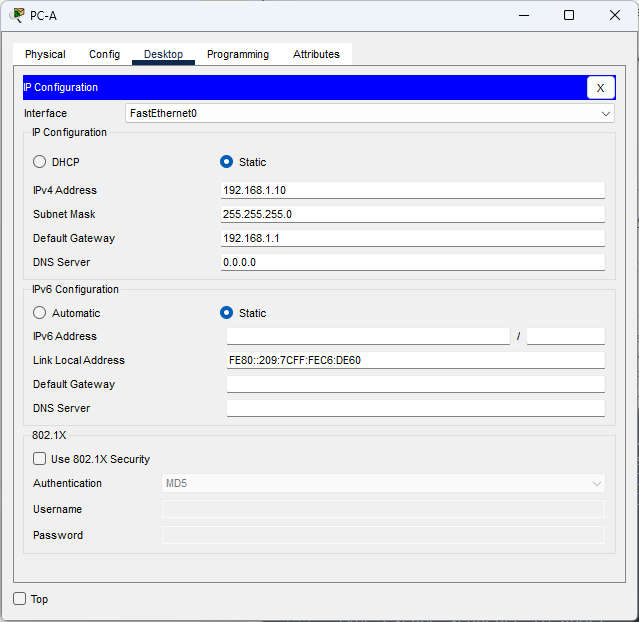
C:\> ipconfig

FastEthernet0 Connection:(default port)

   Connection-specific DNS Suffix..:
   Link-local IPv6 Address.........: FE80::209:7CFF:FEC6:DE60
   IPv6 Address....................: ::
   IPv4 Address....................: 192.168.1.10
   Subnet Mask.....................: 255.255.255.0
   Default Gateway.................: ::
                                     192.168.1.1
Fix 2: S1 F0/5: set 100 Mbps full duplex.
S1(config)# interface fastethernet 0/5
S1(config-if)# speed 100
S1(config-if)# duplex full
Fix 3: S1: correct the default gateway.
S1(config)# ip default-gateway 192.168.1.1
S1# show running-config | include default-gateway
ip default-gateway 192.168.1.1
Fix 4: R1 G0/0/1: remove the bandwidth statement and set 100 Mbps full duplex.
R1(config)# interface gigabitethernet 0/0/1
R1(config-if)# no bandwidth
R1(config-if)# speed 100
R1(config-if)# duplex full
R1# show interfaces gigabitethernet 0/0/1
GigabitEthernet0/0/1 is up, line protocol is up (connected)
  Hardware is Lance, address is 000a.4120.b202 (bia 000a.4120.b202)
  Internet address is 192.168.1.1/24
  MTU 1500 bytes, BW 10000 Kbit, DLY 100 usec,
     reliability 255/255, txload 1/255, rxload 1/255
  Encapsulation ARPA, loopback not set
  Full Duplex, 100Mbps, link type is auto, media type is RJ45
  ARP type: ARPA, ARP Timeout 04:00:00,
  Last input 00:00:08, output 00:00:05, output hang never
  Last clearing of "show interface" counters never
  Input queue: 0/75/0 (size/max/drops); Total output drops: 0
  Queueing strategy: fifo
  Output queue :0/40 (size/max)
  5 minute input rate 0 bits/sec, 0 packets/sec
  5 minute output rate 0 bits/sec, 0 packets/sec
     4 packets input, 512 bytes, 0 no buffer
     Received 0 broadcasts, 0 runts, 0 giants, 0 throttles
     0 input errors, 0 CRC, 0 frame, 0 overrun, 0 ignored, 0 abort
     0 input packets with dribble condition detected
     4 packets output, 512 bytes, 0 underruns
     0 output errors, 0 collisions, 1 interface resets
     0 babbles, 0 late collision, 0 deferred
     0 lost carrier, 0 no carrier
     0 output buffer failures, 0 output buffers swapped out
S1# show interfaces fastethernet 0/5
FastEthernet0/5 is up, line protocol is up (connected)
  Hardware is Lance, address is 0001.97a7.3605 (bia 0001.97a7.3605)
 BW 10000 Kbit, DLY 100 usec,
     reliability 255/255, txload 1/255, rxload 1/255
  Encapsulation ARPA, loopback not set
  Keepalive set (10 sec)
  Full-duplex, 100Mb/s
  input flow-control is off, output flow-control is off
  ARP type: ARPA, ARP Timeout 00:04:00
  Last input 00:00:08, output 00:00:05, output hang never
  Last clearing of "show interface" counters never
  Input queue: 0/75/0/0 (size/max/drops/flushes); Total output drops: 0
  Queueing strategy: fifo
  Output queue :0/40 (size/max)
  5 minute input rate 0 bits/sec, 0 packets/sec
  5 minute output rate 0 bits/sec, 0 packets/sec
     956 packets input, 193351 bytes, 0 no buffer
     Received 956 broadcasts, 0 runts, 0 giants, 0 throttles
     0 input errors, 0 CRC, 0 frame, 0 overrun, 0 ignored, 0 abort
     0 watchdog, 0 multicast, 0 pause input
     0 input packets with dribble condition detected
     2357 packets output, 263570 bytes, 0 underruns
     0 output errors, 0 collisions, 10 interface resets
     0 babbles, 0 late collision, 0 deferred
     0 lost carrier, 0 no carrier
0 output buffer failures, 0 output buffers swapped outR1# show running-config | include bandwidth R1#
Fix 5: R1: add a default route to the ISP.
R1(config)# ip route 0.0.0.0 0.0.0.0 10.1.1.2
R1# show ip route
Codes: L - local, C - connected, S - static, R - RIP, M - mobile, B - BGP
       D - EIGRP, EX - EIGRP external, O - OSPF, IA - OSPF inter area
       N1 - OSPF NSSA external type 1, N2 - OSPF NSSA external type 2
       E1 - OSPF external type 1, E2 - OSPF external type 2, E - EGP
       i - IS-IS, L1 - IS-IS level-1, L2 - IS-IS level-2, ia - IS-IS inter area
       * - candidate default, U - per-user static route, o - ODR
       P - periodic downloaded static route

Gateway of last resort is 10.1.1.2 to network 0.0.0.0

     10.0.0.0/8 is variably subnetted, 2 subnets, 2 masks
C       10.1.1.0/30 is directly connected, GigabitEthernet0/0/0
L       10.1.1.1/32 is directly connected, GigabitEthernet0/0/0
     192.168.1.0/24 is variably subnetted, 2 subnets, 2 masks
C       192.168.1.0/24 is directly connected, GigabitEthernet0/0/1
L       192.168.1.1/32 is directly connected, GigabitEthernet0/0/1
S* 0.0.0.0/0 [1/0] via 10.1.1.2Fix 6: S1: enable the VLAN 1 interface.
S1(config)# interface vlan 1
S1(config-if)# no shutdown
S1# show ip interface brief
Interface              IP-Address      OK? Method Status                Protocol
FastEthernet0/1        unassigned      YES manual administratively down down
FastEthernet0/2        unassigned      YES manual administratively down down
FastEthernet0/3        unassigned      YES manual administratively down down
FastEthernet0/4        unassigned      YES manual administratively down down
FastEthernet0/5        unassigned      YES manual up                    up
FastEthernet0/6        unassigned      YES manual up                    up
FastEthernet0/7        unassigned      YES manual down                  down
FastEthernet0/8        unassigned      YES manual down                  down
FastEthernet0/9        unassigned      YES manual down                  down
FastEthernet0/10       unassigned      YES manual down                  down
FastEthernet0/11       unassigned      YES manual down                  down
FastEthernet0/12       unassigned      YES manual down                  down
FastEthernet0/13       unassigned      YES manual down                  down
FastEthernet0/14       unassigned      YES manual down                  down
FastEthernet0/15       unassigned      YES manual down                  down
FastEthernet0/16       unassigned      YES manual down                  down
FastEthernet0/17       unassigned      YES manual down                  down
FastEthernet0/18       unassigned      YES manual down                  down
FastEthernet0/19       unassigned      YES manual down                  down
FastEthernet0/20       unassigned      YES manual down                  down
FastEthernet0/21       unassigned      YES manual down                  down
FastEthernet0/22       unassigned      YES manual down                  down
FastEthernet0/23       unassigned      YES manual down                  down
FastEthernet0/24       unassigned      YES manual down                  down
GigabitEthernet0/1     unassigned      YES manual down                  down
GigabitEthernet0/2     unassigned      YES manual down                  down
Vlan1 192.168.1.2 YES manual up upS1# ping 192.168.1.1
Type escape sequence to abort.
Sending 5, 100-byte ICMP Echos to 192.168.1.1, timeout is 2 seconds:
.!!!!
Success rate is 80 percent (4/5), round-trip min/avg/max = 0/0/1 msPart 3: Verify Full Functionality
Verify that full functionality has been restored. PC-A, S1, and R1 should be able to reach the external server, and ping replies from PC-A to the external server should exhibit no significant variation in response times.
Compare the response times of PC-A to its gateway before and after the fixes:
C:\> ping 192.168.1.1

Pinging 192.168.1.1 with 32 bytes of data:

Reply from 192.168.1.1: bytes=32 time=6ms TTL=255
Reply from 192.168.1.1: bytes=32 time<1ms TTL=255
Reply from 192.168.1.1: bytes=32 time<1ms TTL=255
Reply from 192.168.1.1: bytes=32 time<1ms TTL=255

Ping statistics for 192.168.1.1:
    Packets: Sent = 4, Received = 4, Lost = 0 (0% loss),
Approximate round trip times in milli-seconds:
Minimum = 0ms, Maximum = 6ms, Average = 1msPart 4: Document Findings and Configuration Changes
Use the space provided below to document the issues found during your troubleshooting and the configuration changes made to resolve those issues.
Documentation will vary but should include the date when troubleshooting was conducted, devices that were tested, commands used along with the output generated by those commands, issues found, and configuration changes made to resolve those issues.
Issues Found and Solutions
| # | Device | Issue | Command that reveals it | Solution |
|---|---|---|---|---|
| 1 | PC-A | No default gateway configured | PC-A: ipconfig |
Set the default gateway to 192.168.1.1 |
| 2 | S1 F0/5 | Forced to 10 Mbps half duplex: collisions and slow response times | S1: show interfaces fastethernet 0/5 |
Set speed 100 and duplex full |
| 3 | S1 | Default gateway set to 192.168.1.0 (the network address, not a host) | S1: show running-config | include default-gateway |
Change it to 192.168.1.1 |
| 4 | R1 G0/0/1 | Configured with bandwidth 10000, speed 10 and half duplex: the S1-R1 link runs at only 10 Mb/s half duplex | R1: show interfaces gigabitethernet 0/0/1 |
Remove the bandwidth statement (no bandwidth), then set speed 100 and duplex full |
| 5 | R1 | No gateway of last resort: no route to the internet (209.165.200.226) | R1: show ip route |
Add a default route: ip route 0.0.0.0 0.0.0.0 10.1.1.2 |
| 6 | S1 VLAN 1 | The SVI is administratively down: S1 cannot ping any device | S1: show ip interface brief |
interface vlan 1, no shutdown |
Reflection Question
This Packet Tracer Lab Companion had you troubleshoot all devices before making any changes. Is there another way to apply the troubleshooting methodology?
Answers may vary. Another way the troubleshooting methodology could be applied would be to complete all 6 steps on a device before moving on to another device. For example, after you determined that the default gateway was not set on the PC, you would add the default gateway setting and verify functionality. If network issues still exist, you would then move on to the next device, S1 in this example. When the troubleshooting process had been completed on S1 and issues still existed, you would then move on to R1. This process would continue until full network functionality was achieved.
Device Configs - Final
ROUTER R1
! ==============================================================
!--- 17.7.7 Packet Tracer - Troubleshoot Connectivity Issues - Physical Mode
!--- FIX SCRIPT FOR ROUTER R1
!--- Usage: open the R1 console (no login is required; R1 has no enable password) and paste this file at the R1> prompt. This is a troubleshooting activity: the script contains only the fixes for R1. Every line beginning with "!" is a comment; IOS ignores it.
! ==============================================================

enable
configure terminal

! --------------------------------------------------------------
!--- Part 2: Implement Network Changes.
! --------------------------------------------------------------

!--- Probable cause 4: G0/0/1 (LAN side) is configured with "bandwidth 10000", "duplex half" and "speed 10". Remove the bandwidth statement (it lowers the bandwidth/delay values used by the router), then set 100 Mbps full duplex to match S1 F0/5.
interface gigabitethernet 0/0/1
 no bandwidth
 speed 100
 duplex full
 exit

!--- Probable cause 5: R1 has no gateway of last resort. Add a default route to the ISP router (next hop 10.1.1.2) so traffic can reach 209.165.200.226.
ip route 0.0.0.0 0.0.0.0 10.1.1.2

end

! --------------------------------------------------------------
!--- Save the configuration to NVRAM. (Press Enter when prompted for the destination filename.)
! --------------------------------------------------------------
copy running-config startup-config


! ==============================================================
!--- Verification:
!---   show interfaces gigabitethernet 0/0/1  -> Full Duplex, 100Mbps
!---   show running-config | include bandwidth  -> no output (the bandwidth statement is removed)
!--- Note: Packet Tracer may still display "BW 10000 Kbit" after the change; the running-config is the proof.
!---   show ip route                          -> Gateway of last resort is 10.1.1.2 to network 0.0.0.0
!---   ping 209.165.200.226                   -> !!!!!
! ==============================================================
SWITCH S1
! ==============================================================
!--- 17.7.7 Packet Tracer - Troubleshoot Connectivity Issues - Physical Mode
!--- FIX SCRIPT FOR SWITCH S1
!--- Usage: open the S1 console (no login is required; S1 has no enable password) and paste this file at the S1> prompt. This is a troubleshooting activity: the script contains only the fixes for S1. Every line beginning with "!" is a comment; IOS ignores it.
! ==============================================================

enable
configure terminal

! --------------------------------------------------------------
!--- Part 2: Implement Network Changes.
! --------------------------------------------------------------

!--- Probable cause 2: F0/5 (uplink to R1) is forced to 10 Mbps half duplex. Set 100 Mbps full duplex to match R1 G0/0/1.
interface fastethernet 0/5
 speed 100
 duplex full
 exit

!--- Probable cause 3: the default gateway is 192.168.1.0 (the network address). Set it to R1 G0/0/1, 192.168.1.1; the new value replaces the old one.
ip default-gateway 192.168.1.1

!--- VLAN 1 (192.168.1.2) is administratively down, so S1 cannot reach any device. Enable it.
interface vlan 1
 no shutdown
 exit

end

! --------------------------------------------------------------
!--- Save the configuration to NVRAM. (Press Enter when prompted for the destination filename.)
! --------------------------------------------------------------
copy running-config startup-config


! ==============================================================
!--- Verification:
!---   show interfaces fastethernet 0/5  -> Full-duplex, 100Mb/s
!---   show ip interface brief           -> Vlan1 192.168.1.2 up/up
!---   show running-config | include default-gateway  -> ip default-gateway 192.168.1.1
!---   ping 209.165.200.226              -> !!!!!
! ==============================================================
PC-A
Download Packet Tracer (.pka) file:


