
6.8.1 Packet Tracer - Configure NAT for IPv4 Answers
Topology
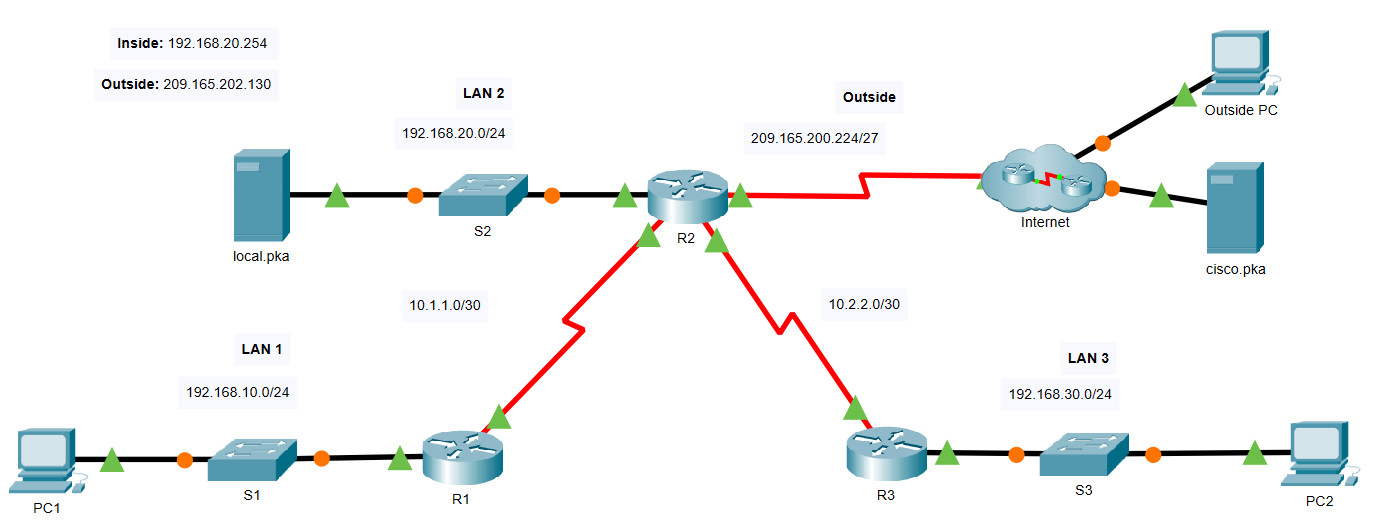
Addressing Table
| Device | Interface | IP Address |
|---|---|---|
| R1 | S0/0/0 | 10.1.1.1/30 |
| F0/0 | 192.168.10.1/24 | |
| R2 | S0/0/0 | 10.1.1.2/30 |
| S0/0/1 | 10.2.2.1/30 | |
| S0/1/0 | 209.165.200.225/27 | |
| F0/0 | 192.168.20.1/24 | |
| R3 | S0/0/1 | 10.2.2.2/30 |
| F0/0 | 192.168.30.1/24 | |
| PC1 | NIC | 192.168.10.10/24 |
| PC2 | NIC | 192.168.30.10/24 |
| local.pka | NIC | 192.168.20.254/24 |
| Outside PC | NIC | 209.165.201.14/28 |
| cisco.pka | NIC | 209.165.201.30/28 |
Objectives
- Configure Dynamic NAT with PAT
- Configure Static NAT
Background / Scenario
In this lab, you will configure a router with dynamic NAT with PAT. This will translate addresses from the three internal LANs to a single outside address. In addition, you will configure static NAT to translate an internal server address to an outside address.
Instructions
In this activity you will only configure router R2.
- Use a named ACL to permit the addresses from LAN1, LAN2, and LAN3 to be translated. Specify the LANs in this order. Use the name R2NAT. The name you use must match this name exactly.
R2(config)# ip access-list standard R2NAT
R2(config-std-nacl)# permit 192.168.10.0 0.0.0.255
R2(config-std-nacl)# permit 192.168.20.0 0.0.0.255
R2(config-std-nacl)# permit 192.168.30.0 0.0.0.255
- Create a NAT pool named R2POOL. The pool should use the first address from the 209.165.202.128/30 address space. The pool name you use must match this name exactly. All translated addresses must use this address as their outside address.
R2(config)# ip nat pool R2POOL 209.165.202.129 209.165.202.129 netmask 255.255.255.252
- Configure NAT with the ACL and NAT pool that you have created.
R2(config)# ip nat inside source list R2NAT pool R2POOL overload
- Configure static NAT to map the local.pka server inside address to the second address from the 209.165.202.128/30 address space.
R2(config)# ip nat inside source static 192.168.20.254 209.165.202.130
- Configure the interfaces that will participate in NAT.
R2(config)# interface fastethernet 0/0
R2(config-if)# ip nat inside
R2(config-if)# interface serial 0/0/0
R2(config-if)# ip nat inside
R2(config-if)# interface serial 0/0/1
R2(config-if)# ip nat inside
R2(config-if)# interface serial 0/1/0
R2(config-if)# ip nat outside
Verify NAT
Browse to cisco.pka (209.165.201.30) from PC1 and PC2, and to 209.165.202.130 from Outside PC. Then verify NAT on R2.
R2# show ip nat translations
Pro  Inside global     Inside local       Outside local      Outside global
---  209.165.202.130   192.168.20.254     ---                ---
tcp 209.165.202.129:1024192.168.30.10:1025 209.165.201.30:80  209.165.201.30:80
tcp 209.165.202.129:1025192.168.10.10:1025 209.165.201.30:80  209.165.201.30:80
tcp 209.165.202.130:80 192.168.20.254:80  209.165.201.14:1025209.165.201.14:1025
R2# show ip nat statistics
Total translations: 4 (1 static, 3 dynamic, 3 extended)
Outside Interfaces: Serial0/1/0
Inside Interfaces: FastEthernet0/0 , Serial0/0/0 , Serial0/0/1
Hits: 22  Misses: 3
Expired translations: 0
Dynamic mappings:
-- Inside Source
access-list R2NAT pool R2POOL refCount 2
 pool R2POOL: netmask 255.255.255.252
       start 209.165.202.129 end 209.165.202.129
       type generic, total addresses 1 , allocated 1 (100%), misses 0
Device Configs - Final
ROUTER R2
! ==============================================================
!--- 6.8.1 Packet Tracer - Configure NAT for IPv4
!--- ANSWER SCRIPT FOR ROUTER R2
!--- Usage: open the R2 CLI tab and paste this whole file at the R2> prompt. Every line beginning with "!" is a comment; IOS ignores it, so pasting a comment by accident is harmless.
! ==============================================================

enable
configure terminal

! --------------------------------------------------------------
!--- Instructions: configure dynamic NAT with PAT and static NAT on R2.
! --------------------------------------------------------------

!--- Named ACL R2NAT permits LAN1, LAN2 and LAN3, in this order.
ip access-list standard R2NAT
 permit 192.168.10.0 0.0.0.255
 permit 192.168.20.0 0.0.0.255
 permit 192.168.30.0 0.0.0.255
 exit

!--- NAT pool R2POOL with the first address of 209.165.202.128/30.
ip nat pool R2POOL 209.165.202.129 209.165.202.129 netmask 255.255.255.252

!--- NAT with ACL R2NAT and pool R2POOL; overload lets all hosts share the one address (PAT).
ip nat inside source list R2NAT pool R2POOL overload

!--- Static NAT: local.pka 192.168.20.254 to the second address 209.165.202.130.
ip nat inside source static 192.168.20.254 209.165.202.130

!--- Interfaces that participate in NAT: F0/0, S0/0/0 and S0/0/1 inside; S0/1/0 outside.
interface fastethernet 0/0
 ip nat inside
 exit
interface serial 0/0/0
 ip nat inside
 exit
interface serial 0/0/1
 ip nat inside
 exit
interface serial 0/1/0
 ip nat outside
 exit

end

! --------------------------------------------------------------
!--- Save the configuration to NVRAM. (Press Enter when prompted for the destination filename.)
! --------------------------------------------------------------
copy running-config startup-config


! ==============================================================
!--- Verification:
!---   browse to cisco.pka (209.165.201.30) from PC1 and PC2   -> web page opens
!---   browse to 209.165.202.130 from Outside PC              -> local.pka web page opens
!---   show ip nat translations  -> static 209.165.202.130 = 192.168.20.254; PAT entries use 209.165.202.129
! ==============================================================


