
2.9.1 Packet Tracer - Basic Switch and End Device Configuration Instructor Version
Topology Isomorphs
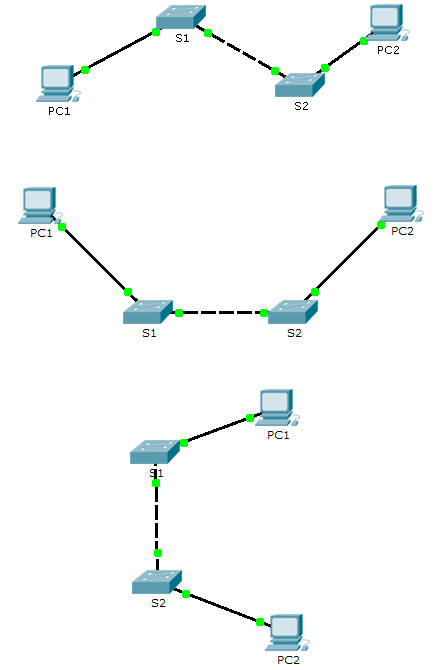
Addressing Table
Scenario 1
| Device | Interface | Address | Subnet Mask |
|---|---|---|---|
| Class-A | VLAN 1 | 128.107.20.10 | 255.255.255.0 |
| Class-B | VLAN 1 | 128.107.20.15 | 255.255.255.0 |
| Student-1 | NIC | 128.107.20.25 | 255.255.255.0 |
| Student-2 | NIC | 128.107.20.30 | 255.255.255.0 |
Objectives
- Configure hostnames and IP addresses on two Cisco Internetwork Operating System (IOS) switches using the command-line interface (CLI).
- Use Cisco IOS commands to specify or limit access to the device configurations.
- Use IOS commands to save the running configuration.
- Configure two host devices with IP addresses.
- Verify connectivity between the two PC end devices.
Scenario
As a recently hired LAN technician, your network manager has asked you to demonstrate your ability to configure a small LAN. Your tasks include configuring initial settings on two switches using the Cisco IOS and configuring IP address parameters on host devices to provide end-to-end connectivity. You are to use two switches and two hosts/PCs on a cabled and powered network.
Instructions
Configure the devices to fulfill the requirements below.
Requirements
- Use a console connection to access each switch.
- Name Class-A and Class-B switches.
Switch(config)# hostname Class-A
Switch(config)# hostname Class-B
- Use the R4Xe3 password for all lines.
Class-A(config)# line console 0
Class-A(config-line)# password R4Xe3
Class-A(config-line)# login
Class-A(config)# line vty 0 15
Class-A(config-line)# password R4Xe3
Class-A(config-line)# login
Class-B(config)# line console 0
Class-B(config-line)# password R4Xe3
Class-B(config-line)# login
Class-B(config)# line vty 0 15
Class-B(config-line)# password R4Xe3
Class-B(config-line)# login
- Use the C4aJa secret password.
Class-A(config)# enable secret C4aJa
Class-B(config)# enable secret C4aJa
- Encrypt all clear text passwords.
Class-A(config)# service password-encryption
Class-B(config)# service password-encryption
- Configure an appropriate message-of-the-day (MOTD) banner.
Class-A(config)# banner motd #Unauthorized access to this device is prohibited!#
Class-B(config)# banner motd #Unauthorized access to this device is prohibited!#
- Configure addressing for all devices according to the Addressing Table.
Class-A(config)# interface vlan 1
Class-A(config-if)# ip address 128.107.20.10 255.255.255.0
Class-A(config-if)# no shutdown
Class-B(config)# interface vlan 1
Class-B(config-if)# ip address 128.107.20.15 255.255.255.0
Class-B(config-if)# no shutdown
- Save your configurations.
Class-A# copy running-config startup-config
Class-B# copy running-config startup-config
- Verify connectivity between all devices.
C:\> ping 128.107.20.10
C:\> ping 128.107.20.15
C:\> ping 128.107.20.30
Note: Click Check Results to see your progress. Click Reset Activity to generate a new set of requirements. If you click on this before you complete the activity, all configurations will be lost.
Device Configs - Final
SWITCH Class-A
! ==============================================================
!--- 2.9.1 Packet Tracer - Basic Switch and End Device Configuration
!--- ANSWER SCRIPT FOR SWITCH Class-A (Activity ID 0001 - values in red change with each ID)
!--- Usage: copy this whole file and paste it into the Class-A terminal (start at the Switch> prompt). Every line beginning with "!" is a comment; IOS ignores it, so pasting a comment by accident is harmless.
! ==============================================================

enable
configure terminal

! --------------------------------------------------------------
!--- Requirements: Configure the switch.
! --------------------------------------------------------------

!--- Name the switch Class-A.
hostname Class-A

!--- Use the C4aJa secret password.
enable secret C4aJa

!--- Use the R4Xe3 password for the console line.
line console 0
 password R4Xe3
 login
 exit

!--- Use the R4Xe3 password for all vty lines (0 - 15).
line vty 0 15
 password R4Xe3
 login
 exit

!--- Encrypt all clear text passwords.
service password-encryption

!--- Configure an appropriate message-of-the-day (MOTD) banner.
banner motd #Unauthorized access to this device is prohibited!#

!--- Configure addressing according to the Addressing Table.
interface vlan 1
 ip address 128.107.20.10 255.255.255.0
 no shutdown
 exit

end

! --------------------------------------------------------------
!--- Save your configurations. (Press Enter when prompted for the destination filename.)
! --------------------------------------------------------------
copy running-config startup-config


! ==============================================================
!--- Verification:
!---   show ip interface brief  -> VLAN 1 up/up with its IP address
!---   show running-config      -> hostname, encrypted passwords, banner
!---   ping 128.107.20.25       -> reach Student-1
!---   ping 128.107.20.30       -> reach Student-2
!--- Note: "all lines" includes vty 5 - 15. Configuring only line vty 0 4
!--- can leave the password items incomplete in Check Results.
! ==============================================================
SWITCH Class-B
! ==============================================================
!--- 2.9.1 Packet Tracer - Basic Switch and End Device Configuration
!--- ANSWER SCRIPT FOR SWITCH Class-B (Activity ID 0001 - values in red change with each ID)
!--- Usage: copy this whole file and paste it into the Class-B terminal (start at the Switch> prompt). Every line beginning with "!" is a comment; IOS ignores it, so pasting a comment by accident is harmless.
! ==============================================================

enable
configure terminal

! --------------------------------------------------------------
!--- Requirements: Configure the switch.
! --------------------------------------------------------------

!--- Name the switch Class-B.
hostname Class-B

!--- Use the C4aJa secret password.
enable secret C4aJa

!--- Use the R4Xe3 password for the console line.
line console 0
 password R4Xe3
 login
 exit

!--- Use the R4Xe3 password for all vty lines (0 - 15).
line vty 0 15
 password R4Xe3
 login
 exit

!--- Encrypt all clear text passwords.
service password-encryption

!--- Configure an appropriate message-of-the-day (MOTD) banner.
banner motd #Unauthorized access to this device is prohibited!#

!--- Configure addressing according to the Addressing Table.
interface vlan 1
 ip address 128.107.20.15 255.255.255.0
 no shutdown
 exit

end

! --------------------------------------------------------------
!--- Save your configurations. (Press Enter when prompted for the destination filename.)
! --------------------------------------------------------------
copy running-config startup-config


! ==============================================================
!--- Verification:
!---   show ip interface brief  -> VLAN 1 up/up with its IP address
!---   show running-config      -> hostname, encrypted passwords, banner
!---   ping 128.107.20.25       -> reach Student-1
!---   ping 128.107.20.30       -> reach Student-2
!--- Note: "all lines" includes vty 5 - 15. Configuring only line vty 0 4
!--- can leave the password items incomplete in Check Results.
! ==============================================================
PC Student-1
Student-1PC
IP Address128.107.20.25
Subnet Mask255.255.255.0
Command Promptipconfig 128.107.20.25 255.255.255.0
PC Student-2
Student-2PC
IP Address128.107.20.30
Subnet Mask255.255.255.0
Command Promptipconfig 128.107.20.30 255.255.255.0
Packet Tracer 2.9.1 Script Generator
Basic Switch & End Device Configuration — Auto-generate Cisco IOS scripts from your Lab ID
Find your 4-digit ID at the bottom of the Packet Tracer instruction window. Each digit is 0, 1, or 2.
Download Packet Tracer (.pka) file:


