
6.6.7 Packet Tracer - Configure PAT Answers
Topology
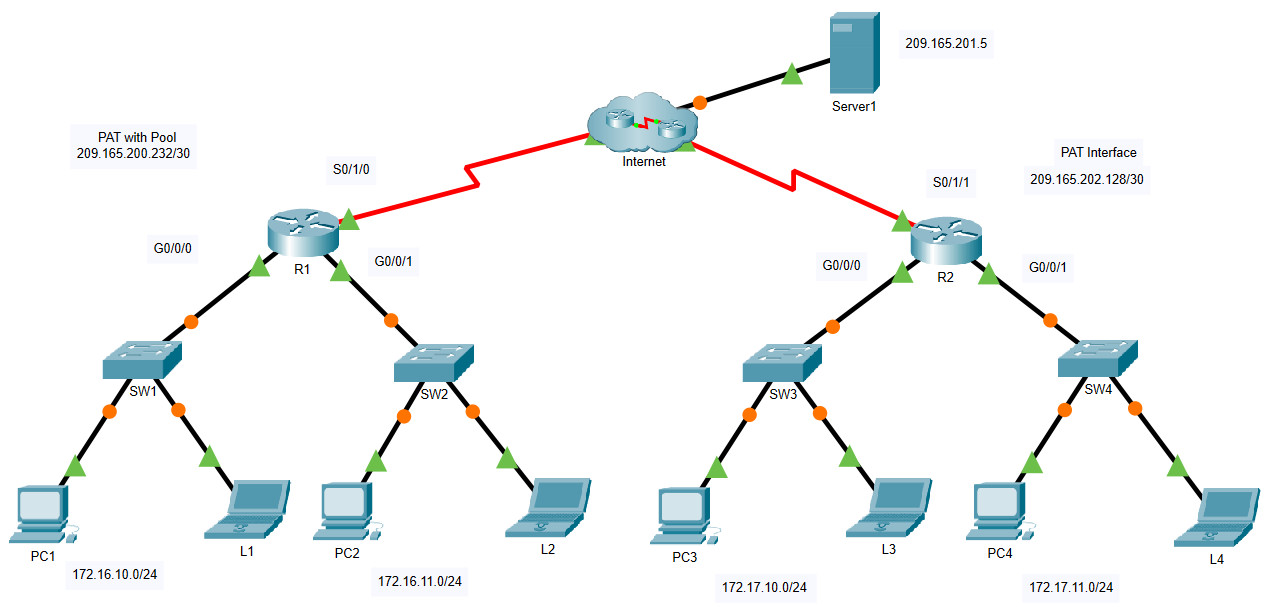
Objectives
- Part 1: Configure Dynamic NAT with Overload
- Part 2: Verify Dynamic NAT with Overload Implementation
- Part 3: Configure PAT using an Interface
- Part 4: Verify PAT Interface Implementation
Instructions
Part 1: Configure Dynamic NAT with Overload
Step 1: Configure traffic that will be permitted.
On R1, configure one statement for ACL 1 to permit any address belonging to 172.16.0.0/16.
R1(config)# access-list 1 permit 172.16.0.0 0.0.255.255
Step 2: Configure a pool of addresses for NAT.
Configure R1 with a NAT pool that uses the two usable addresses in the 209.165.200.232/30 address space.
R1(config)# ip nat pool ANY_POOL_NAME 209.165.200.233 209.165.200.234 netmask 255.255.255.252
Step 3: Associate ACL 1 with the NAT pool and allow addresses to be reused.
R1(config)# ip nat inside source list 1 pool ANY_POOL_NAME overload
Step 4: Configure the NAT interfaces.
Configure R1 interfaces with the appropriate inside and outside NAT commands.
R1(config)# interface serial 0/1/0
R1(config-if)# ip nat outside
R1(config-if)# interface gigabitethernet 0/0/0
R1(config-if)# ip nat inside
R1(config-if)# interface gigabitethernet 0/0/1
R1(config-if)# ip nat inside
Part 2: Verify Dynamic NAT with Overload Implementation
Step 1: Access services across the internet.
From the web browser of each of the PCs that use R1 as their gateway (PC1, L1, PC2, and L2), access the web page for Server1 (209.165.201.5).
Were all connections successful?
Yes
Step 2: View NAT translations.
View the NAT translations on R1.
R1# show ip nat translations
Pro  Inside global     Inside local       Outside local      Outside global
tcp 209.165.200.233:1024172.16.10.11:1025  209.165.201.5:80   209.165.201.5:80
tcp 209.165.200.233:1025172.16.10.10:1025  209.165.201.5:80   209.165.201.5:80
tcp 209.165.200.233:1026172.16.11.10:1025  209.165.201.5:80   209.165.201.5:80
tcp 209.165.200.233:1027172.16.11.11:1025  209.165.201.5:80   209.165.201.5:80
Notice that all four devices were able to communicate, and they are using just one address out of the pool. PAT will continue to use the same address until it runs out of port numbers to associate with the translation. Once that occurs, the next address in the pool will be used. While the theoretical limit would be 65,536 since the port number field is a 16-bit number, the device would likely run out of memory before that limit would be reached.
Part 3: Configure PAT using an Interface
Step 1: Configure traffic that will be permitted.
On R2, configure one statement for ACL 2 to permit any address belonging to 172.17.0.0/16.
R2(config)# access-list 2 permit 172.17.0.0 0.0.255.255
Step 2: Associate ACL 2 with the NAT interface and allow addresses to be reused.
Enter the R2 NAT statement to use the interface connected to the internet and provide translations for all internal devices.
R2(config)# ip nat inside source list 2 interface Serial0/1/1 overload
Step 3: Configure the NAT interfaces.
Configure R2 interfaces with the appropriate inside and outside NAT commands.
R2(config)# interface serial 0/1/1
R2(config-if)# ip nat outside
R2(config-if)# interface gigabitethernet 0/0/0
R2(config-if)# ip nat inside
R2(config-if)# interface gigabitethernet 0/0/1
R2(config-if)# ip nat inside
Part 4: Verify PAT Interface Implementation
Step 1: Access services across the internet.
From the web browser of each of the PCs that use R2 as their gateway (PC3, L3, PC4, and L4), access the web page for Server1 (209.165.201.5).
Were all connections successful?
Yes
Step 2: View NAT translations.
View the NAT translations on R2.
R2# show ip nat translations
Pro  Inside global     Inside local       Outside local      Outside global
tcp 209.165.202.130:1024172.17.10.11:1025  209.165.201.5:80   209.165.201.5:80
tcp 209.165.202.130:1025172.17.10.10:1025  209.165.201.5:80   209.165.201.5:80
tcp 209.165.202.130:1026172.17.11.10:1025  209.165.201.5:80   209.165.201.5:80
tcp 209.165.202.130:1027172.17.11.11:1025  209.165.201.5:80   209.165.201.5:80
Step 3: Compare NAT statistics on R1 and R2.
Compare the NAT statistics on the two devices.
R1:
R1# show ip nat statistics
Total translations: 4 (0 static, 4 dynamic, 4 extended)
Outside Interfaces: Serial0/1/0
Inside Interfaces: GigabitEthernet0/0/0 , GigabitEthernet0/0/1
Hits: 29  Misses: 4
Expired translations: 0
Dynamic mappings:
-- Inside Source
access-list 1 pool ANY_POOL_NAME refCount 4
 pool ANY_POOL_NAME: netmask 255.255.255.252
       start 209.165.200.233 end 209.165.200.234
       type generic, total addresses 2 , allocated 1 (50%), misses 0
R2:
R2# show ip nat statistics
Total translations: 4 (0 static, 4 dynamic, 4 extended)
Outside Interfaces: Serial0/1/1
Inside Interfaces: GigabitEthernet0/0/0 , GigabitEthernet0/0/1
Hits: 28  Misses: 4
Expired translations: 0
Dynamic mappings:
Why doesn’t R2 list any dynamic mappings?
R1 lists dynamic mappings for the pool of addresses that has been configured. R2 is only using the outside interface as the address to translate internal addresses to so there is no dynamic mapping.
Device Configs - Final
ROUTER R1
! ==============================================================
!--- 6.6.7 Packet Tracer - Configure PAT
!--- ANSWER SCRIPT FOR ROUTER R1
!--- Usage: open the R1 CLI tab and paste this whole file at the R1> prompt. Every line beginning with "!" is a comment; IOS ignores it, so pasting a comment by accident is harmless.
! ==============================================================

enable
configure terminal

! --------------------------------------------------------------
!--- Part 1: Configure Dynamic NAT with Overload.
! --------------------------------------------------------------

!--- Step 1. ACL 1 permits any address in 172.16.0.0/16.
access-list 1 permit 172.16.0.0 0.0.255.255

!--- Step 2. NAT pool with the two usable addresses of 209.165.200.232/30.
ip nat pool ANY_POOL_NAME 209.165.200.233 209.165.200.234 netmask 255.255.255.252

!--- Step 3. Associate ACL 1 with the pool and allow addresses to be reused (overload).
ip nat inside source list 1 pool ANY_POOL_NAME overload

!--- Step 4. S0/1/0 is outside; G0/0/0 and G0/0/1 are inside.
interface serial 0/1/0
 ip nat outside
 exit
interface gigabitethernet 0/0/0
 ip nat inside
 exit
interface gigabitethernet 0/0/1
 ip nat inside
 exit

end

! --------------------------------------------------------------
!--- Save the configuration to NVRAM. (Press Enter when prompted for the destination filename.)
! --------------------------------------------------------------
copy running-config startup-config


! ==============================================================
!--- Verification:
!---   browse to Server1 from PC1, L1, PC2, L2  -> all succeed
!---   show ip nat translations               -> all hosts share 209.165.200.233 with different ports
!---   show ip nat statistics                 -> Dynamic mappings for pool ANY_POOL_NAME
! ==============================================================
ROUTER R2
! ==============================================================
!--- 6.6.7 Packet Tracer - Configure PAT
!--- ANSWER SCRIPT FOR ROUTER R2
!--- Usage: open the R2 CLI tab and paste this whole file at the R2> prompt. Every line beginning with "!" is a comment; IOS ignores it, so pasting a comment by accident is harmless.
! ==============================================================

enable
configure terminal

! --------------------------------------------------------------
!--- Part 3: Configure PAT using an Interface.
! --------------------------------------------------------------

!--- Step 1. ACL 2 permits any address in 172.17.0.0/16.
access-list 2 permit 172.17.0.0 0.0.255.255

!--- Step 2. Overload ACL 2 onto the address of the internet interface S0/1/1.
ip nat inside source list 2 interface Serial0/1/1 overload

!--- Step 3. S0/1/1 is outside; G0/0/0 and G0/0/1 are inside.
interface serial 0/1/1
 ip nat outside
 exit
interface gigabitethernet 0/0/0
 ip nat inside
 exit
interface gigabitethernet 0/0/1
 ip nat inside
 exit

end

! --------------------------------------------------------------
!--- Save the configuration to NVRAM. (Press Enter when prompted for the destination filename.)
! --------------------------------------------------------------
copy running-config startup-config


! ==============================================================
!--- Verification:
!---   browse to Server1 from PC3, L3, PC4, L4  -> all succeed
!---   show ip nat translations               -> all hosts share the S0/1/1 address with different ports
!---   show ip nat statistics                 -> no pool under Dynamic mappings
! ==============================================================


