Month: July 2022
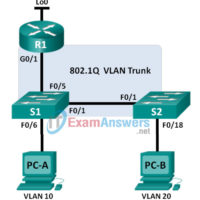
6.3.3.7 Lab - Configuring 802.1Q Trunk-Based Inter-VLAN Routing (Instructor Version - Optional Lab) Instructor Note: Red font color or gray highlights indicate text that appears in the instructor copy only. Optional activities are designed to enhance understanding and/or to provide additional practice. Topology Addressing Table Device Interface IP …
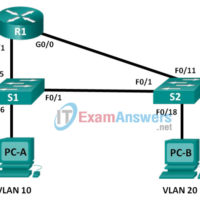
6.3.2.4 Lab - Configuring Per-Interface Inter-VLAN Routing (Instructor Version) Instructor Note: Red font color or Gray highlights indicate text that appears in the instructor copy only. Topology Addressing Table Device Interface IP Address Subnet Mask Default Gateway R1 G0/0 192.168.20.1 255.255.255.0 N/A G0/1 192.168.10.1 255.255.255.0 N/A S1 VLAN …
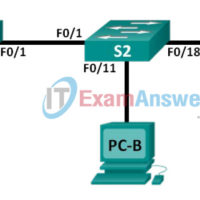
6.2.3.9 Lab - Troubleshooting VLAN Configurations (Instructor Version - Optional Lab) Instructor Note: Red font color or gray highlights indicate text that appears in the instructor copy only. Optional activities are designed to enhance understanding and/or to provide additional practice. Topology Addressing Table Device Interface IP Address Subnet …
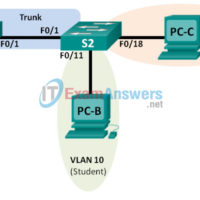
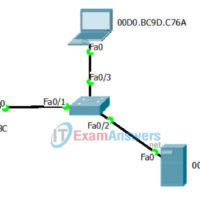
6.2.2.5 Lab - Configuring VLANs and Trunking (Instructor Version) Instructor Note: Red font color or Gray highlights indicate text that appears in the instructor copy only. Topology Addressing Table Device Interface IP Address Subnet Mask Default Gateway S1 VLAN 1 192.168.1.11 255.255.255.0 N/A S2 VLAN 1 192.168.1.12 255.255.255.0 …
6.0.1.2 Vacation Station (Instructor Version - Optional Lab) Instructor Note: Red font color or gray highlights indicate text that appears in the instructor copy only. Optional activities are designed to enhance understanding and/or to provide additional practice. Objective Explain the purpose of VLANs in a switched network. To …
5.3.1.1 Switch Trio (Instructor Version - Optional Lab) Instructor Note: Red font color or gray highlights indicate text that appears in the instructor copy only. Optional activities are designed to enhance understanding and/or to provide additional practice. Objective Verify the Layer 2 configuration of a switch port connected …
5.2.2.9 Lab - Configuring Switch Security Features (Instructor Version - Optional Lab) Instructor Note: Red font color or gray highlights indicate text that appears in the instructor copy only. Optional activities are designed to enhance understanding and/or to provide additional practice. Topology Addressing Table Device Interface IP Address …
5.1.1.6 Lab - Configuring Basic Switch Settings (Instructor Version) Instructor Note: Red font color or Gray highlights indicate text that appears in the instructor copy only. Topology Addressing Table Device Interface IP Address Subnet Mask Default Gateway S1 VLAN 99 192.168.1.2 255.255.255.0 192.168.1.1 PC-A NIC 192.168.1.10 255.255.255.0 192.168.1.1 …
5.0.1.2 Stand By Me (Instructor Version - Optional Lab) Instructor Note: Red font color or gray highlights indicate text that appears in the instructor copy only. Optional activities are designed to enhance understanding and/or to provide additional practice. Objective Describe the role of unicast, broadcast, and multicast in …
4.3.1.1 It’s Network Access Time (Instructor Version - Optional Lab) Instructor Note: Red font color or gray highlights indicate text that appears in the instructor copy only. Optional activities are designed to enhance understanding and/or to provide additional practice. Objectives Describe features available for switches to support requirements …