Author: ITExamAnswers Editorial Team
The ITExamAnswers Editorial Team is a dedicated group of certified IT professionals and network engineers. We rigorously review, verify, and update all exam materials to ensure you receive the most accurate and reliable resources for your certification journey.
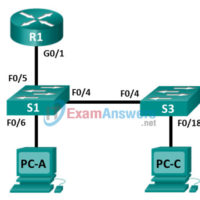
5.3.2.3 Lab - Implement Local SPAN (Instructor Version) Instructor Note: Red font color or gray highlights indicate text that appears in the instructor copy only. Topology Addressing Table Device Interface IP Address Subnet Mask Default Gateway R1 G0/1 192.168.1.1 255.255.255.0 N/A S1 VLAN 1 192.168.1.2 255.255.255.0 192.168.1.1 S3 …
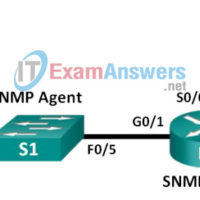
5.2.2.6 Lab - Configuring SNMP (Instructor Version) Instructor Note: Red font color or gray highlights indicate text that appears in the instructor copy only. Topology Addressing Table Device Interface IP Address Subnet Mask Default Gateway R1 G0/1 192.168.1.1 255.255.255.0 N/A S0/0/0 192.168.2.1 255.255.255.252 N/A R2 S0/0/0 192.168.2.2 255.255.255.252 …
5.2.1.9 Lab - Researching Network Monitoring Software (Instructor Version) Instructor Note: Red font color or Gray highlights indicate text that appears in the instructor copy only. Objectives Part 1: Survey Your Understanding of Network Monitoring Part 2: Research Network Monitoring Tools Part 3: Select a Network Monitoring Tool …
5.0.1.2 Network Maintenance Development (Instructor Version) Instructor Note: Red font color or Gray highlights indicate text that appears in the instructor copy only. Objective Describe the different levels of router log messages. Instructor Note: This activity is best completed in groups of two to three students. Scenario Currently, …
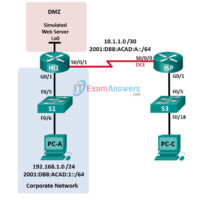
4.4.2.11 Lab - Troubleshooting ACL Configuration and Placement (Instructor Version) Instructor Note: Red font color or gray highlights indicate text that appears in the instructor copy only. Topology Addressing Table Device Interface IP Address Subnet Mask Default Gateway IPv6 Address / Prefix Link Local Address HQ G0/1 192.168.1.1 …
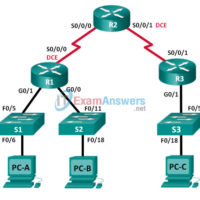
4.3.2.7 Lab - Configuring and Verifying IPv6 ACLs (Instructor Version) Instructor Note: Red font color or Gray highlights indicate text that appears in the instructor copy only. Topology Addressing Table Device Interface IP Address Default Gateway R1 G0/0 2001:DB8:ACAD:B::1/64 N/A G0/1 2001:DB8:ACAD:A::1/64 N/A S0/0/0 (DCE) 2001:DB8:AAAA:1::1/64 N/A R2 …
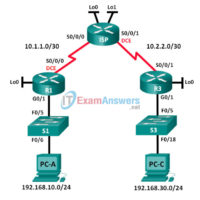
4.2.2.13 Lab - Configuring and Verifying Extended ACLs (Instructor Version) Instructor Note: Red font color or Gray highlights indicate text that appears in the instructor copy only. Topology Addressing Table Device Interface IP Address Subnet Mask Default Gateway R1 G0/1 192.168.10.1 255.255.255.0 N/A Lo0 192.168.20.1 255.255.255.0 N/A S0/0/0 …
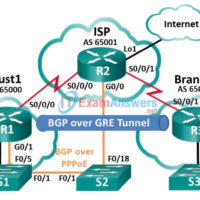
3.6.1.3 Lab - Configure a Branch Connection (Instructor Version) Instructor Note: Red font color or gray highlights indicate text that appears in the instructor copy only. Topology Addressing Table Device Interface IP Address Subnet Mask R1 G0/0 192.168.1.1 255.255.255.0 G0/1 PPPoE Client Lo1 209.165.200.49 255.255.255.240 S0/0/0 (DCE) 209.165.200.81 …
3.6.1.1 Class Activity - VPN Planning Design (Instructor Version) Instructor Note: Red font color or gray highlights indicate text that appears in the instructor copy only. Objective Explain the use of VPNs in securing site-to-site connectivity in a small- to medium-sized business network. Instructor Note: This activity is …
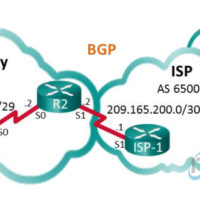
3.5.3.5 Lab - Configure and Verify eBGP (Instructor Version) Instructor Note: Red font color or gray highlights indicate text that appears in the instructor copy only. Topology Addressing Table Device Interface IP Address Subnet Mask R1 S0/0/0 (DCE) 198.133.219.1 255.255.255.248 R2 S0/0/0 198.133.219.2 255.255.255.248 S0/0/1 (DCE) 209.165.200.2 255.255.255.252 …