Author: ITExamAnswers Editorial Team
The ITExamAnswers Editorial Team is a dedicated group of certified IT professionals and network engineers. We rigorously review, verify, and update all exam materials to ensure you receive the most accurate and reliable resources for your certification journey.
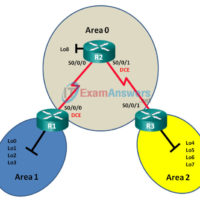
9.2.2.9 Lab - Configuring Multi-area OSPFv3 (Instructor Version) Instructor Note: Red font color or gray highlights indicate text that appears in the instructor copy only. Topology Addressing Table Device Interface IPv6 Address R1 S0/0/0 (DCE) 2001:DB8:ACAD:12::1/64 FE80::1 link-local Lo0 2001:DB8:ACAD::1/64 Lo1 2001:DB8:ACAD:1::1/64 Lo2 2001:DB8:ACAD:2::1/64 Lo3 2001:DB8:ACAD:3::1/64 R2 S0/0/0 …
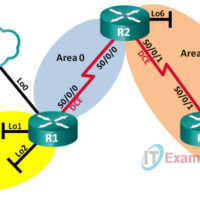
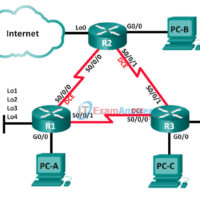
9.2.2.8 Lab - Configuring Multi-area OSPFv2 (Instructor Version) Instructor Note: Red font color or gray highlights indicate text that appears in the instructor copy only. Topology Addressing Table Device Interface IP Address Subnet Mask R1 Lo0 209.165.200.225 255.255.255.252 Lo1 192.168.1.1 255.255.255.0 Lo2 192.168.2.1 255.255.255.0 S0/0/0 (DCE) 192.168.12.1 255.255.255.252 …
9.0.1.2 Leaving on a Jet Plane (Instructor Version) Instructor Note: Red font color or Gray highlights indicate text that appears in the instructor copy only. Objective Explain the operation of multiarea OSPF to enable internetworking in a small- to medium-sized business network. This activity will introduce the concept …
8.4.1.1 Stepping Through OSPFv3 (Instructor Version) Instructor Note: Red font color or Gray highlights indicate text that appears in the instructor copy only. Objectives Explain the process by which link-state routers learn about other networks. This class activity is designed for groups of three students. Its objective is …
8.3.3.6 Lab - Configuring Basic Single-Area OSPFv3 (Instructor Version) Instructor Note: Red font color or Gray highlights indicate text that appears in the instructor copy only. Topology Addressing Table Device Interface IPv6 Address Default Gateway R1 G0/0 2001:DB8:ACAD:A::1/64 FE80::1 link-local N/A S0/0/0 (DCE) 2001:DB8:ACAD:12::1/64 FE80::1 link-local N/A S0/0/1 …
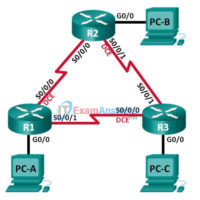
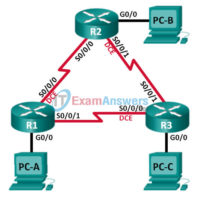
8.2.4.5 Lab - Configuring Basic Single-Area OSPFv2 (Instructor Version) Instructor Note: Red font color or Gray highlights indicate text that appears in the instructor copy only. Topology Addressing Table Device Interface IP Address Subnet Mask Default Gateway R1 G0/0 192.168.1.1 255.255.255.0 N/A S0/0/0 (DCE) 192.168.12.1 255.255.255.252 N/A S0/0/1 …
8.0.1.2 Can Submarines Swim? (Instructor Version) Instructor Note: Red font color or Gray highlights indicate text that appears in the instructor copy only. Objectives Explain the process by which link-state routers learn about other networks. This modeling activity focuses students’ thoughts on the basic idea of using the …
7.3.1.1 Class Activity - Tuning EIGRP (Instructor Version) Instructor Note: Red font color or gray highlights indicate text that appears in the instructor copy only. Objectives Implement advanced EIGRP features to enhance operation in a small- to medium-sized business network. This chapter will focus on some advanced methods …
7.2.3.7 Lab - Troubleshooting Advanced EIGRP (Instructor Version) Instructor Note: Red font color or gray highlights indicate text that appears in the instructor copy only. Topology Addressing Table Device Interface IP Address Subnet Mask Default Gateway R1 G0/0 192.168.1.1 255.255.255.0 N/A Lo1 172.16.11.1 255.255.255.0 N/A Lo2 172.16.12.1 255.255.255.0 …
7.2.3.6 Lab - Troubleshooting Basic EIGRP for IPv4 and IPv6 (Instructor Version) Instructor Note: Red font color or Gray highlights indicate text that appears in the instructor copy only. Topology Addressing Table Device EIGRP Router ID Interface IP Address Default Gateway R1 1.1.1.1 G0/0 192.168.1.1/24 2001:DB8:ACAD:A::1/64 FE80::1 link-local …