Author: ITExam Editorial Team
The ITExamAnswers Editorial Team is a dedicated group of certified IT professionals and network engineers. We rigorously review, verify, and update all exam materials to ensure you receive the most accurate and reliable resources for your certification journey.
1. Which technology supports the stateless assignment of IPv6 addresses? A. DNS B. DHCPv6 C. DHCP D. autoconfiguration Correct Answer: BD 2. What are two requirements for an HSRP group? (Choose two.) A. exactly one active router B. one or more standby routers C. one or more backup …
2.2.4.4 Packet Tracer - Configuring IPv6 Static and Default Routes (Instructor Version) Instructor Note: Red font color or Gray highlights indicate text that appears in the instructor copy only. Topology IPv6 Addressing Table Device Interface IPv6 Address/Prefix Default Gateway R1 G0/0 2001:DB8:1:1::1/64 N/A S0/0/0 2001:DB8:1:A001::1/64 N/A R2 G0/0 …
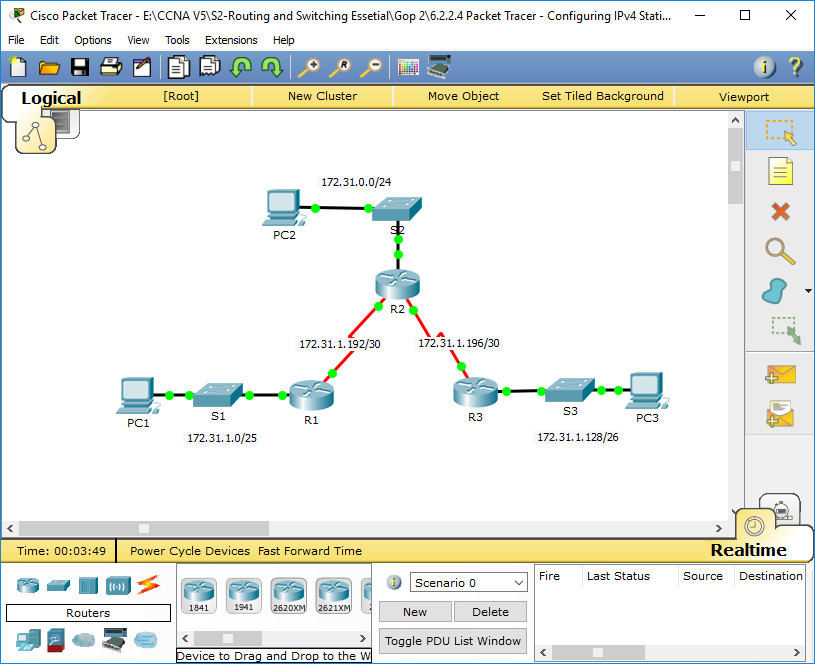
Packet Tracer - Configuring IPv4 Static and Default Routes (Instructor Version) Instructor Note: Red font color or Gray highlights indicate text that appears in the instructor copy only. Topology Addressing Table Device Interface IPv4 Address Subnet Mask Default Gateway R1 G0/0 172.31.1.1 255.255.255.128 N/A S0/0/0 172.31.1.194 255.255.255.252 N/A …
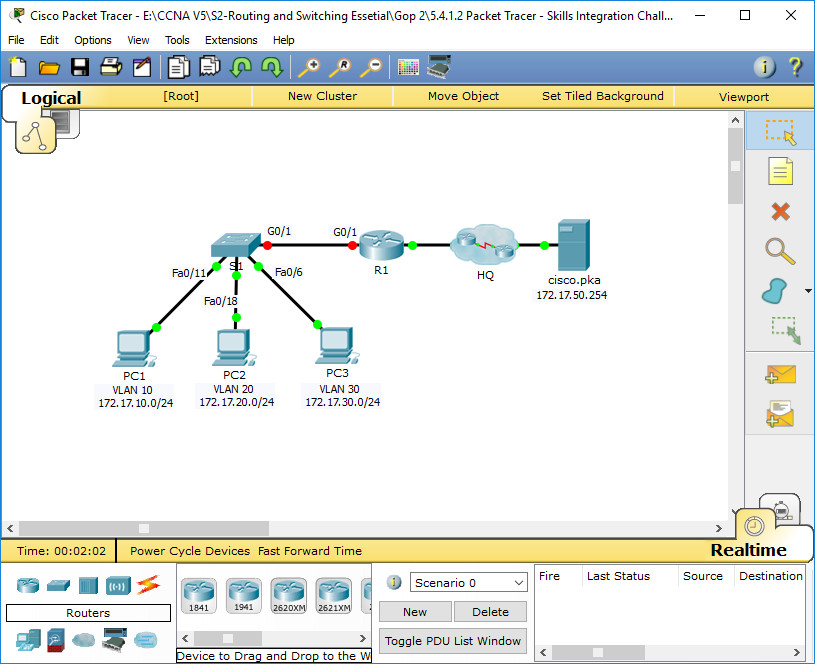
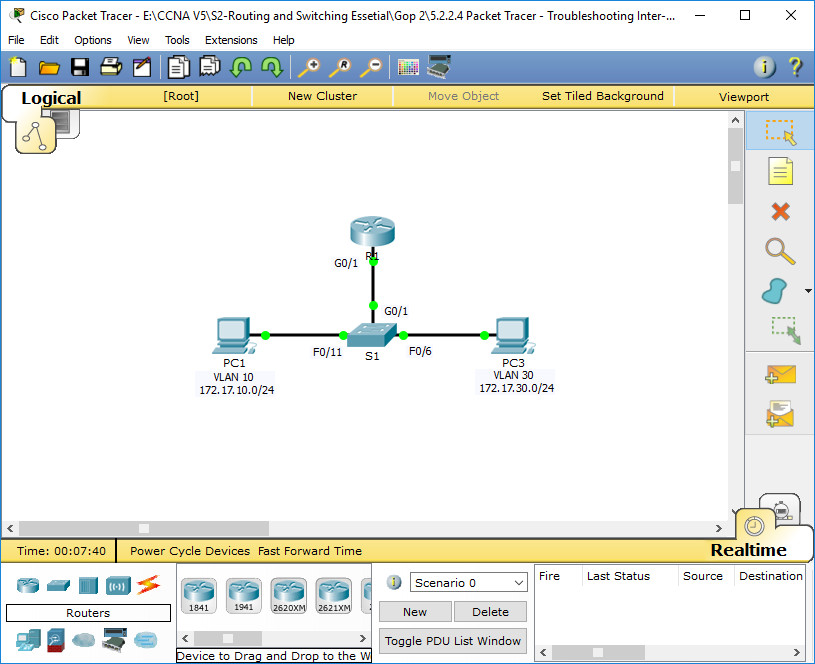
5.4.1.2 Packet Tracer - Skills Integration Challenge Addressing Table VLAN and Port Assignments Table Scenario In this activity, you will demonstrate and reinforce your ability to implement inter-VLAN routing, including configuring IP addresses, VLANs, trunking and subinterfaces. Requirements · Assign IP addressing to R1 and S1 based on …
Addressing Table Objectives Part 1: Locate Network Problems Part 2: Implement the Solution Part 3: Verify Network Connectivity Scenario In this activity, you will troubleshoot connectivity problems caused by improper configurations related to VLANs and inter-VLAN routing. Part 1: Locate the Network Problems Examine the network and locate …
6.3.3.6 Packet Tracer – Configuring Router-on-a-Stick Inter-VLAN Routing (Instructor Version) Instructor Note: Red font color or Gray highlights indicate text that appears in the instructor copy only. Topology Addressing Table Device Interface IPv4 Address Subnet Mask Default Gateway R1 G0/0.10 172.17.10.1 255.255.255.0 N/A G0/0.30 172.17.30.1 255.255.255.0 N/A PC1 …
Packet Tracer - Investigating Directly Connected Routes (Instructor Version) Instructor Note: Red font color or Gray highlights indicate text that appears in the instructor copy only. Topology Objectives Part 1: Investigate IPv4 Directly Connected Routes Part 2: Investigate IPv6 Directly Connected Routes Background The network in the activity …
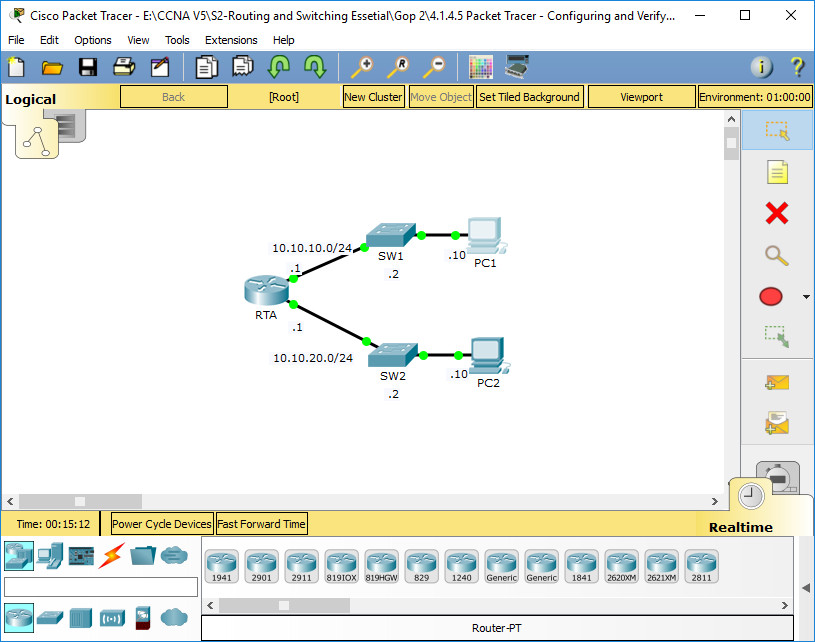
Packet Tracer - Configuring and Verifying a Small Network (Instructor Version) Instructor Note: Red font color or Gray highlights indicate text that appears in the instructor copy only. Topology Addressing Table Device Interface IP Address Subnet Mask Default Gateway RTA G0/0 10.10.10.1 255.255.255.0 N/A G0/1 10.10.20.1 255.255.255.0 N/A …
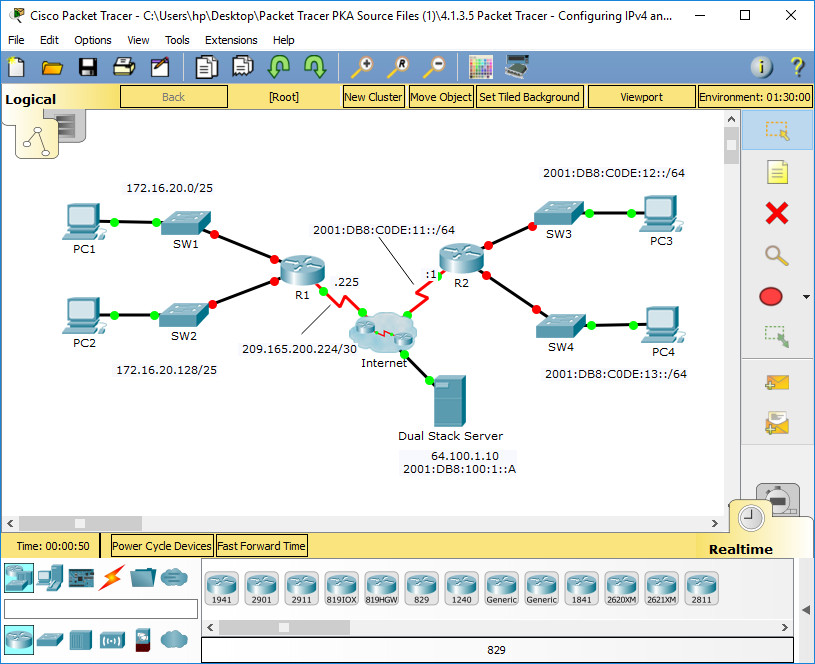
Packet Tracer - Configuring IPv4 and IPv6 Interfaces (Instructor Version) Instructor Note: Red font color or Gray highlights indicate text that appears in the instructor copy only. Topology Addressing Table Device Interface IPv4 Address Subnet Mask Default Gateway IPv6 Address/Prefix R1 G0/0 172.16.20.1 255.255.255.128 N/A G0/1 172.16.20.129 255.255.255.128 …
Packet Tracer - Documenting the Network (Instructor Version) Instructor Note: Red font color or Gray highlights indicate text that appears in the instructor copy only. Topology Background In this activity, your job is to document the addressing scheme and connections used in the Central portion of the network. …